Test DPC
Exploring the World of Test DPC: A Handy Tool for Developers
Hey there, fellow tech enthusiasts! I recently had the chance to dive into the world of Test DPC, an app that's been buzzing around in the Android developer community. If you’re a developer, especially in the enterprise space, you might want to stick around as I unravel my experience with this intriguing app.
What is Test DPC?
To kick things off, Test DPC stands for Device Policy Controller, and it’s essentially a tool that lets you test your applications in a managed context. Imagine you’re developing an app that needs to run on corporate devices with specific policies or restrictions. That’s where Test DPC comes into play, allowing you to simulate these environments without actually needing a managed device.
Getting Started with Test DPC
Getting up and running with Test DPC is a breeze. I hopped onto the Google Play Store, hit that download button, and voilà! The installation was swift, and before I knew it, I was navigating through its user-friendly interface. The app doesn’t require any fancy setup – just install and you're ready to roll.
Features that Stand Out
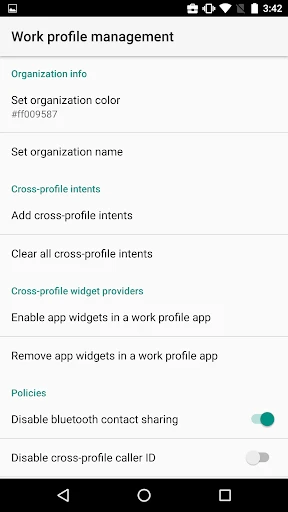
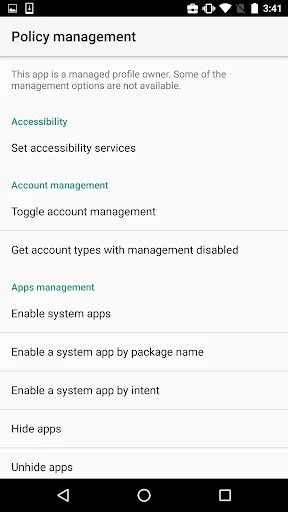
Once inside, I was greeted with a plethora of features that made me feel like a kid in a candy store. From setting up different user profiles to configuring complex policy settings, Test DPC offers a sandbox environment that's both robust and flexible.
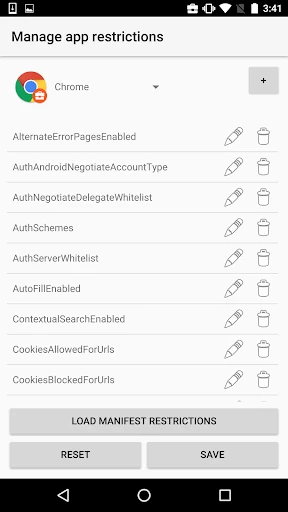
Policy Management: You can easily experiment with various policy settings like password requirements, app restrictions, and network configurations. This feature is a godsend for developers who need to ensure their apps comply with enterprise standards.
User Profile Simulation: Test DPC allows you to create and manage multiple user profiles, which is perfect for testing how apps behave under different user conditions.
Security Settings: Dive deep into security configurations and test your app's resilience against potential threats. It’s like having a personal security drill sergeant for your app!
Why Developers Will Love It
As someone who loves tinkering with apps, Test DPC felt like a playground. It’s incredibly versatile, allowing you to test everything from basic functionality to complex security policies. Plus, it’s completely free, which is a huge bonus for developers working on a tight budget.
The app is particularly useful for those working with Android Enterprise, as it bridges the gap between development and deployment by providing a realistic testing environment. This means fewer surprises when your app finally hits the corporate world.
The Final Verdict
In conclusion, Test DPC is a must-have tool for any Android developer dealing with enterprise solutions. Its ease of use combined with a comprehensive set of features makes it an invaluable asset in the development process. Whether you’re a seasoned developer or a newbie just starting out, Test DPC provides a safe and efficient way to test your apps in a controlled environment. So, if you haven’t already, give it a spin and see how it can streamline your development workflow!
Happy developing, and may your code be bug-free!


- Developer
- Sample developer
- Version
- 9.0.13
- Installs
- 500,000+
- Android Version
- 5.0
- Content Rating
- Everyone
- Price
- Free
- Highly customizable settings for testing
- Free to download and use
- Supports multiple device profiles
- Regular updates with new features
- User-friendly interface
- Requires technical knowledge to use
- Limited support for non-tech users
- Can be unstable on some devices
- Frequent updates may cause issues
- Not suitable for casual users