Sweepy: Home Cleaning Schedule icon

Sweepy: Home Cleaning Schedule

House & Home

Related searches

Meet Your New Cleaning Buddy: Sweepy

Let’s be real for a second: keeping your home spick and span isn't anyone's favorite pastime. But what if I told you there’s an app that turns this dreaded chore into a manageable task? Enter Sweepy, your new home-cleaning sidekick. I've been using it for a while now, and trust me, it’s a game-changer for anyone who, like me, struggles to keep the dust bunnies at bay.

Getting Started with Sweepy

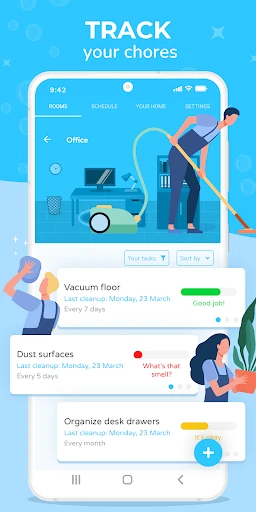
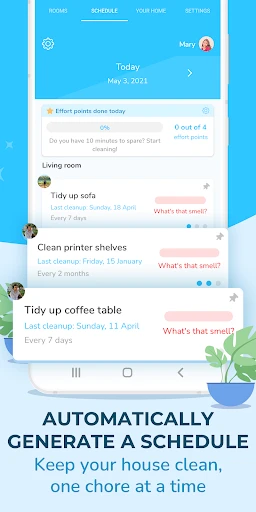
First things first, setting up Sweepy is a breeze. Available on both Android and iOS, the app greets you with a clean and intuitive interface. Upon launching it for the first time, you’re prompted to add the rooms in your house. Whether you’re dealing with a modest studio apartment or a sprawling mansion, Sweepy’s got you covered. You can add details like the frequency of cleaning and specific chores for each room. It’s like your personal cleaning command center!

Features that Shine

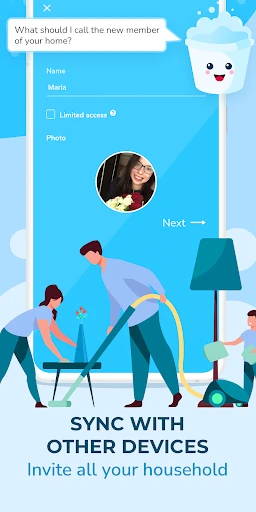
What really makes Sweepy stand out are its customizable features. You can set daily, weekly, or monthly cleaning goals, ensuring you don’t bite off more than you can chew. Do you have a roommate who’s always "forgetting" their chores? No worries—Sweepy allows you to assign tasks to different members of your household. It’s an organizational dream.

One feature I particularly love is the app's ability to track your progress. There’s something oddly satisfying about checking off tasks and watching your productivity soar. Plus, the app sends you friendly reminders, so you’ll never accidentally "forget" to vacuum again.

The User Experience

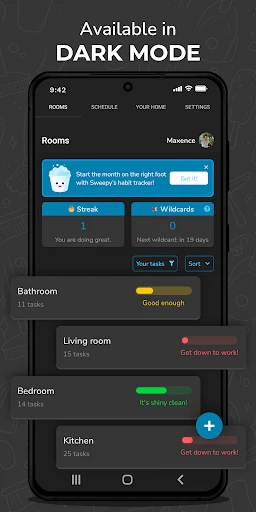
In terms of user experience, Sweepy is top-notch. The app is snappy and doesn’t bog down your phone with unnecessary bloat. The interface is sleek, with a color-coded system that makes it easy to see what needs to be done at a glance. The developers clearly understand the importance of user-friendly design.

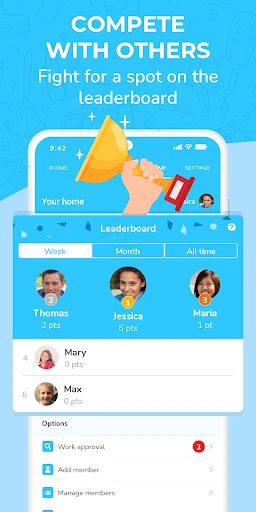
If you're someone who loves a bit of competition, you'll appreciate the app's gamification elements. Completing tasks earns you points, and you can even level up. Who knew cleaning could be this rewarding?

Final Thoughts

If you’re looking for a way to tackle your cleaning schedule without losing your sanity, Sweepy is definitely worth a try. It’s like having a little cleaning coach in your pocket, always ready to cheer you on. I’ve found it incredibly helpful in keeping my home tidy without feeling overwhelmed.

So, if cleaning feels like an uphill battle, give Sweepy a download. It might just become your new favorite app. Happy cleaning!
Sweepy: Home Cleaning Schedule screenshot Sweepy: Home Cleaning Schedule screenshot Sweepy: Home Cleaning Schedule screenshot Sweepy: Home Cleaning Schedule screenshot Sweepy: Home Cleaning Schedule screenshot
Sweepy: Home Cleaning Schedule icon
Sweepy: Home Cleaning Schedule
Developer
Appsent
Version
5.5.1
Installs
1,000,000+
Android Version
7.0
Content Rating
Everyone
Price
Free
Pros
  • Easy-to-use interface
  • Customizable cleaning schedules
  • Syncs across devices
  • Task reminders
  • Supports multiple users
Cons
  • Limited features in free version
  • Ads in free version
  • Occasional sync issues
  • No offline mode
  • Subscription can be costly

Ratings

4.6

Similar Apps

Zillow: Homes For Sale & Rent

Zillow: Homes For Sale & Rent

4.8
Get
Bayut KSA - Real Estate

Bayut KSA - Real Estate

3.9
Get
Trulia Rent Apartments & Homes

Trulia Rent Apartments & Homes

4.7
Get
Hisense TV Remote

Hisense TV Remote

4.3
Get
Home Security Camera - SeeCiTV

Home Security Camera - SeeCiTV

4.2
Get
Angi: Hire Home Service Pros

Angi: Hire Home Service Pros

4.3
Get
Online Portal by AppFolio

Online Portal by AppFolio

3.7
Get
Onn Smart TV Remote

Onn Smart TV Remote

4.4
Get
Roku Smart Home

Roku Smart Home

3.9
Get
Ceiling Fan Balancer

Ceiling Fan Balancer

4.4
Get
TurboTenant for Renters

TurboTenant for Renters

4.6
Get

Frequently Asked Questions

What is Sweepy: Home Cleaning Schedule and how does it work?

Sweepy: Home Cleaning Schedule is an app designed to help users organize and manage their home cleaning tasks efficiently. It works by allowing you to create customized cleaning schedules, set reminders, and track the completion of tasks. The app provides a user-friendly interface where you can assign tasks to different days and even allocate them to specific members of your household, making home cleaning a collaborative effort.

Is Sweepy: Home Cleaning Schedule free to use?

Sweepy: Home Cleaning Schedule offers a free version with basic features, which is suitable for most users to manage their cleaning tasks. However, for those seeking advanced functionalities, such as detailed analytics, custom reminders, and ad-free experience, there is a premium version available through in-app purchases. This allows users to choose the version that best fits their needs and budget.

Can I use Sweepy: Home Cleaning Schedule on multiple devices?

Yes, Sweepy: Home Cleaning Schedule supports synchronization across multiple devices. Users can log into their account on different devices and have their cleaning schedule, task progress, and other settings synced automatically. This feature ensures that all household members can stay updated and contribute to the cleaning tasks, regardless of the device they are using.

How does Sweepy: Home Cleaning Schedule handle task assignments among household members?

The app allows users to assign tasks to different household members easily. You can create profiles for each member, designate tasks, and set deadlines. Sweepy sends notifications to remind everyone of their responsibilities. This feature promotes accountability and ensures that everyone contributes to maintaining a clean household, making it an excellent tool for families and shared living spaces.

What kind of customer support does Sweepy: Home Cleaning Schedule offer?

Sweepy provides a comprehensive support system for its users. You can access FAQs, tutorials, and troubleshooting guides directly within the app. For more specific inquiries, users can contact customer support via email or through the app's support chat feature. The support team is known for being responsive and helpful, ensuring that any issues are resolved promptly.