Remote for Smart Samsung TV
Transform Your Smartphone into a Samsung TV Remote
Alright folks, let’s dive right into the world of convenience. Have you ever found yourself frantically searching for your TV remote, only to discover it wedged between the couch cushions or mysteriously vanished? Well, fret no more because the Remote for Smart Samsung TV app is here to save the day. This nifty little app turns your smartphone into a fully functional Samsung TV remote, letting you surf through your channels with ease.
Smooth and Intuitive Interface
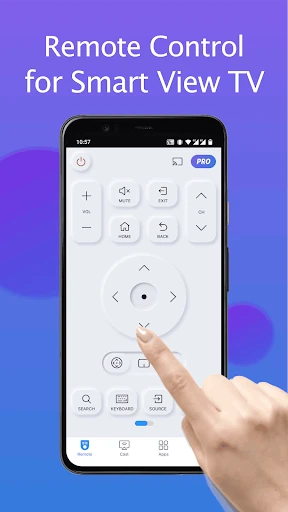
First things first, let’s talk about the interface. One of the standout features of the Remote for Smart Samsung TV app is its user-friendly design. The developers have done a commendable job ensuring the layout is intuitive and easy to navigate. With large buttons and a clean interface, even tech novices will find themselves mastering the app in no time. It’s like they took the regular remote and gave it a digital makeover.
Seamless Connectivity
Now, you might be wondering, “how reliable is this app when it comes to connecting to my TV?” The answer: incredibly reliable. Connecting to your Samsung TV is a breeze. The app uses your home’s Wi-Fi network to establish a connection, eliminating the need for pesky IR blasters. All you need is for your TV and smartphone to be on the same network, and voila, you’re all set. It’s like magic, but better because it’s real!
Features That Pack a Punch
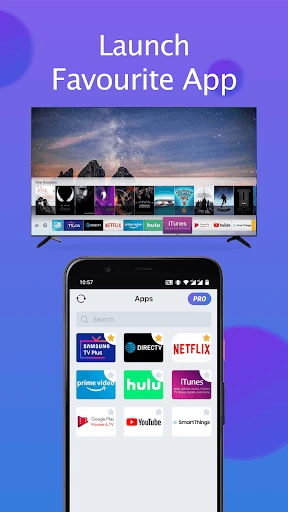
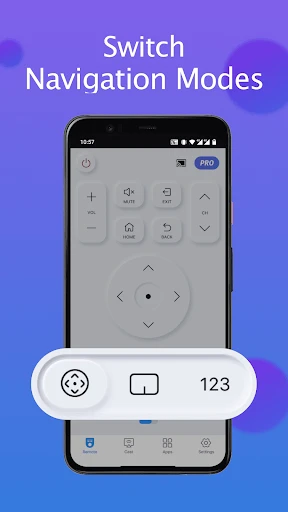
Let’s delve into the features, shall we? Aside from the basic channel switching and volume control, this app offers a plethora of options that take your TV viewing experience to the next level. You can easily access apps installed on your Samsung TV, navigate through menus, and even use a keyboard for typing – a real game-changer for logging into streaming services or searching for your favorite shows.
Channel navigation
Volume control
Access to TV apps
Menu navigation
Keyboard functionality
Why You'll Love It
So, what makes this app a must-have for Samsung TV owners? It’s all about the convenience and flexibility. Imagine controlling your TV from anywhere in your house, as long as you’re connected to Wi-Fi. No more pointing the remote at awkward angles or getting off the couch to retrieve it. Plus, it’s a lifesaver when your physical remote is out of batteries or misplaced.
Final Thoughts
In conclusion, the Remote for Smart Samsung TV app is like having a universal remote right in your pocket. It’s convenient, easy to use, and packed with features that enhance your TV watching experience. Whether you’re a tech-savvy individual or someone who just wants a little more convenience in their life, this app is definitely worth a try. It’s time to say goodbye to the remote control hunt and hello to seamless channel surfing.
So, next time you find yourself without a remote or simply want a smarter way to control your TV, give this app a whirl. It’s like having the power of your TV at your fingertips, literally!
- Developer
- BoostVision
- Version
- 1.6.3
- Installs
- 10,000,000+
- Android Version
- 5.0
- Content Rating
- Everyone
- Price
- Free
- Easy to use interface
- Compatible with most Samsung TVs
- Quick and responsive controls
- Supports multiple devices
- Customizable remote layout
- Requires in-app purchases for full features
- Limited features compared to physical remote
- Occasional connectivity issues
- Ads can be intrusive
- Not compatible with older TV models