Bitwarden Password Manager
Ever found yourself in the never-ending spiral of trying to remember passwords for all the countless apps and websites you use? Well, that’s where Bitwarden Password Manager steps in, and let me tell you, it’s a game-changer!
What’s the Buzz About Bitwarden?
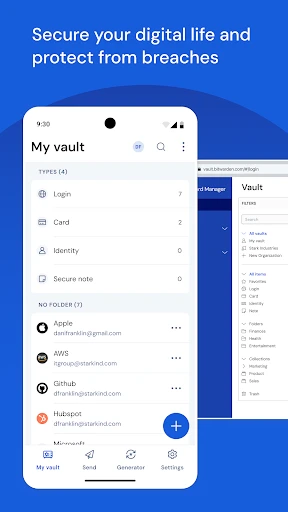
So, I decided to give Bitwarden a whirl after hearing numerous friends rave about it. Imagine having a vault, a digital one, where all your passwords are securely stored. Yep, that’s Bitwarden for you! It’s available on both Android and iOS, making it super flexible for all users out there. The app is open-source, which is a big deal for tech aficionados because it means transparency and community-driven improvements.
Setting Up and First Impressions
Getting started with Bitwarden is as easy as pie. Download it from the app store, sign up, and voilà, you’re in! The interface is sleek and intuitive, so you don’t feel like you need a tech degree to navigate it. The first thing I noticed was how easily I could import my existing passwords from other managers. Plus, creating new entries is straightforward. Just a few taps, and you’re done!
Features Galore!
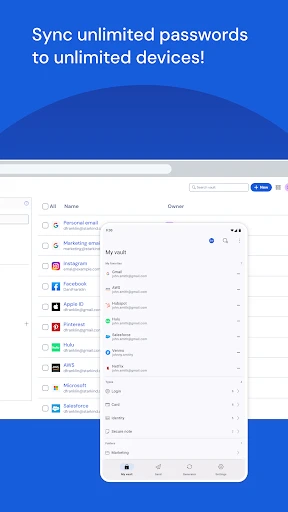
Let’s talk features because Bitwarden is packed with them. One of my favorites has to be the password generator. It creates complex passwords for you, which is perfect for those of us who tend to use ‘123456’ more often than we’d like to admit. Additionally, the autofill feature works like a charm, making logins a breeze. You can also share passwords securely with family or team members, which is a lifesaver for shared accounts.
Now, security is where it really shines. Bitwarden employs end-to-end encryption, ensuring that only you have access to your data. It’s like having a bouncer at the door of your digital vault! And if you’re like me, paranoid about losing access, the two-step login option provides that extra layer of security.
Why You Might Consider Giving It a Go
In a world where our digital footprint is ever-expanding, having a reliable password manager is not just convenient but necessary. Bitwarden offers a free version that is more than adequate for personal use, but if you’re looking for added features like encrypted file storage, their premium plan is quite affordable.
Another aspect I appreciate is the community support behind Bitwarden. Being open-source, it benefits from contributions from developers worldwide, ensuring it stays updated with the latest security protocols and features. It feels like being part of a community dedicated to keeping your online life secure.
So, if you’re juggling multiple passwords and want to keep your online accounts safe, Bitwarden Password Manager is worth a try. It’s user-friendly, secure, and offers peace of mind in today’s digital jungle.


- Developer
- Bitwarden Inc.
- Version
- 2025.4.0
- Installs
- 5,000,000+
- Android Version
- 10
- Content Rating
- Everyone
- Price
- Free
- Free version offers robust features
- Cross-platform compatibility
- Secure password sharing
- Open-source and transparent
- Biometric login for quick access
- Limited offline access
- Premium features require payment
- Basic UI design
- Initial setup can be complex
- No built-in password generator