
Nano Teleprompter
When it comes to creating videos or delivering speeches, having a reliable teleprompter app can be an absolute game-changer. That's where Nano Teleprompter steps into the spotlight. As someone who's dabbled in video production, I can tell you that this app is a nifty little tool that can elevate your content creation game to another level.
Meet Nano Teleprompter
First things first, let’s get acquainted with Nano Teleprompter. This app is designed for both amateur and professional content creators who need a simple yet effective way to read scripts while recording. Whether you’re a YouTuber, a public speaker, or just someone who needs to practice their lines, Nano Teleprompter has got your back.
Features That Make a Difference
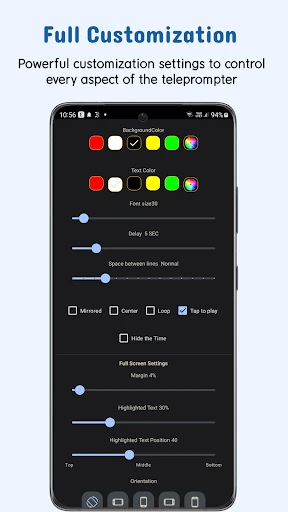
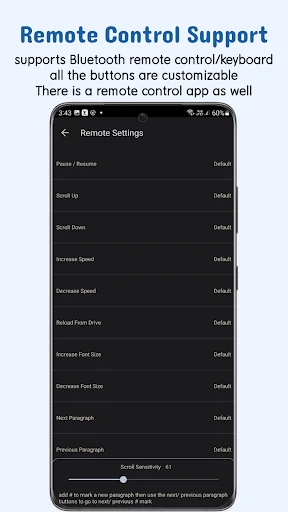
The app boasts a plethora of features, but a few really stand out. The ability to adjust the scroll speed is a lifesaver. You can set it to your preferred pace, ensuring that you can read comfortably without stumbling over your words. The app also supports mirror mode, which is perfect if you're using a reflective screen.
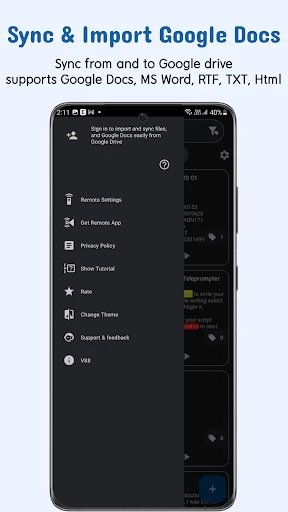
Another neat feature is the ability to import scripts from various platforms like Google Drive or Dropbox. No more copy-pasting between apps—which, let's be honest, can be a bit of a hassle. Plus, with customizable text sizes and colors, you can tweak the display to suit your needs perfectly.
Using Nano Teleprompter
Installation and setup are as easy as pie. Once you have the app downloaded and installed, you are greeted with a simple interface that even the least tech-savvy individuals can navigate. It’s basically plug-and-play.
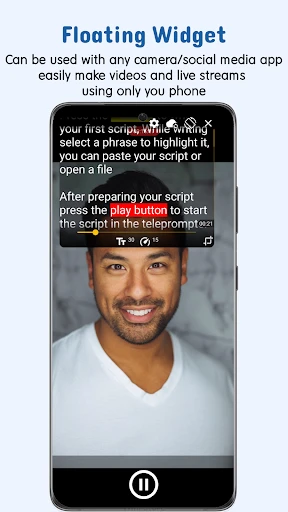
Start by importing your script and position the floating widget anywhere on your screen. The transparency feature allows you to see your script while using your camera or any other app. This is particularly helpful when you're recording yourself using your phone's camera.
Performance in Real-Life Scenarios
Let me tell you about my experience using Nano Teleprompter for a recent project. I was working on a video tutorial and needed to deliver a flawless script without having to memorize pages of content. Nano Teleprompter made it incredibly easy. The adjustable scroll speed meant I didn’t have to rush my delivery, and the floating widget worked seamlessly with my camera app.
What truly impressed me was the app’s stability. Not once did it crash or lag during my recording, which is something I can’t say for all apps in this category. It felt like having a professional teleprompter setup right there on my smartphone.
Final Thoughts
All in all, Nano Teleprompter is a solid choice for anyone looking to enhance their video presentations or practice speeches without the hefty price tag of professional teleprompter equipment. Its user-friendly interface, coupled with robust features, makes it an app that’s hard to pass up.
If you’re diving into video content creation or just need a reliable tool for public speaking, give Nano Teleprompter a try. It’s like having a little assistant in your pocket, ready to help you deliver your words with confidence and ease.

- Developer
- AFELL APPS
- Version
- 7.4.3
- Installs
- 50,000+
- Android Version
- 5.0
- Content Rating
- Everyone
- Price
- $4.49
- Lightweight and easy to use interface.
- Customizable text size and scrolling speed.
- Compatible with various video recording apps.
- No intrusive ads to disrupt your workflow.
- Supports script import from multiple sources.
- Limited free version features.
- Occasional syncing issues with scripts.
- No cloud save for scripts.
- Some features require in-app purchases.
- Can drain battery quickly during use.


