

Cryptomator
Ever felt like your cloud storage is a bit like leaving your diary open on a public bench? Well, that’s where Cryptomator steps in, acting as your personal lock and key for your digital secrets. Let’s dive into why this app might just be the guardian angel your files have been waiting for.
What is Cryptomator?
So, what’s the deal with Cryptomator? It’s an open-source software that encrypts your files before they even hit the cloud. Think of it as a digital safe that only you have the combination to. What’s cool is that it’s designed to work seamlessly with any cloud service, whether you’re team Google Drive, Dropbox, or OneDrive. The best part? It’s super user-friendly, so you don’t need a PhD in computer science to get started.
Easy Peasy Setup
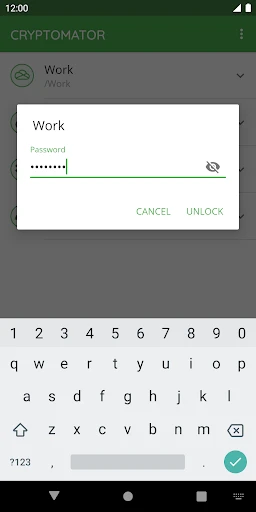
Setting up Cryptomator is as easy as pie. Once you download the app, you create a vault – this is where your files will live. You set a password, and boom, you’re ready to roll. Just drag and drop your files into the vault, and Cryptomator takes care of the encryption magic behind the scenes. The app’s interface is straightforward and intuitive. Even if tech isn’t your thing, you’ll feel like a pro in no time.
Security That Speaks Volumes
Now, let’s talk security. Cryptomator uses AES encryption, which is fancy tech talk for “nobody’s cracking this anytime soon.” Your files are encrypted on your device before they get uploaded to the cloud, meaning even if someone hacks into your cloud storage, they’ll only find a bunch of gibberish. It’s like handing a thief a locked box without the key – good luck with that!
Why It Stands Out
What makes Cryptomator shine is its transparency. Being open-source, the code is available for anyone to review, meaning there’s a whole community out there ensuring it stays secure and up-to-date. Plus, there are no subscription fees or hidden costs involved. You make a one-time purchase, and that’s it. It’s refreshing in a world full of recurring charges and sneaky fees.
Little Things That Matter
While the main job of Cryptomator is to keep your files safe, it doesn’t skimp on convenience. It supports multiple platforms, so whether you’re on Android, iOS, or desktop, your files can travel safely with you. And if you’re someone who loves a dark mode, Cryptomator’s got you covered there too. Who doesn’t love a sleek interface that’s easy on the eyes?
All in all, Cryptomator is a stellar choice for anyone looking to add an extra layer of security to their cloud storage. It’s simple, effective, and doesn’t break the bank. If you’re tired of worrying about who might be snooping through your digital life, it’s time to give Cryptomator a whirl. Your files deserve the best protection, and honestly, peace of mind never felt so good.




- Developer
- Skymatic GmbH
- Version
- 1.10.3
- Installs
- 10,000+
- Android Version
- 8.0
- Content Rating
- Everyone
- Price
- $9.99
- Open-source encryption ensures security.
- User-friendly interface for easy navigation.
- Compatible with major cloud services.
- No account registration needed.
- Cross-platform availability.
- No mobile offline access to files.
- Limited advanced settings for tech users.
- Relies on third-party cloud storage.
- Occasional sync issues reported.
- No file sharing directly from app.


