Streamlabs: Live Streaming
Have you ever wondered how some streamers manage to create such professional-looking streams? Well, let me introduce you to Streamlabs: Live Streaming, the app that's transforming the game for content creators everywhere. If you're looking to up your streaming game, this might just be the tool you need.
Getting Started with Streamlabs
First things first, downloading and setting up Streamlabs: Live Streaming is a breeze. Available on both Android and iOS, the app offers a straightforward interface that even beginners can navigate with ease. Once you’ve got it installed, you’re just a few taps away from broadcasting to the world. The app seamlessly integrates with popular platforms like Twitch, YouTube, and Facebook, making it super versatile for any streamer.
Features That Stand Out
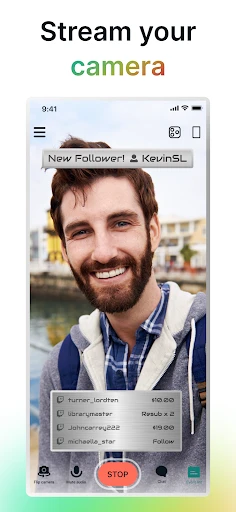
One of the standout features of Streamlabs is its customizable alerts. Whether someone follows, subscribes, or donates, your viewers will get a fun notification on the screen. This not only enhances viewer engagement but also adds a professional touch to your streams. Another cool feature is the ability to switch between multiple scenes. Imagine having different layouts for starting, chatting, and gaming – it’s all possible with just a few taps.
Moreover, Streamlabs offers a wide range of widgets to enhance interactivity. From chat boxes to donation goals, you can keep your viewers informed and engaged. And let's not forget about the extensive theme library. With countless themes to choose from, you can personalize your stream to reflect your style.
Performance and Usability
Performance-wise, Streamlabs holds up well. The app runs smoothly without bogging down your device, which is crucial during live streaming. It's optimized to handle high-quality streams while maintaining a low CPU usage, ensuring that your device doesn’t overheat or crash mid-broadcast.
Usability is another area where Streamlabs shines. The app's interface is intuitive, with all the tools you need readily accessible. Whether you're adjusting audio levels, switching scenes, or interacting with your chat, everything is just a tap away. Plus, the app provides useful analytics, so you can track your performance and make data-driven improvements.
Final Thoughts
To wrap it up, if you're serious about streaming and want an app that offers both functionality and flexibility, Streamlabs: Live Streaming is definitely worth checking out. It’s packed with features that cater to both novices and seasoned streamers, and its user-friendly interface makes it accessible to everyone. So go ahead, give it a try, and watch your streaming career soar!



- Developer
- Logitech Europe S.A.
- Version
- 3.13.1
- Installs
- 10,000,000+
- Android Version
- Varies With Device
- Content Rating
- Everyone
- Price
- Free
- User-friendly interface for beginners
- Compatible with multiple platforms
- Customizable stream overlays
- Integrated donation alerts
- Real-time chat interaction
- Requires stable internet connection
- Limited features in free version
- Occasional lag during streaming
- Can be resource-intensive
- Some features need premium subscription