Session - Private Messenger
Have you ever felt the need for a messaging app that prioritizes your privacy without compromising on functionality? Enter Session - Private Messenger, an app that claims to offer just that. I recently took it for a spin, and here’s what I found out.
Privacy First Messaging
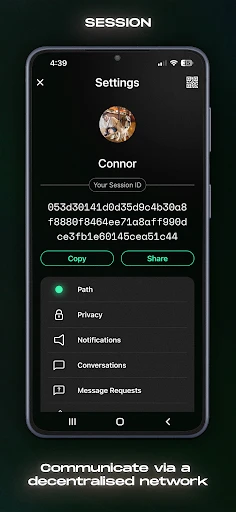
In today’s digital age, privacy is a luxury many crave. Session - Private Messenger stands out by ensuring that all your communications remain private and secure. What immediately caught my eye was the app’s bold claim of not requiring a phone number or email to create an account. That’s right, no personal identifiers needed. It’s refreshing to see a messaging app that truly values anonymity.
As I delved deeper, I discovered that Session uses a unique decentralized network. This means that your messages aren’t stored on any central server, reducing the risk of data breaches. It’s built on blockchain technology, which in itself is a buzzword, but here it genuinely adds a layer of security. The app also encrypts all messages end-to-end, so only you and the intended recipient can read them.
Features That Stand Out
While privacy is its main selling point, Session doesn't skimp on features. You can send text messages, voice notes, and even make voice calls. The app's interface is clean and intuitive, making it easy for anyone to navigate. I particularly enjoyed the group chat feature, which allows you to connect with multiple friends at once without compromising on privacy.
Another feature that deserves a mention is the self-destructing messages. You can set a timer for how long your messages remain visible. It’s a nifty addition for those secret conversations you don’t want lingering around.
Performance and Usability
Now, let’s talk performance. During my time using Session, I noticed it runs smoothly for the most part. Sending messages and media is quick, but there are occasional lags, especially with voice calls. It’s not a deal-breaker, but something to keep in mind if you’re planning on using it for frequent calls.
Usability-wise, the app is straightforward. Even if you’re not tech-savvy, you’ll find it easy to set up and use. There’s a bit of a learning curve when it comes to understanding the decentralized network, but nothing too complicated.
Final Thoughts
In conclusion, Session - Private Messenger is a breath of fresh air in the crowded messaging app market. It’s perfect for those who prioritize privacy without sacrificing essential features. While it might not replace your primary messaging app just yet, it’s a commendable alternative for private conversations. If privacy is your top priority, give Session a try. You might just find it to be a perfect fit for your messaging needs.


- Developer
- Session Foundation
- Version
- 1.23.2
- Installs
- 1,000,000+
- Android Version
- 8.0
- Content Rating
- Everyone
- Price
- Free
- End-to-end encryption for all chats.
- No ads or trackers in the app.
- Open-source and transparent.
- Supports voice and video calls.
- Cross-platform compatibility.
- Limited user base compared to other messengers.
- Occasional connectivity issues.
- No cloud backup for chat history.
- Lacks advanced features like bots.
- User interface is not very intuitive.