My Verisure
Ever wondered how to turn your home security experience into a smooth ride? Enter My Verisure, the app that's making waves in the world of home security for both Android and iOS users. Let me take you on a tour of this nifty application, and trust me, by the end of this, you'll feel like a security expert in your own right.
Getting Started with My Verisure
First things first, setting up My Verisure is as easy as pie. After downloading it from the App Store or Google Play, you’ll need to log in with your Verisure credentials. If you don't have an account yet, no worries! Setting one up is a breeze. The app guides you through the process with clear and straightforward instructions. Once you're in, boom! You're greeted with a clean, user-friendly interface that’s simple enough for anyone to navigate.
Features That Stand Out
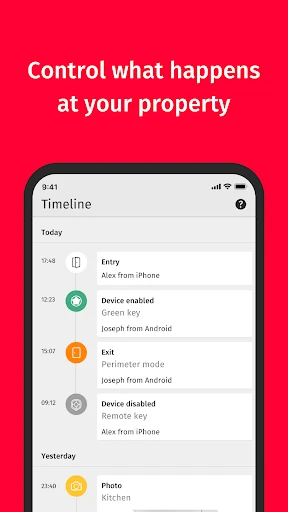
Now, let’s talk features because this app is packed with them. One of my favorites is the real-time notifications. Imagine being at work and getting a ping that someone’s at your front door. It’s like having a personal security guard in your pocket. Plus, you can arm and disarm your alarm system remotely. Forgot to set the alarm while rushing out? No problem, just a tap, and you’re all set.
The app also offers live video streaming, allowing you to check on your home anytime, anywhere. This feature is especially handy when you’re on vacation and want to make sure everything’s shipshape back home. Another cool feature is the smart key sharing system, which lets you grant temporary access to your home to friends or family. No more hiding keys under the doormat!
User Experience
As someone who's spent quite a bit of time tinkering with apps, I appreciate how My Verisure manages to balance functionality with ease of use. The interface is intuitive, and all the main features are just a swipe or tap away. The app’s reliability is also worth mentioning. I’ve yet to experience any crashes or glitches, which is a huge plus in my book.
Another aspect worth highlighting is the customer support integrated within the app. If you ever hit a snag, help is just a message away. The support team is quick to respond, ensuring that any issues are resolved promptly. This feature alone could save you a lot of headaches and potential security mishaps.
Why It’s Worth It
In a world where security is paramount, having an app like My Verisure gives you peace of mind. It’s like having a security command center right at your fingertips. Whether you’re tech-savvy or a bit of a novice with apps, this one’s designed to cater to all. The combination of advanced features, user-friendly design, and excellent support makes it a must-have for anyone serious about home security.
So there you have it, folks. My take on My Verisure. If you're looking to up your security game, this app is definitely worth checking out. It’s reliable, easy to use, and packed with features that make home security management a breeze. Give it a go, and you might just find yourself wondering how you ever managed without it!


- Developer
- Securitas Direct - Verisure
- Version
- 10.144.0
- Installs
- 5,000,000+
- Android Version
- 8.0
- Content Rating
- Everyone
- Price
- Free
- User-friendly interface
- Real-time security alerts
- Remote control of devices
- 24/7 customer support
- Customizable security settings
- Limited features in free version
- Requires stable internet connection
- Occasional app crashes
- Complex initial setup
- Subscription can be pricey