MobileSheets
When it comes to managing sheet music on your tablet, MobileSheets is a name that pops up quite often. As someone who’s spent countless hours flipping through physical scores, I was eager to see how this app could revolutionize my music sessions. Spoiler alert: it’s a game-changer!
Getting Started with MobileSheets
Setting up MobileSheets is a breeze. Whether you’re on Android or iOS, downloading and installing the app is straightforward. Once you launch it, you’re greeted by a clean and intuitive interface that doesn’t overwhelm. It’s like the developers knew exactly what we musicians needed—simplicity meets functionality.
Features that Hit the Right Notes
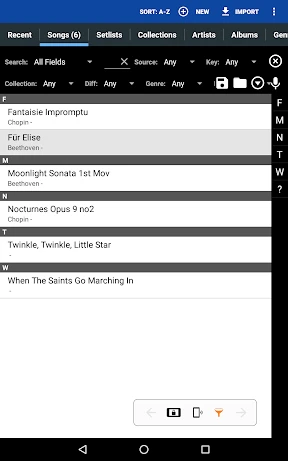
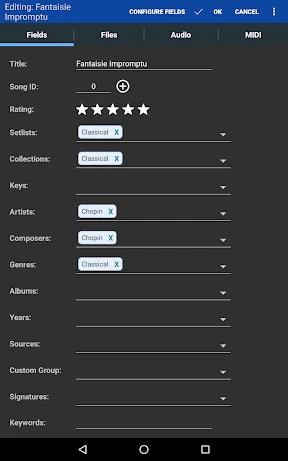
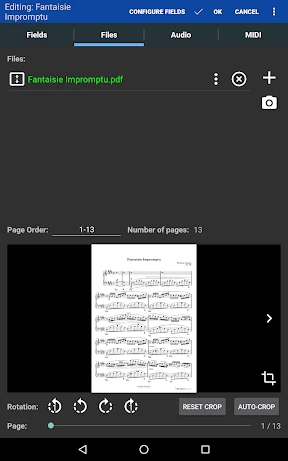
The app shines with its plethora of features. The library management system is top-notch, allowing you to organize your music by title, composer, genre, or any custom tag you fancy. Adding scores is as simple as a few taps, whether you’re importing PDFs, images, or other supported formats. I particularly love the batch import feature—perfect for those with extensive collections.
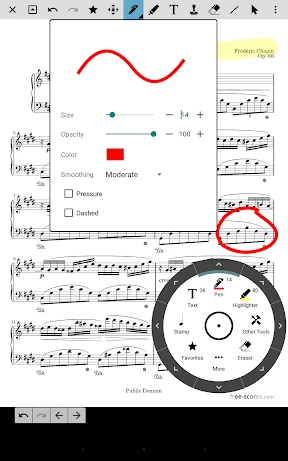
Annotation tools are another highlight. Gone are the days of scribbling notes in the margins of your sheet music. With MobileSheets, you can add text, highlight sections, or even draw freehand. And if you make a mistake? Just undo it with a tap.
Performance Mode and Setlists
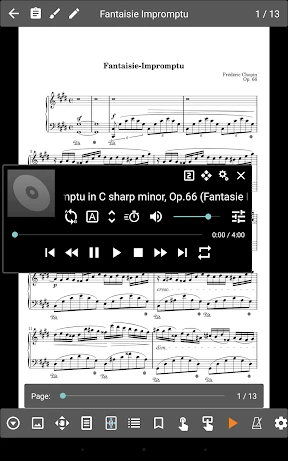
For performers, the app’s performance mode is a godsend. You can create setlists for your gigs and navigate through them seamlessly. The half-page turn feature ensures you’re never caught off guard, flipping pages mid-performance. It’s as if the app was designed with live musicians in mind.
The metronome and audio playback features are icing on the cake. You can practice with a metronome or play along with audio tracks linked to your scores. It’s like having a personal accompanist right there with you.
Sync and Backup
One of my biggest concerns with digital sheet music was losing my collection. MobileSheets addresses this with its robust backup and sync options. Whether you prefer cloud storage or local backups, the app has you covered. I can’t stress enough how comforting it is to know my music is safe and sound.
Final Thoughts
In a world where digital solutions are becoming the norm, MobileSheets stands out as an essential tool for musicians. It combines practicality with a suite of features that cater to both casual players and professional performers. While it may take a bit of time to get used to if you’re transitioning from physical sheets, the payoff is well worth it.
So, if you’re looking to streamline your music practice or performance, give MobileSheets a try. It’s more than just an app; it’s a partner in your musical journey.
- Developer
- Zubersoft
- Version
- 3.9.7
- Installs
- 100,000+
- Android Version
- Varies With Device
- Content Rating
- Everyone
- Price
- $15.99
- Highly customizable sheet music reader.
- Supports various file formats.
- Annotation tools included.
- Cloud sync available.
- Easy library management.
- User interface can be complex.
- Limited free version features.
- Occasional sync issues.
- Requires frequent updates.
- Steep learning curve for new users.