Microsoft Outlook
Diving into Microsoft Outlook: Your Personal Email Maestro
If you’re like me, juggling multiple email accounts between work, personal, and perhaps a quirky hobby newsletter or two, then Microsoft Outlook might just be your new best friend. It's been around the block for a while, and honestly, it’s quite the seasoned pro in the email management game.
First Impressions: Interface and Usability
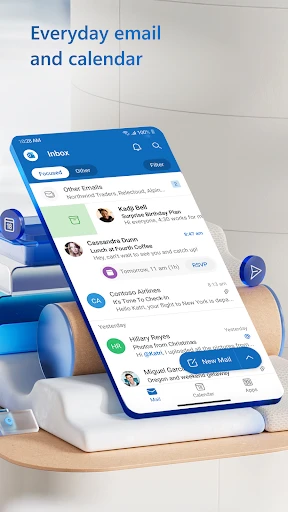
Let’s talk about the interface first. Opening up Outlook, you’re greeted with a clean, crisp design that makes navigating through your emails a breeze. It’s like stepping into a well-organized office where everything is right where it should be. The color scheme is easy on the eyes, which is a relief for those of us who spend hours staring at screens. Plus, the layout is intuitive, making it super easy to switch between your inbox, calendar, and contacts.
Features That Make Life Easier
Now, I can't stress enough how Outlook’s features are designed to simplify your life. For starters, the Focus Inbox is a game-changer. It automatically sorts emails based on importance, so you see what matters most first. No more sifting through endless spam about discounts you’ll never use!
Another nifty feature is the Calendar. It’s seamlessly integrated with your email, allowing you to schedule meetings or set reminders without hopping between apps. You can even share your calendar with colleagues or friends, making it super easy to plan that long-overdue catch-up.
Performance on Android and iOS
Whether you’re team Android or iOS, Outlook doesn’t disappoint. The app is smooth and responsive, even on older devices. Syncing between devices is a piece of cake, which means your emails and calendar are always up-to-date, no matter where you are. And if you’re someone who travels a lot, the offline access feature is a lifesaver. You can draft emails or check your calendar without the internet, and everything syncs once you’re back online.
Security and Privacy
In today’s digital age, security is paramount, and Outlook takes this seriously. It offers robust encryption and multi-factor authentication to keep your emails secure. Plus, with Microsoft’s ongoing updates, you can rest easy knowing your data is protected against the latest threats.
Final Thoughts
So, is Microsoft Outlook worth downloading? I’d say a resounding yes! It’s not just an email app; it’s a comprehensive tool that helps you manage your digital life efficiently. Whether you’re a busy professional or just someone who likes to keep things organized, Outlook has something to offer. Give it a try, and you might just find it’s the email assistant you never knew you needed.
Download it, explore its features, and let me know what you think. Happy emailing!
- Developer
- Microsoft Corporation
- Version
- Varies With Device
- Installs
- 1,000,000,000+
- Android Version
- 9
- Content Rating
- Everyone
- Price
- Free
- Integrates with Microsoft Office Suite seamlessly.
- Robust email organization and filters.
- Calendar integration boosts productivity.
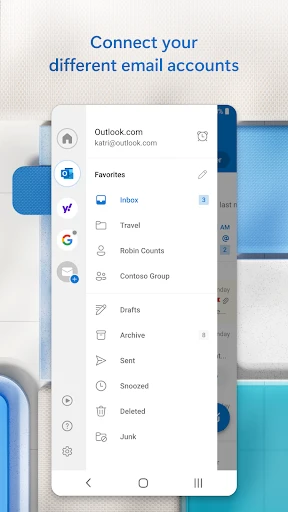
- Supports multiple email accounts easily.
- Reliable security features for emails.
- Can be overwhelming for new users.
- Requires Microsoft account for full features.
- Occasional sync issues reported.
- Limited customization for appearance.
- Resource-intensive on older devices.