Microsoft Designer
Have you ever wanted to unleash your inner designer without having to go through the lumbering process of learning professional tools like Photoshop or Illustrator? Enter Microsoft Designer, a sleek and user-friendly app designed to make graphic design accessible to everyone. Whether you're a social media enthusiast, a small business owner, or just someone who wants to create stunning visuals for personal projects, this app has got you covered.
First Impressions: Sleek and Intuitive
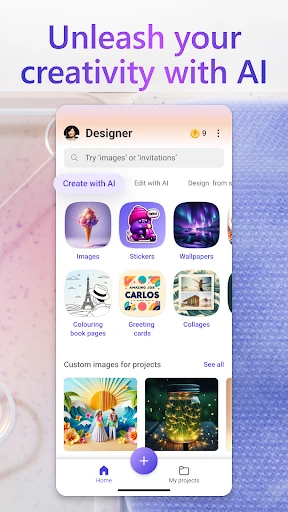
From the moment you open Microsoft Designer, you’ll notice how clean and intuitive the interface is. It doesn’t bombard you with complex menus or overwhelming options. Instead, it offers a straightforward layout that makes navigation a breeze. I particularly love how everything is neatly categorized, allowing you to jump straight into your project without any fuss.
Templates Galore
One of the standout features of Microsoft Designer is its vast array of templates. Whether you’re designing a flyer, a social media post, or a business card, there’s a template for every occasion. And these aren’t your run-of-the-mill templates either. They’re crafted by professional designers to ensure your projects look polished and professional. Just pick a template, and you’re halfway to a stunning design.
Customizability at its Finest
While templates are a great starting point, the real magic of Microsoft Designer lies in its customizability. You can tweak every element to suit your style. Change the colors, switch up the fonts, add your own images – the possibilities are endless. I spent hours just playing around with different combinations, and each time I was amazed by how easy it was to create something unique and eye-catching.
Collaboration Made Easy
In today’s digital age, teamwork is key, and Microsoft Designer has embraced this wholeheartedly. The app allows for seamless collaboration, enabling multiple users to work on a project simultaneously. This is perfect for teams who need to brainstorm ideas and implement changes on the fly. Plus, with cloud integration, you can access your designs from anywhere, making remote work a breeze.
Performance and Compatibility
Performance-wise, Microsoft Designer runs smoothly on both Android and iOS platforms. I didn’t encounter any crashes or slowdowns, even when working on complex designs. The app is also compatible with a variety of file formats, so you can easily export your designs for print or digital use. Whether you’re on a smartphone or a tablet, the app adapts beautifully to different screen sizes, ensuring a consistent experience across devices.
In conclusion, Microsoft Designer is a game-changer for anyone looking to dive into the world of graphic design without the steep learning curve. It’s packed with features that cater to both beginners and seasoned designers, making it a versatile tool for a wide range of users. If you’re looking to create stunning visuals with minimal effort, this app is definitely worth a try. Trust me, you’ll be designing like a pro in no time!
- Developer
- Microsoft Corporation
- Version
- 1.2507604.7001
- Installs
- 1,000,000+
- Android Version
- 9
- Content Rating
- Everyone
- Price
- Free
- Intuitive UI for seamless design.
- Wide range of templates available.
- Collaborative features integrated.
- Cross-platform compatibility.
- Regular updates with new features.
- Requires a Microsoft account to use.
- Limited offline functionality.
- May consume significant storage.
- Occasional lag on older devices.
- Subscription needed for premium features.