Easy Pose - 3D pose making app icon

Easy Pose - 3D pose making app

Art & Design

Related searches

Hey there, fellow artists and animators! If you've ever struggled to find that perfect pose for your character designs, then let me introduce you to Easy Pose, the 3D pose making app that's got your back, literally. This nifty little tool is like having a digital mannequin right on your phone, and it's here to save the day (and your sketches).

Getting Started with Easy Pose

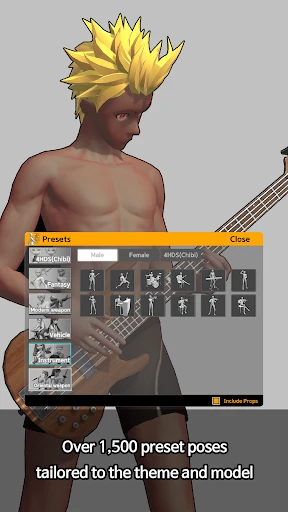
Alright, let's dive into the nitty-gritty. Easy Pose is available on both Android and iOS, making it super accessible. The setup is a breeze, and once you're in, you're greeted with a clean, intuitive interface that's easy to navigate. No more fumbling around trying to figure out what does what. The app offers a wide variety of pre-made poses, but the real magic happens when you start customizing them to suit your needs.

Features that Stand Out

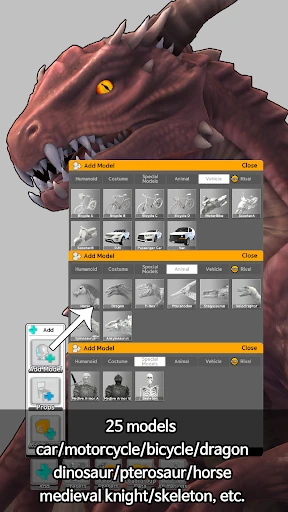
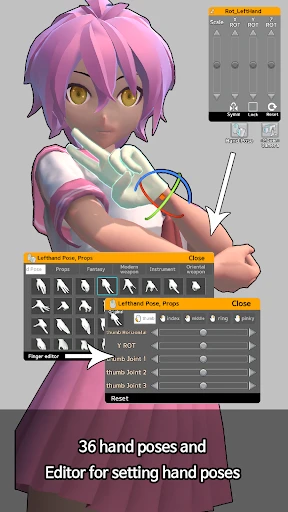
What I love about Easy Pose is its versatility. You can manipulate the 3D models with ease, adjusting limbs, rotating joints, and even changing the camera angle to get every detail just right. It's like having a mini studio in your pocket! Plus, the app supports multiple figures, so you can create complex scenes with various characters interacting.

Another cool feature is the light manipulation tool. Adjusting the lighting helps you understand how shadows play on the body, which is a game-changer for getting those highlights and shadows spot on in your drawings. It's these little details that make a huge difference in the final artwork.

Why You'll Love It

Easy Pose isn't just for seasoned artists; it's perfect for beginners too. The app offers a helpful tutorial section that guides you through the basics, ensuring you’re not left in the dark. And speaking of guidance, the app's supportive community is a great resource for tips and inspiration. It’s like having a bunch of art buddies cheering you on!

One of my favorite things about Easy Pose is that it doesn't try to cram too much into its interface. It's focused on what matters most: helping you create poses quickly and efficiently. This focus makes it a joy to use whether you're sketching on the go or planning a more detailed piece in your studio.

Final Thoughts

In a nutshell, Easy Pose is a fantastic tool for anyone looking to enhance their artistic process. Whether you're doodling for fun, crafting a comic, or working on an animation project, this app is a trusty sidekick. It's not just about making poses; it's about unleashing your creativity and bringing your ideas to life with precision and flair.

So, if you're ready to take your art to the next level, give Easy Pose a try. Trust me, once you start using it, you'll wonder how you ever managed without it. Happy creating!
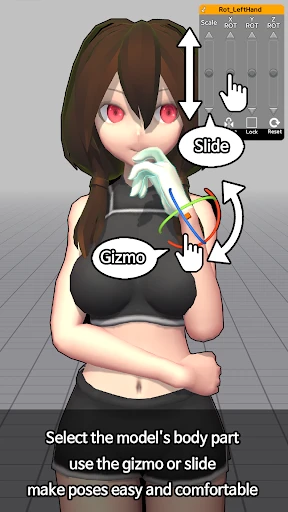
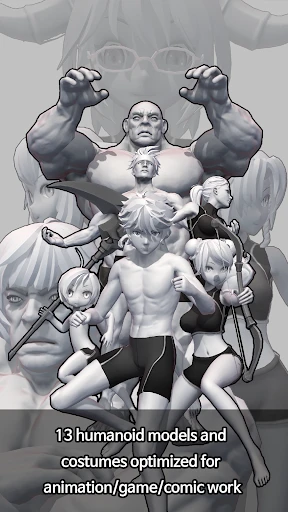
Easy Pose - 3D pose making app screenshot Easy Pose - 3D pose making app screenshot Easy Pose - 3D pose making app screenshot Easy Pose - 3D pose making app screenshot Easy Pose - 3D pose making app screenshot
Easy Pose - 3D pose making app icon
Easy Pose - 3D pose making app
Developer
MadcatGames
Version
1.6.10
Installs
10,000,000+
Android Version
5.1
Content Rating
Teen
Price
Free
Pros
  • Intuitive interface for easy navigation.
  • Wide range of customizable models.
  • Realistic 3D graphics for detailed poses.
  • Supports diverse artistic styles.
  • Frequent updates with new features.
Cons
  • Some features require paid version.
  • Might lag on older devices.
  • Limited free model options.
  • Occasional bugs in 3D rendering.
  • Steep learning curve for beginners.
Ratings

3.6

Similar Apps

AI Face Swap Video App-Swapme

AI Face Swap Video App-Swapme

3.8
Get
Animic AI: Anime Generator

Animic AI: Anime Generator

0
Get
Drawing Apps: Draw, Sketch Pad

Drawing Apps: Draw, Sketch Pad

3.7
Get
AR Drawing - Sketchar App

AR Drawing - Sketchar App

4.1
Get
Textify- Art Font Photo Editor

Textify- Art Font Photo Editor

4.1
Get
Future Self Face Aging Changer

Future Self Face Aging Changer

3.9
Get
Genmoji - AI Emojis™

Genmoji - AI Emojis™

3.1
Get
Vector Ink: SVG, Illustrator

Vector Ink: SVG, Illustrator

3.9
Get
Poster Maker - Flyer Maker

Poster Maker - Flyer Maker

4.8
Get
Floor Plan Creator

Floor Plan Creator

4
Get
AI Image Generator: ImagineArt

AI Image Generator: ImagineArt

4.4
Get
FlipArtify - 2D Draw Animation

FlipArtify - 2D Draw Animation

3.9
Get

Frequently Asked Questions

What is Easy Pose and what can I use it for?

Easy Pose is a 3D pose making app designed for artists, animators, and illustrators who want to create realistic human and animal poses. It is a versatile tool that allows users to manipulate 3D models to practice drawing, study anatomy, or use as a reference for artworks. With a variety of models and adjustable joints, it helps users visualize poses from different angles, making it a valuable asset for creative projects.

Is Easy Pose suitable for beginners in drawing and animation?

Yes, Easy Pose is user-friendly and suitable for beginners. The app provides intuitive controls and a simple interface that helps new users create and manipulate poses without extensive experience in 3D modeling. Additionally, it offers tutorials and guides to help beginners maximize the app’s features, making it an excellent starting point for anyone interested in enhancing their drawing or animation skills.

Does Easy Pose offer a variety of models and customization options?

Easy Pose offers a wide range of models including humans, animals, and fantasy creatures, each with customizable features. Users can adjust body parts, change proportions, and apply various textures and lighting effects. This flexibility allows for highly detailed and personalized poses, catering to the needs of different artistic styles and projects.

Can I export poses created in Easy Pose to other platforms or software?

Yes, Easy Pose allows users to export their created poses in various formats suitable for integration with other art and animation software. This feature is particularly useful for artists who want to continue refining their work in more advanced tools or need to include the poses in larger projects. The app supports several export options to ensure compatibility with other platforms.

What are the system requirements for running Easy Pose on Android and iOS devices?

Easy Pose is compatible with a wide range of Android and iOS devices. However, for optimal performance, it is recommended to have a device with at least 2GB of RAM and a modern processor. Ensuring your device meets these requirements allows for smoother operation, particularly when dealing with complex models and high-resolution textures. Users should check the app store for specific device compatibility information.