CamToPlan
Get Creative with CamToPlan: The Augmented Reality Ruler App
Have you ever found yourself in a situation where you needed to measure something but didn’t have a tape measure at hand? Maybe you’re planning a home renovation or just want to see if that new couch will fit in your living room. Enter CamToPlan, the app that brings the tape measure to your pocket using augmented reality (AR). Let’s dive into how this nifty app can change the way you measure spaces and objects.
Augmented Reality: Measure with Precision
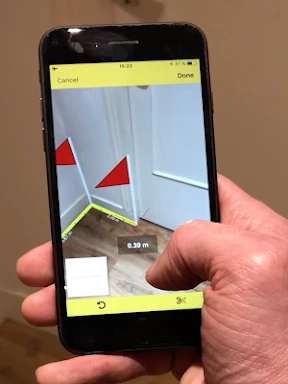
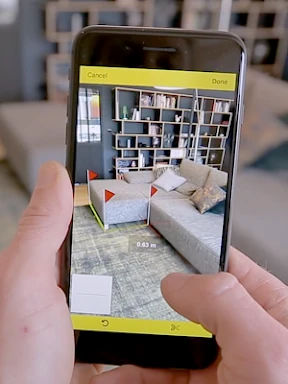
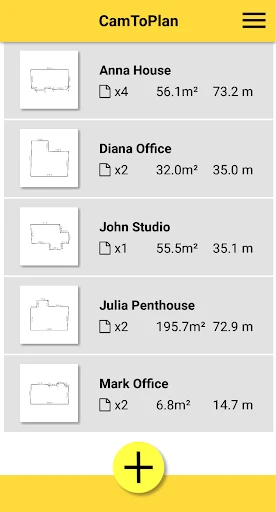
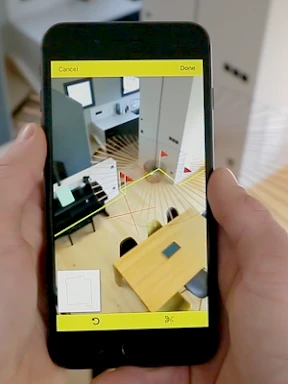
CamToPlan is an app that utilizes your smartphone’s camera and AR technology to measure distances and surfaces. It’s like having a virtual ruler that you can use to measure anything from the length of your dining table to the height of your walls. All you need to do is point your camera at the object or space you want to measure, and the app does the rest. It’s surprisingly accurate, and according to the developers, it can measure distances with precision up to a few centimeters. Perfect for those who love DIY projects or professional use in real estate and construction.
Easy to Use and Versatile
One of the best things about CamToPlan is its user-friendly interface. Honestly, it doesn’t take much to get started. Once you’ve downloaded the app, you’re greeted with a simple tutorial that guides you through the basics. The interface is clean and intuitive, so you can jump right in without feeling overwhelmed. Plus, it’s versatile enough to handle both horizontal and vertical measurements, making it a great tool whether you’re measuring the floor plan of a room or the height of a bookshelf.
Accuracy and Limitations
Now, while CamToPlan is quite accurate, it’s worth mentioning that the accuracy can depend on the lighting conditions and the type of surface you’re measuring. Reflective and transparent surfaces might throw it off a bit, but for most everyday scenarios, it performs exceptionally well. It’s a good idea to double-check with a physical measuring tape if you need absolute precision, especially for critical measurements.
Practical Uses Beyond Home DIY
While I initially downloaded CamToPlan for some home improvement projects, I quickly realized its potential for other uses. Imagine you’re in a store and want to know if a piece of furniture will fit in your car or if you’re a realtor needing to give potential buyers quick measurements of a property. The app comes in handy for all these scenarios. It’s like having a Swiss Army knife of measuring tools right on your phone.
Final Thoughts
In a world where technology continues to blur the lines between the digital and physical, CamToPlan stands out as a practical application of AR technology. Whether you’re a DIY enthusiast, a professional in need of quick measurements, or just someone who appreciates cool tech, CamToPlan is worth checking out. It’s easy to use, versatile, and a fun way to bring a bit of high-tech magic into your everyday life. So why not give it a try and see how it can make your life a little easier?
- Developer
- Tasmanic Editions
- Version
- 5.3.3
- Installs
- 100,000+
- Android Version
- 7.0
- Content Rating
- Everyone
- Price
- $19.99
- Accurate AR measurements for both horizontal and vertical surfaces.
- User-friendly interface makes it easy to use for anyone.
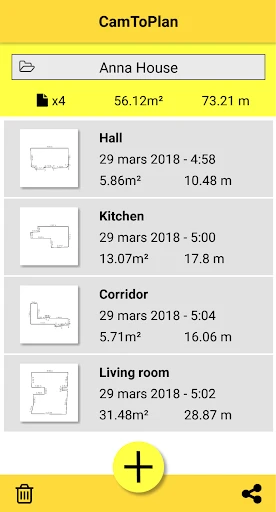
- Supports exporting data in multiple formats for convenience.
- Works well in various lighting conditions.
- No need for additional hardware
- Requires a well-lit environment for best results.
- May not work on older devices with outdated AR support.
- Occasional calibration issues in complex spaces.
- Free version has limited features compared to premium.
- Battery consumption is higher during extended use.