ColorNote Notepad Notes
Have you ever found yourself in the midst of chaos, trying to remember where you jotted down that important note? Fear not, because ColorNote Notepad Notes might just be your new best friend. Let's dive into why I think this app deserves a spot on your phone.
Getting Organized with ColorNote
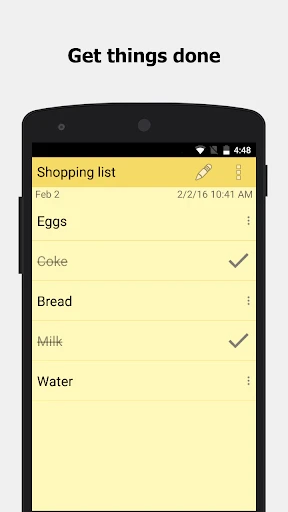
First things first, let me tell you how easy it is to get started with ColorNote Notepad Notes. It's like having a virtual sticky note pad, but way more convenient. The app allows you to create notes in two formats – text and checklist. So, whether you're a list lover like me or prefer jotting down paragraphs of thoughts, ColorNote has got you covered.
Features that Stand Out
One of the features I absolutely adore is the color-coding system. It's not just a pretty face; it actually helps in organizing your notes. Assigning different colors to different types of notes can make a world of difference. Imagine having a rainbow of reminders, each color representing a different task or category. It’s both visually pleasing and super functional.
Another cool feature is the ability to set reminders. Never again will you forget your grocery list or that important meeting. The app sends a notification at your chosen time, acting as a gentle nudge to keep you on top of your game. You can also pin notes to your status bar, keeping your most essential notes just a swipe away.
Seamless Synchronization
If you're worried about losing your notes when switching devices, ColorNote has thought of that too. The app offers a cloud sync feature, allowing you to backup and sync your notes across multiple devices. This means you can access your notes anytime, anywhere. It’s like having a personal assistant that moves with you.
User Experience and Interface
The user interface is clean and intuitive, making it easy to navigate even for the less tech-savvy among us. I found that the app runs smoothly without any hiccups, which is a huge plus in my book. The developers have done a stellar job ensuring that the app is not only functional but also user-friendly.
What really sets ColorNote apart is its simplicity. In a world where apps are becoming increasingly complex, it's refreshing to see an app that sticks to the basics and does it well. The app is lightweight, ensuring it doesn’t hog precious storage space on your device.
Final Thoughts
In conclusion, ColorNote Notepad Notes is a fantastic tool for anyone looking to bring some order into their lives. Its straightforward design, coupled with powerful features, makes it a must-have app for note-takers everywhere. Whether you're a student, a professional, or just someone who loves staying organized, I highly recommend giving ColorNote a try. Trust me, once you start using it, you'll wonder how you ever lived without it!



- Developer
- Notes
- Version
- 4.6.4
- Installs
- 100,000,000+
- Android Version
- 4.1
- Content Rating
- Everyone
- Price
- Free
- User-friendly interface for easy navigation.
- Syncs across multiple devices seamlessly.
- Supports color coding for better organization.
- Includes reminder feature for tasks.
- Offline access to notes anytime.
- No advanced formatting options for notes.
- Limited widget customization on Android.
- Ads can be intrusive in the free version.
- No collaboration feature for shared notes.
- Lacks integration with other productivity apps.