

Adobe Acrobat Reader: Edit PDF
When it comes to managing PDFs on your mobile device, Adobe Acrobat Reader is the app that often finds its way to the top of the list. Whether you’re a student, a professional, or just someone who deals with PDFs regularly, this app promises to be your go-to solution for all things PDF-related. But is it really worth the hype? I decided to dive in and see if Adobe Acrobat Reader stands tall among its competitors in the mobile app world.
Getting Started with Adobe Acrobat Reader
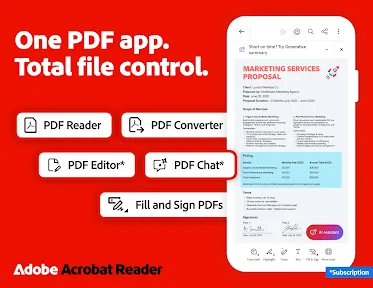
The first thing I noticed after downloading Adobe Acrobat Reader from the app store was its sleek and intuitive interface. The app doesn’t waste time with unnecessary frills and gets straight to the point. Once you fire it up, you’re greeted with a straightforward dashboard that makes navigation a breeze. Whether you’re looking to open a PDF, edit, or share, everything is just a tap away.
Easy Navigation
One of the standout features is the easy navigation. The app categorizes your documents neatly, and the search function is top-notch. If you’re like me and have a ton of documents, this feature will save you a lot of time. Plus, the app supports multiple file formats, so you’re not just limited to PDFs. You can handle Word documents, Excel sheets, and even PowerPoint presentations.
Editing on the Go
Now, let’s talk about the editing capabilities. This is where Adobe Acrobat Reader really shines. Editing PDFs on a mobile device sounds daunting, but the app makes it surprisingly simple. Whether you need to add text, insert images, or even annotate, it’s all very accessible. I found myself editing documents with ease, something I didn’t expect to do on my phone. There’s also a handy feature for converting PDFs to other formats, which is perfect when you need to work with different file types.
Annotation and Commenting
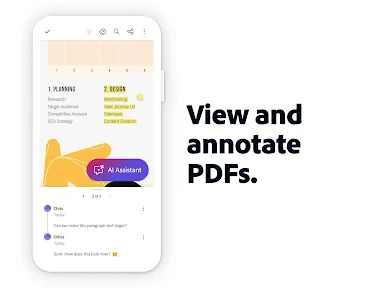
The annotation tools are another aspect worth mentioning. Highlighting text, adding sticky notes, and even drawing on your documents is as easy as pie. If you collaborate with others frequently, you’ll appreciate the commenting features. It makes reviewing documents a collaborative effort, even when you’re on the move. This ability to review and share feedback instantly is a game-changer for many professionals.
Security and Sharing
Security is a big deal when it comes to handling documents, and Adobe Acrobat Reader doesn’t disappoint. You can password-protect your PDFs, ensuring sensitive information remains confidential. Plus, sharing documents is straightforward. You can email them directly from the app or use cloud services, which is super convenient if you’re working remotely. I found the integration with other Adobe services seamless, enhancing productivity significantly.
Cloud Storage Integration
With integration options like Dropbox, Google Drive, and Adobe Document Cloud, accessing and saving your files is a breeze. This feature is particularly useful if you’re someone who juggles between devices or works in a team. Having everything in sync and accessible from anywhere is a huge plus.
Final Thoughts
After spending some time with Adobe Acrobat Reader, I can confidently say it’s a must-have for anyone dealing with PDFs regularly. The app combines functionality with ease of use, making it a leader in its field. Whether you’re editing, sharing, or securing your documents, Adobe Acrobat Reader covers all bases effectively. It might not replace your desktop software entirely, but for mobile use, it’s as good as it gets.
So, if you haven’t tried it yet, give Adobe Acrobat Reader a spin. It might just become your new favorite app for managing PDFs on the go!
- Developer
- Adobe
- Version
- Varies With Device
- Installs
- 500,000,000+
- Android Version
- Varies With Device
- Content Rating
- Everyone
- Price
- Free
- Wide range of annotation tools for PDFs.
- Seamless integration with Adobe Document Cloud.
- Supports various file formats.
- User-friendly interface.
- Strong security and privacy features.
- Some features require a subscription.
- Occasional performance lags.
- Limited editing capabilities.
- Can be complex for beginners.
- Requires internet for cloud features.


