TP-Link Tether
Let me tell you about this nifty little app I stumbled upon, called TP-Link Tether. If you're like me, juggling multiple devices and trying to keep track of your Wi-Fi network can sometimes feel like a full-time job. But this app? Game changer! It’s like having a universal remote control for your network right in your pocket. Intrigued? Let’s dive in.
Getting to Know TP-Link Tether
First things first, TP-Link Tether is designed to make managing your home network a breeze. It’s available on both Android and iOS platforms, so no one’s left out. The app provides an intuitive and easy-to-use interface to manage your TP-Link routers and extenders. From setting up your network to keeping an eye on connected devices, it’s all there right at your fingertips.
Setup and Usability
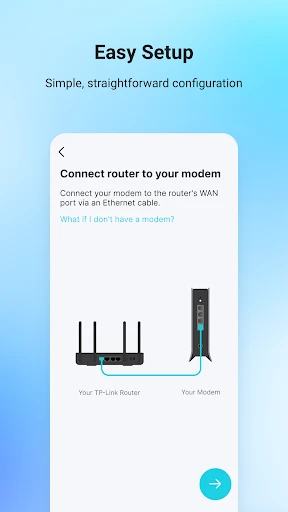
I remember the first time I set up a router—cables everywhere and a manual that looked like it was written for rocket scientists. But with Tether, setting up your network is as easy as pie. The app guides you through the setup process with clear, step-by-step instructions. In no time, you’ll have your network up and running without breaking a sweat.
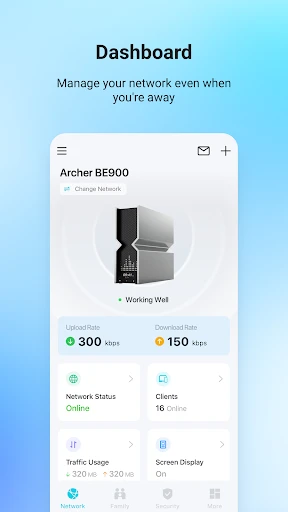
Once you’re all set up, you can monitor who’s connected to your network, manage their access, and even set up parental controls. The interface is super user-friendly, so you don’t need to be a tech whiz to navigate it. Whether you want to prioritize devices for faster speeds or block those freeloading neighbors, Tether’s got you covered.
Features That Stand Out
One of the standout features has to be the real-time network management. Imagine you're streaming your favorite show and suddenly, there’s a lag. With Tether, you can quickly check if someone in the house is hogging the bandwidth and adjust accordingly. Also, the ability to update your router firmware directly from the app is a huge time-saver. No more hunting down updates on your computer!
And let’s not forget about the parental controls. As someone who occasionally babysits my nephew, being able to manage what he can and can't access online is a lifesaver. You can set usage schedules and block specific sites, ensuring a safe browsing experience for the little ones.
Final Thoughts
All in all, TP-Link Tether makes network management accessible and straightforward. It's perfect for anyone who wants to take control of their home Wi-Fi without diving into complex technical details. Whether you're a tech newbie or a seasoned pro, this app offers something for everyone. So, if you're tired of wrestling with your network and want an easy, hassle-free solution, give Tether a try. Trust me, your future self will thank you!


- Developer
- TP-LINK SYSTEMS INC.
- Version
- 4.10.4
- Installs
- 50,000,000+
- Android Version
- 6.0
- Content Rating
- Everyone
- Price
- Free
- Easy setup and management of TP-Link routers.
- Remote access to network settings.
- User-friendly interface.
- Parental controls for safe browsing.
- Real-time network monitoring.
- Limited advanced features for tech-savvy users.
- Occasional connectivity issues.
- Requires TP-Link account for full functionality.
- Ads and promotions can be intrusive.
- Compatibility limited to TP-Link devices.