Samsung Smart Switch Mobile
Ever found yourself in a situation where you’ve got a brand-new Samsung device and all your precious data is locked away in your old phone? Enter Samsung Smart Switch Mobile – your knight in shining armor. This nifty little app is here to make your life a whole lot easier, promising a seamless transfer of data from one device to another, and trust me, it’s a lifesaver!
Getting Started with Samsung Smart Switch Mobile
First things first, let’s talk about setting up. Downloading the app is a breeze; it’s available on both the Google Play Store and Samsung’s Galaxy Store. Once installed, you’re greeted with a straightforward interface that’s as user-friendly as it gets. Seriously, even your grandma could figure this one out!
The app supports a wide range of devices. Whether you’re switching from an iOS device, an older Android, or even another Samsung, Smart Switch Mobile has got you covered. You can transfer pretty much everything – contacts, photos, music, messages, and even your home screen settings.
Seamless Data Transfer
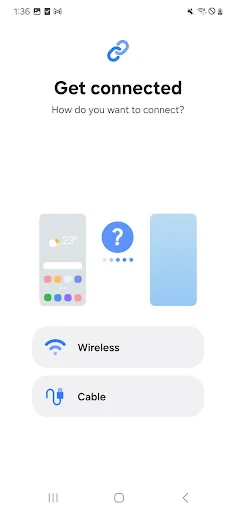
Now, onto the good stuff – the data transfer process. You’ve got a few options here. You can transfer via a USB cable, wirelessly, or even using a PC. Personally, I found the wireless transfer to be super convenient. Just connect both devices to the same Wi-Fi network, follow the prompts, and voila! All your data is transferred without a hitch.
One of the standout features is the app’s speed. It’s surprisingly fast; we’re talking transferring all your essentials in a matter of minutes. And the best part? It doesn’t compromise on data quality. All your photos and videos retain their original resolution, and there’s no loss of data during the transfer.
Compatibility and User Experience
Compatibility is often a hiccup with such apps, but not with Smart Switch Mobile. It works effortlessly across different platforms. I tested it with an old iPhone and a Samsung Galaxy S21, and the transition was smooth as butter. It even transferred my WhatsApp messages intact, which was a pleasant surprise!
As for the user experience, Samsung has nailed it. The app is intuitive, with clear instructions at every step. It’s almost like having a personal tech assistant guiding you through the process. Plus, the app doesn’t bombard you with ads, which is always a plus in my book.
Final Thoughts
In a nutshell, Samsung Smart Switch Mobile is a must-have for anyone looking to upgrade their phone without the hassle of manually transferring data. It’s efficient, reliable, and incredibly easy to use. Whether you’re a tech novice or a seasoned gadget guru, this app will have you set up on your new device in no time.
So, if you’re planning a switch to a Samsung device, do yourself a favor and download Smart Switch Mobile. It turns a potentially stressful task into a walk in the park. And hey, who doesn’t love a bit of convenience in their life?



- Developer
- Samsung Electronics Co., Ltd.
- Version
- 3.7.64.10
- Installs
- 1,000,000,000+
- Android Version
- 5.0
- Content Rating
- Everyone
- Price
- Free
- Easy data transfer between devices
- Supports multiple data types
- User-friendly interface
- Fast transfer speeds
- Compatible with various devices
- Requires Samsung device for full features
- May not transfer all app data
- Needs stable Wi-Fi or data connection
- Limited support for non-Samsung devices
- Occasional app crashes reported