Tasker
If you're like me, always trying to squeeze every little bit of productivity out of your smartphone, then Tasker might just be the app you never knew you needed. Tasker is an automation app for Android that lets you automate just about anything on your device. From simple tasks like muting your phone at night to complex sequences that involve multiple steps and conditions, Tasker is the Swiss Army knife of smartphone automation.
Getting Started with Tasker
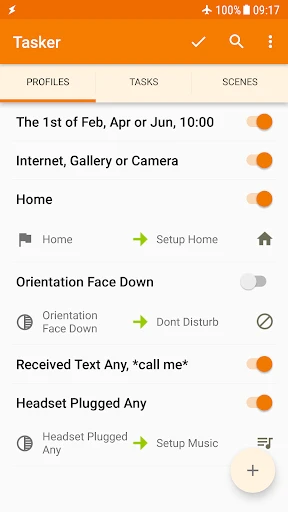
Let me tell you, diving into Tasker can feel a bit overwhelming at first. When I first opened it, the interface didn’t exactly scream "user-friendly." But don't let that scare you off! Once you get the hang of it, the possibilities are endless. The app uses a system of "profiles" and "tasks," where profiles are the conditions that trigger actions, and tasks are the actions themselves.
For instance, you can create a profile that triggers when you connect to your home Wi-Fi, and a task that turns off mobile data to save on battery. Pretty neat, right? The learning curve is there, but the app does provide plenty of guides and there’s a whole community online ready to help out.
The Magic of Automation
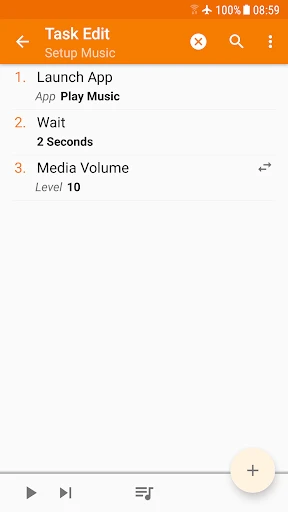
One of the things I absolutely love about Tasker is how it can make your phone truly work for you. Have you ever wished your phone would automatically switch to silent mode when you arrive at the office? Or perhaps, you want your favorite music app to launch when you plug in your headphones? Tasker can handle all of that effortlessly.
In my case, I’ve set it up to send an automated text to my partner when I leave work, so they know when to expect me. It’s like having a personal assistant who never complains! And the best part? No coding skills required.
Exploring Advanced Features
For those of you who are a bit more tech-savvy, Tasker offers plugins and integrations with other apps and services like IFTTT, MQTT, and more. These can really supercharge what you can do. You can even integrate Tasker with your smart home devices for a seamless experience.
Another cool feature is the ability to create your own applets. With a bit of creativity, you can design custom widgets and shortcuts for your most-used tasks. It’s personalization at its finest. For instance, I created a widget that dims my screen and launches my eBook reader app when tapped—perfect for winding down before bed.
Final Thoughts
All in all, Tasker is a powerful tool for those who are willing to invest some time into learning its ropes. It’s not the prettiest app out there, and it might take a bit of patience, but once you get past that initial hump, it’s incredibly rewarding. It’s like having a magic wand that turns your phone into a personalized powerhouse of productivity.
So, if you're ready to take your smartphone automation to the next level, give Tasker a try. It’s a bit of a wild ride, but as I’ve discovered, it’s totally worth it. Happy automating!

- Developer
- joaomgcd
- Version
- 6.3.13
- Installs
- 1,000,000+
- Android Version
- 5.0
- Content Rating
- Everyone
- Price
- $3.49
- Highly customizable automation tool.
- Supports a wide range of plugins.
- User-friendly interface for tech-savvy.
- Integrates well with other apps.
- Saves time by automating daily tasks.
- Steep learning curve for beginners.
- App interface can be overwhelming.
- Limited customer support available.
- Some features may require root access.
- Can drain battery with intensive use.