Sygic GPS Navigation & Maps
Exploring the Road with Sygic GPS Navigation & Maps
Hey there, fellow road adventurer! 🚗 If you're like me, always on the lookout for the perfect GPS app to guide your journeys, then let me spill the beans on a little gem I recently tried out: Sygic GPS Navigation & Maps. This app has been around the block a few times and is renowned for its offline capabilities. Intrigued? Let’s dive into the nitty-gritty of what makes this app a popular choice among travelers.
First Impressions and Features
When you first open Sygic, you're greeted with a sleek and user-friendly interface. It's not one of those apps where you need a manual to figure out where to go next. The intuitive design makes it easy to jump right in and start planning your next trip.
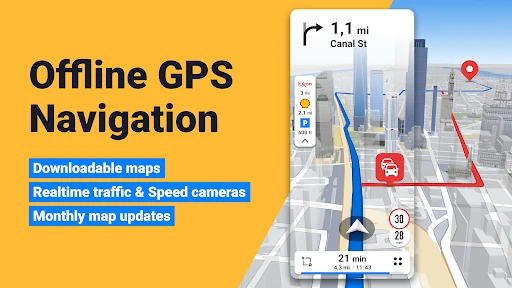
One of the standout features of Sygic is its offline maps. Yep, you heard that right! You can download maps and use them even when you're in the middle of nowhere with no signal. It's a lifesaver, especially when you're hiking in the mountains or driving through rural areas. Not to mention, the maps are sourced from TomTom and are updated regularly, so you’re always in the know about the latest road changes.
Navigating the World with Ease
Now, let's talk about the navigation experience. Sygic offers voice-guided navigation that is available in various languages. This makes it super convenient if English isn't your first language or if you're traveling in a non-English speaking country. I found the voice commands clear and the directions precise, which is crucial when you're zipping through busy city streets.
Another cool feature is the lane assistance. It helps you stay in the correct lane, especially on highways where missing an exit could mean a detour of several miles. I can't stress enough how much this feature has saved me from last-minute lane changes!
Safety First
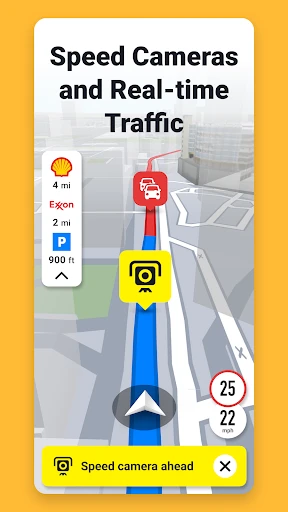
Safety is a big deal when it comes to driving, and Sygic has got you covered with its range of safety features. Real-time traffic updates alert you to any traffic jams, accidents, or road closures, allowing you to reroute and save precious time. Plus, the app warns you about speed cameras and speed limits, helping you avoid those pesky tickets.
If you’re traveling with family, the app’s Head-up Display (HUD) projects navigation information onto the windshield, ensuring you keep your eyes on the road. It's like something straight out of a sci-fi movie, and trust me, it's as cool as it sounds!
Worth the Download?
So, is Sygic GPS Navigation & Maps worth a spot on your home screen? In my opinion, absolutely! Whether you're a frequent traveler or someone who just wants a reliable navigation app for everyday use, Sygic ticks all the right boxes. The offline maps feature alone is a game-changer, and when paired with its robust set of navigation tools, it transforms your smartphone into a powerful GPS device.
Of course, like any app, it has its quirks. Some users report occasional glitches with the HUD feature, and the premium features do come with a price tag. However, the free version offers plenty of functionality to get you started, and you can always opt for in-app purchases if you find yourself needing more advanced features.
All in all, Sygic GPS Navigation & Maps is a solid choice for anyone looking to explore with confidence, whether it’s a road trip across the country or just a quick drive to a new restaurant in town. So go ahead, give it a whirl, and let it guide you to your next adventure!


- Developer
- Sygic.
- Version
- Varies With Device
- Installs
- 50,000,000+
- Android Version
- Varies With Device
- Content Rating
- Everyone
- Price
- Free
- User-friendly interface
- Offline maps available
- Real-time traffic updates
- Voice-guided navigation
- Customizable routes
- Frequent ads in free version
- Occasional GPS signal loss
- In-app purchases required
- Large app size
- Battery drain issues