what3words: Navigation & Maps icon

what3words: Navigation & Maps

Maps & Navigation

Related searches

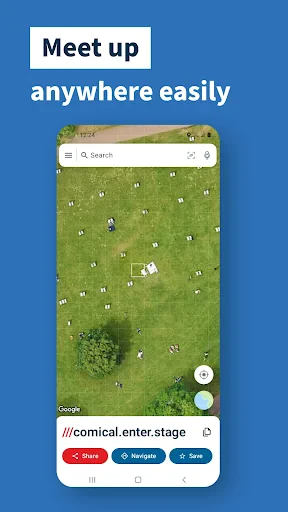
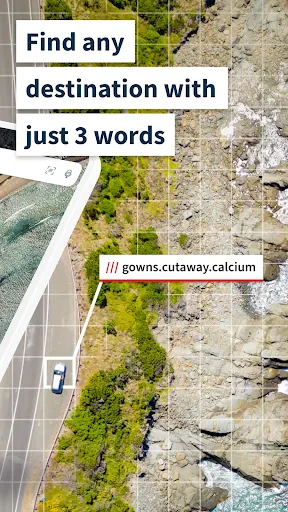
If you’ve ever found yourself lost in the middle of nowhere, desperately trying to pinpoint your exact location, what3words: Navigation & Maps could be your new best friend. This ingenious app is here to save the day by dividing the world into a grid of 3m x 3m squares and assigning each one a unique combination of three words. Intrigued? Let’s delve into the world of what3words and see what it’s all about!

Unraveling the Magic of what3words

Imagine trying to find your friends at a sprawling music festival or direct an Uber driver to the precise spot you’re standing. With traditional addresses sometimes failing us, what3words comes to the rescue by providing a simple three-word address for every single spot on the planet. I mean, who knew technology could be this cool?

How It Works

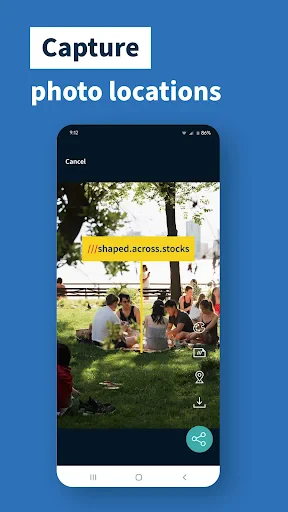
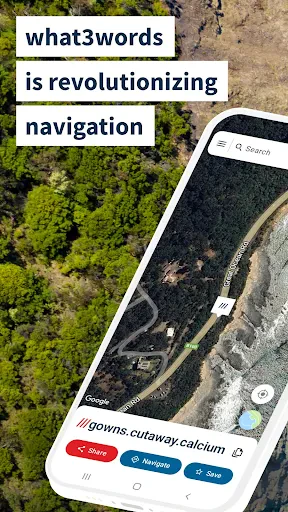
The app’s interface is refreshingly straightforward. You simply open the app, and it uses your phone’s GPS to pinpoint your location. Instantly, you’re given three words that uniquely describe your exact spot. Need to share your location? Just send those three words to anyone, anywhere. Easy peasy!

Practical Applications

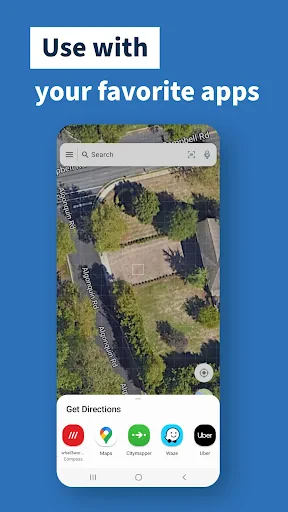
The potential uses for what3words are endless. Emergency services, delivery drivers, and even travelers can benefit immensely. No more fumbling around with coordinates or vague address descriptions. Whether you’re hiking in the wilderness or navigating the crowded streets of a bustling city, this app has got your back.

User Experience

Using what3words feels like having a secret superpower. The app is intuitive, with a clean design that doesn’t overwhelm. It’s available on both Android and iOS, making it accessible to pretty much everyone. Plus, it’s free! Who doesn’t love a free app that actually delivers on its promises?

Final Thoughts

In a world where precision is key, what3words: Navigation & Maps stands out as a revolutionary tool. It’s not just an app; it’s a solution to a problem we didn’t even realize we had. So, the next time you’re planning an adventure or simply trying to meet up with a friend, give what3words a shot. You might just find yourself wondering how you ever lived without it!
what3words: Navigation & Maps screenshot what3words: Navigation & Maps screenshot what3words: Navigation & Maps screenshot what3words: Navigation & Maps screenshot what3words: Navigation & Maps screenshot
what3words: Navigation & Maps icon
what3words: Navigation & Maps
Developer
what3words
Version
Varies With Device
Installs
10,000,000+
Android Version
7.1
Content Rating
Everyone
Price
Free
Pros
  • Unique addressing system simplifies navigation.
  • Perfect for outdoor enthusiasts and travelers.
  • Easy to share locations with others.
  • Improves accuracy in emergency situations.
  • No internet required after downloading maps.
Cons
  • Limited adoption in some regions.
  • May not replace traditional addresses easily.
  • Some user interface elements are clunky.
  • Battery consumption can be high on GPS.
  • Not fully integrated with all navigation apps.

Ratings

4.2

Similar Apps

Speedometer: GPS Speedometer

Speedometer: GPS Speedometer

4.6
Get
GPS Earth Maps Live Navigation

GPS Earth Maps Live Navigation

4.2
Get
Fake GPS Location-GPS JoyStick

Fake GPS Location-GPS JoyStick

4.1
Get
GPS Speedometer & Odometer

GPS Speedometer & Odometer

4.6
Get
Grab Driver: App for Partners

Grab Driver: App for Partners

4
Get
myStop® Mobile

myStop® Mobile

4.1
Get
BackCountry Navigator GPS PRO

BackCountry Navigator GPS PRO

3.4
Get
REVER - Motorcycle GPS & Rides

REVER - Motorcycle GPS & Rides

4.5
Get
Maps All in One, Speedometer

Maps All in One, Speedometer

4.2
Get
Offline Map Navigation

Offline Map Navigation

4.3
Get
Voice GPS & Driving Directions

Voice GPS & Driving Directions

4.3
Get
Live Satellite View GPS Map

Live Satellite View GPS Map

3.4
Get

Frequently Asked Questions

What is what3words and how does it work?

What3words is a navigation app that divides the world into a grid of 3m x 3m squares, each identified by a unique combination of three words. This allows users to pinpoint precise locations with an accuracy that traditional address systems may not provide, making it ideal for navigation in remote areas or places lacking clear street addresses.

How can what3words improve my navigation experience compared to traditional GPS apps?

Unlike traditional GPS systems that rely on numeric coordinates or street addresses, what3words uses a unique three-word combination for each location, offering greater precision and ease of use. This can be particularly beneficial in areas with complex or unfamiliar road systems, or places where street addresses are inconsistent or nonexistent.

Is what3words free to use and are there any in-app purchases?

What3words is free to download and use for basic navigation functions. However, there may be additional features or integrations with other services that require in-app purchases or subscriptions. Users should check the app store for the most current pricing and feature availability to ensure they choose the best options for their needs.

Can I use what3words offline, and how reliable is it in areas with poor connectivity?

What3words offers offline functionality, allowing users to access their three-word addresses even without an internet connection. This makes it a reliable option for navigating in remote areas or places with limited connectivity. However, users should ensure the app is updated and relevant maps are downloaded prior to going offline to ensure seamless navigation.

How does what3words ensure the privacy and security of user data?

What3words places a strong emphasis on user privacy and data security. The app does not require users to share personal information to generate or use a three-word address. Additionally, data transmitted through the app is encrypted to protect it from unauthorized access, ensuring a secure navigation experience for users.