Splitwise icon

Splitwise

Finance

Related searches

If you’ve ever been on a trip or a night out with friends, you know the hassle of splitting bills. Enter Splitwise, the app that promises to make shared expenses a breeze. I’ve been using it for a while now, and let me tell you, it’s like having a personal accountant in your pocket!

Getting Started with Splitwise

Setting up Splitwise is as easy as pie. Once you download the app, you just sign up with an email or your Facebook account. The interface is super intuitive, and within minutes, you’re ready to start adding expenses. You can create groups for different occasions - think weekend trips or even just a monthly dinner club. It’s a lifesaver for those who often find themselves in situations where splitting costs is necessary.

How It Works

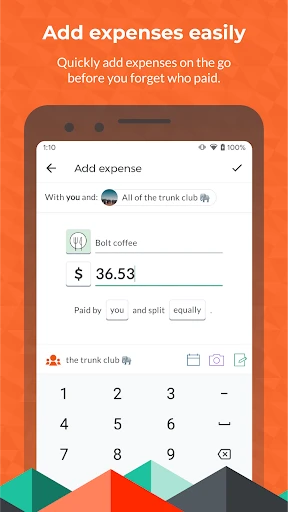
Imagine you’ve just had dinner with friends. Instead of the awkward “who owes what” conversation, you simply open the app, add the total bill amount, and select who paid. The app does all the math for you, dividing the total amongst your group. What’s really cool is that it supports multiple currencies, perfect for international trips. And the best part? You can send reminders to your friends if they ‘forget’ to settle up.

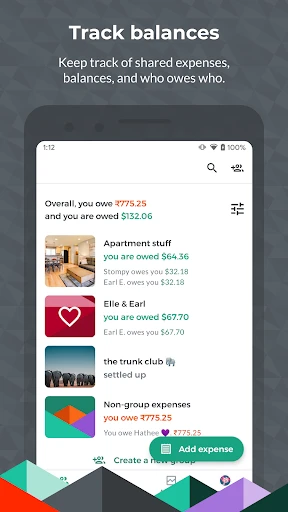
Splitwise also lets you categorize expenses, which is super handy. Whether it’s groceries, rent, or utilities, you can keep track of exactly where your money is going. It also provides a neat balance sheet for each group, so you can see who owes what at a glance. Trust me, it’s a game-changer for group finances.

Keeping It Fair

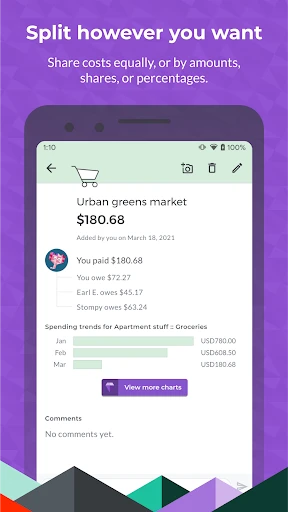
One of the features I love is the ability to split bills unequally. Let’s say someone ordered an extra dish or drinks, you can adjust the amounts accordingly. This ensures that everyone pays their fair share, and no one feels shortchanged. Plus, with the option to attach photos of receipts, you can always double-check the details of any transaction.

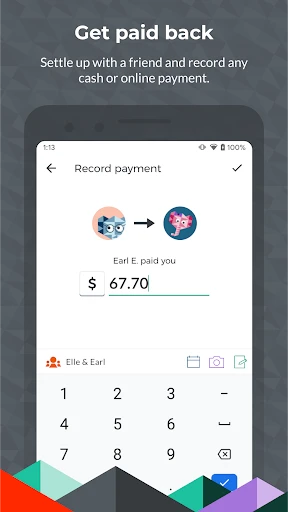
Another nifty feature is the integration with PayPal and Venmo, which allows you to settle up directly through the app. No more excuses for not paying up, right?

Final Thoughts

Overall, Splitwise is a must-have app for anyone who frequently shares expenses. It’s user-friendly, packed with features, and genuinely makes life easier. No more tedious calculations or awkward money conversations. Just pure, simple bill splitting. Whether you’re traveling with friends or just managing household expenses, this app is a definite game-changer. So, if you haven’t already, give Splitwise a spin. You won’t regret it!
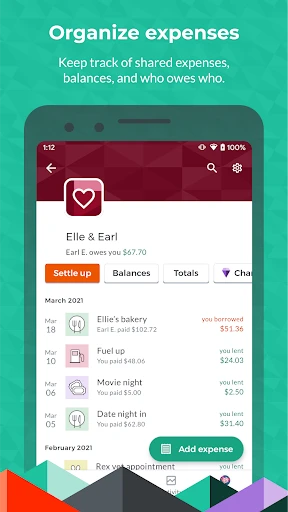
Splitwise screenshot Splitwise screenshot Splitwise screenshot Splitwise screenshot Splitwise screenshot
Developer
Splitwise
Version
Varies With Device
Installs
10,000,000+
Android Version
Varies With Device
Content Rating
Everyone
Price
Free
Pros
  • Simplifies expense splitting.
  • User-friendly interface.
  • Supports multiple currencies.
  • Easily track shared expenses.
  • Syncs data across devices.
Cons
  • Requires internet for syncing.
  • Limited features in free version.
  • Ads in free version.
  • Occasional syncing issues.
  • No receipt scanning in app.

Ratings

4.2

Similar Apps

Access Corrections

Access Corrections

3.6
Get
Freecash: Earn Money & Rewards

Freecash: Earn Money & Rewards

4.2
Get
Drive Safe & Save®

Drive Safe & Save®

4.1
Get
myFICO: FICO Credit Check

myFICO: FICO Credit Check

4.4
Get
CoinMarketCap: Crypto Tracker

CoinMarketCap: Crypto Tracker

4.7
Get
Walmart MoneyCard

Walmart MoneyCard

4.1
Get
FloatMe: Budget & Cash Advance

FloatMe: Budget & Cash Advance

4.6
Get
Bitcoin Price for Wear OS

Bitcoin Price for Wear OS

0
Get
LifeLock Identity by Norton

LifeLock Identity by Norton

4.6
Get
Uphold: Buy BTC, ETH and 300+

Uphold: Buy BTC, ETH and 300+

4.5
Get

Frequently Asked Questions

What is Splitwise and how does it work?

Splitwise is a handy app designed to simplify the process of splitting expenses with friends, family, or roommates. It works by allowing users to create groups or events within the app where they can add expenses. Each member of the group can see the expenses and who owes whom. The app calculates the total amount owed by each participant, making it easy to settle bills or IOUs without any hassle. It's particularly useful for trips, household expenses, or any shared financial responsibilities.

Is Splitwise free to use, or are there any premium features?

Splitwise is free to download and use, with core features available at no cost. However, it also offers a premium subscription called "Splitwise Pro," which includes additional features like currency conversion, expense search, and receipt itemization. The Pro version enhances the app's functionality for users who need more advanced features, especially useful for international travelers or those managing complex expenses.

How secure is my financial information on Splitwise?

Splitwise takes user security seriously by implementing standard encryption protocols to protect your data. The app does not store sensitive financial information like bank details or credit card numbers. Instead, it focuses on tracking shared expenses and balances. Users are encouraged to use strong, unique passwords to further secure their accounts. Overall, Splitwise provides a safe environment for managing shared expenses.

Can I use Splitwise offline, and will it sync later?

Splitwise requires an internet connection to sync data across devices and with other group members. However, you can still add expenses offline, and they will be updated once you reconnect to the internet. This feature ensures that you can keep track of expenses even without immediate internet access, and your data will sync seamlessly when you're back online.

Is Splitwise available on all devices?

Yes, Splitwise is available on both Android and iOS platforms, allowing users to download the app from the Google Play Store or Apple App Store. Additionally, Splitwise offers a web version, enabling users to access their accounts and manage expenses from any internet-connected device. This cross-platform availability ensures that you can manage your shared expenses conveniently, no matter what device you are using.