RadarScope
Discovering RadarScope: An App for Weather Enthusiasts
Hey there, weather geeks and storm chasers! 🌪️ If you're anything like me and love keeping tabs on the sky's every move, you might have stumbled upon an app called RadarScope. Now, you might be wondering, "Is this just another weather app?" Well, let me tell you, RadarScope is not your run-of-the-mill weather application. Buckle up as I take you on a little tour of this nifty tool that’s got me hooked!
A Deep Dive into RadarScope’s Features
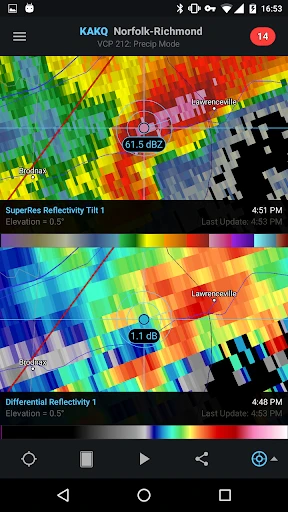
First things first, RadarScope is all about providing professional-level radar data right to your device. What sets it apart is its ability to display native radar data rendered in its original radial format. This means you’re getting the same data that meteorologists use, and trust me, it’s as accurate as it gets!
One of the coolest things about RadarScope is its super-resolution radar. You can zoom in on any storm and get a detailed view, which is perfect for tracking tornadoes, hail, and even wind velocity. It’s like having a mini Doppler radar in your pocket! 🌧️ And for all you data nerds, there’s plenty of customization available, from different radar products to various color tables.
Getting the Most Out of RadarScope
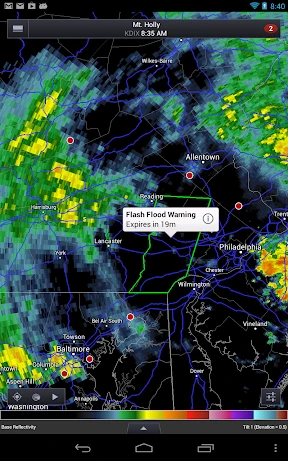
Now, diving into the usability side of things. Honestly, the user interface is pretty intuitive. It might seem a bit overwhelming at first, especially if you’re not used to dealing with raw weather data, but give it a little time, and you’ll be navigating through storms like a pro. The app offers radar data from various locations across the U.S., Canada, and even some parts of Europe and Australia. 🌍
One feature I personally appreciate is the lightning data overlay. It’s perfect for those stormy nights when you’re cozy at home and curious about the lightning strikes nearby. The app also supports dual-pane mode, which is a lifesaver when you want to compare different radar products side by side.
Is RadarScope Worth It?
Let’s talk about the elephant in the room – the price. RadarScope isn’t free, and for some, that might be a dealbreaker. However, if you’re serious about weather tracking, the cost is justified by the wealth of data and features you’re getting. Plus, there are additional subscription tiers if you’re looking for even more advanced data. 📈
One thing to note is that RadarScope doesn’t include a traditional weather forecast. It’s all about raw radar data, so if you’re looking for daily weather updates, you might want to pair it with a standard weather app.
My Final Thoughts
So, what’s the verdict? If you’re a weather enthusiast or someone who needs reliable radar data for work or hobby, RadarScope is a fantastic choice. It’s powerful, reliable, and surprisingly easy to use once you get the hang of it. Whether you're tracking a hurricane or planning a picnic, RadarScope has got you covered with real-time updates and detailed radar images.
Would I recommend it? Absolutely, especially if you’re passionate about weather phenomena. Just remember, it might take a little getting used to, but once you do, you’ll wonder how you ever lived without it. Happy storm chasing! 🌦️


- Developer
- DTN LLC
- Version
- Varies With Device
- Installs
- 100,000+
- Android Version
- 10
- Content Rating
- Everyone
- Price
- $9.99
- Highly detailed weather radar data.
- Includes real-time severe weather alerts.
- Radar animations for tracking storms.
- Customizable radar display options.
- Professional-level tool for meteorologists.
- Steep learning curve for beginners.
- Requires subscription for advanced features.
- High data usage impacts device performance.
- Limited offline functionality.
- Interface can be overwhelming initially.