VITA - Video Editor & Maker
If you've ever found yourself in the creative whirlwind of video editing on your phone, then you've probably stumbled upon a plethora of options. But let me tell you, VITA - Video Editor & Maker is one app that caught my eye and kept me coming back for more. It's like having a mini production studio right in your pocket, and I'm here to spill the beans about it.
A Sleek and User-Friendly Interface
First things first, the interface of VITA - Video Editor & Maker is just as sleek as it is intuitive. You know how some apps just make you feel lost from the get-go? Well, not this one. It welcomes you with a clean layout and everything seems to be right where you'd expect it to be. No more endless tapping just to find a simple feature. I love how it makes editing feel less like a chore and more like a fun, creative process.
Features Galore!
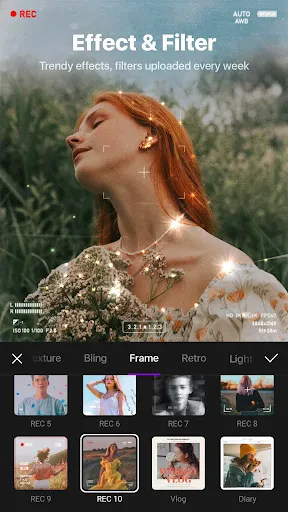
Now, let’s dive into the features. With a plethora of editing tools, VITA lets you trim, cut, and split your videos with ease. The app also offers a wide array of filters and effects that can transform your clips into cinematic pieces. And if you're anything like me, you'll appreciate the extensive library of music that you can add to your videos. It’s like having a personal DJ mix tracks just for your project!
One feature that really stands out is the speed adjustment tool. Whether you want to create a dramatic slow-motion scene or speed up the action, VITA has got you covered. Plus, the app supports high-resolution exports, which means your videos will look crisp and professional, even on larger screens.
Templates to Jumpstart Your Creativity
Sometimes, starting from scratch can be daunting. Luckily, VITA offers a variety of templates to help kickstart your creativity. Whether you're crafting a birthday montage or a travel vlog, there's a template to suit your style. Just pick one, add your clips, and watch the magic happen!
And hey, for those of us who love to stay on trend, VITA keeps updating its template library with the latest styles and effects. So, your content is always fresh and ready to impress.
Sharing Made Easy
Once your masterpiece is complete, sharing it with the world is a breeze. VITA allows you to export your videos directly to social media platforms like Instagram, TikTok, and YouTube. Plus, with customizable export settings, you can ensure that your video meets the specific requirements of each platform. No more worrying about aspect ratios or file sizes!
In conclusion, VITA - Video Editor & Maker is a gem for anyone looking to elevate their video editing game on mobile. It's not just an app; it's a creative companion that makes the whole editing process enjoyable and rewarding. So, if you're ready to unleash your creativity, give VITA a spin. Trust me, you won't be disappointed!



- Developer
- SNOW Corporation
- Version
- 302.0.13
- Installs
- 100,000,000+
- Android Version
- 8.0
- Content Rating
- Everyone
- Price
- Free
- Intuitive user interface.
- Wide range of filters and effects.
- High-quality video export options.
- Supports 4K video editing.
- No watermark on free version.
- Limited music library.
- Occasional app crashes.
- In-app purchases for premium features.
- Large file size.
- Requires high device performance.