
Pixel Studio PRO: editor
Ever wanted to unleash your inner artist but felt constrained by the limited tools on your mobile device? Well, say hello to Pixel Studio PRO, the ultimate app for pixel art enthusiasts. Whether you’re a budding artist or a seasoned designer, this app has something to offer everyone looking to delve into the world of pixel art.
First Impressions
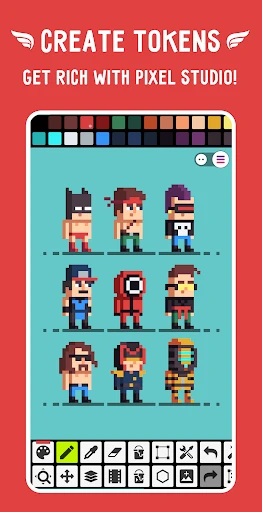
Upon launching Pixel Studio PRO, the first thing that struck me was its sleek and user-friendly interface. The developers have clearly put a lot of thought into making this app accessible without sacrificing functionality. The layout is intuitive, making it easy even for beginners to dive in without feeling overwhelmed. It's like having a digital canvas in your pocket!
Features Galore
One of the standout aspects of Pixel Studio PRO is its plethora of features that cater to both novices and experts alike. Let’s dive into some of the key highlights:
Layers: Just like in professional desktop software, you can work with layers to create complex artwork. This feature is a game-changer for mobile pixel art creation.
Onion Skinning: This tool is a lifesaver for animators, allowing you to see multiple frames at once to ensure smooth transitions.
Customizable Brushes: Whether you prefer a classic pixel brush or want to experiment with shapes and patterns, the customizable brushes have got you covered.
Export Options: Sharing your masterpieces is a breeze with various export options, including animated GIFs and high-resolution images.
Performance
In terms of performance, Pixel Studio PRO runs smoothly on both Android and iOS devices. I didn’t experience any lag or crashes, even when working on more detailed projects. The app seems well-optimized, which is crucial for maintaining the flow of creativity without interruptions.
Community and Support
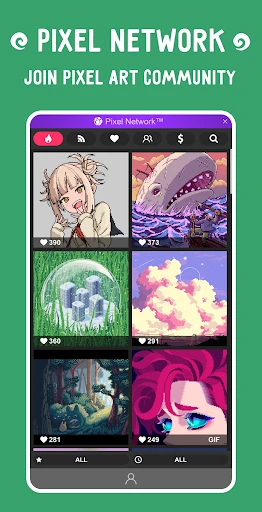
One of the perks of using Pixel Studio PRO is the vibrant community of artists that you can connect with. The app makes it easy to share your work and get feedback, which is incredibly motivating. Plus, there’s a handy support section within the app, so if you ever run into any trouble, help is just a tap away.
Final Thoughts
Overall, Pixel Studio PRO is a must-have app for anyone interested in pixel art, whether you’re just starting out or looking to take your creations to the next level. Its robust features, combined with a user-friendly interface, make it an exceptional tool for unleashing your creativity. So, if you haven’t yet, go ahead and give Pixel Studio PRO a try – your artistic side will thank you!



- Developer
- Hippo Games AM
- Version
- 5.02
- Installs
- 5,000+
- Android Version
- 5.1
- Content Rating
- Everyone
- Price
- $5.99
- User-friendly interface for easy navigation.
- Wide range of editing tools and features.
- Supports multiple file formats.
- Fast processing and rendering capabilities.
- Regular updates with new features.
- Limited cloud storage for projects.
- Occasional bugs with large files.
- High resource usage on older devices.
- Premium version is relatively expensive.
- Requires internet for some features.