MMGuardian Parental Control icon

MMGuardian Parental Control

Parenting

Related searches

If you’ve ever found yourself worrying about what your kids are doing on their smartphones, then MMGuardian Parental Control might just be the app you need. As a parent, I totally get the anxiety that comes with giving kids access to the digital world. MMGuardian aims to set your mind at ease by providing a robust set of tools to monitor and manage your child’s phone usage.

Getting Started with MMGuardian

First things first, let’s talk setup. Installing MMGuardian is pretty straightforward, whether you’re on Android or iOS. You’ll need to install it both on your kid’s device and yours. Once you’ve got everything up and running, the app’s dashboard is your main hub for controlling settings and monitoring activity. It’s not exactly the sleekest interface out there, but it gets the job done.

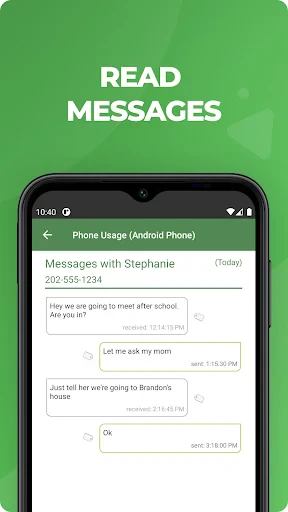
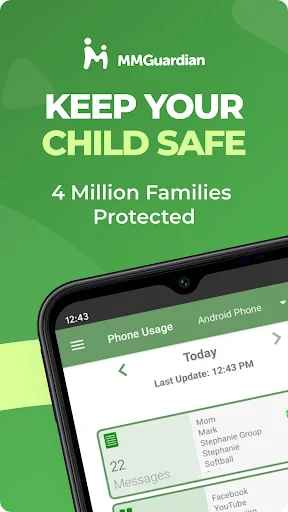
One thing I appreciated right off the bat is how comprehensive it is. We're talking about call and text monitoring, screen time management, app control, and even location tracking. It’s like having a Swiss Army knife of parental controls, right in your pocket.

Features That Stand Out

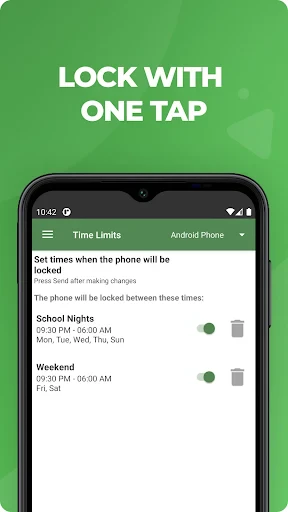
Let’s dive into some of the features that really make MMGuardian shine. The app control feature is a lifesaver. You can block specific apps or set time limits, which is perfect if you’re trying to curb a budding TikTok addiction or just want to make sure homework gets done before gaming starts.

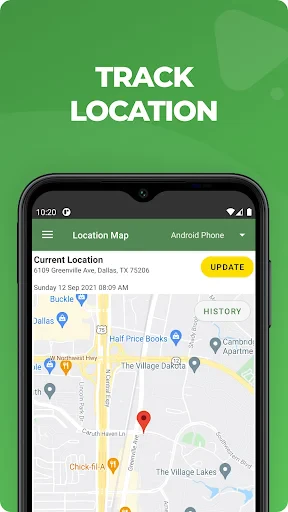
Then there’s the web filter. This feature lets you block inappropriate content effortlessly. It’s customizable, so you can tailor it to be as strict or as lenient as you want. And for those moments when you need to know where your kid is, the location tracking feature has your back. It’s accurate enough for peace of mind without being a creepy Orwellian nightmare.

Usability and Performance

Now, MMGuardian isn’t without its quirks. Sometimes the app can be a bit sluggish, especially on older devices. There were a few times when the location tracking took a little longer to update than I’d like. But overall, it’s pretty reliable.

One thing to keep in mind is that the app’s extensive features might be a tad overwhelming if you’re not exactly tech-savvy. But don’t worry, there are plenty of guides and FAQs available to help you navigate through the setup.

Also, keep an eye on battery usage. With all the monitoring and tracking, it can be a bit of a drain. It’s something to consider, especially if your kid’s phone is already struggling to make it through the day on a single charge.

The Verdict

All in all, MMGuardian Parental Control is a solid choice if you’re serious about keeping tabs on your kid’s digital life. It offers a lot of flexibility and control, which is exactly what you want from a parental control app. While it might not win any design awards, it more than makes up for it with functionality.

So, if you’re on the fence, give it a shot. It might just be the peace of mind you’ve been looking for, wrapped up in a handy little app. And hey, anything that helps you sleep a little easier at night is worth a try in my book!
MMGuardian Parental Control screenshot MMGuardian Parental Control screenshot MMGuardian Parental Control screenshot MMGuardian Parental Control screenshot MMGuardian Parental Control screenshot
MMGuardian Parental Control icon
MMGuardian Parental Control
Developer
MMGuardian.com
Version
3.7.25
Installs
1,000,000+
Android Version
6.0
Content Rating
Everyone
Price
Free
Pros
  • Comprehensive monitoring features.
  • User-friendly interface.
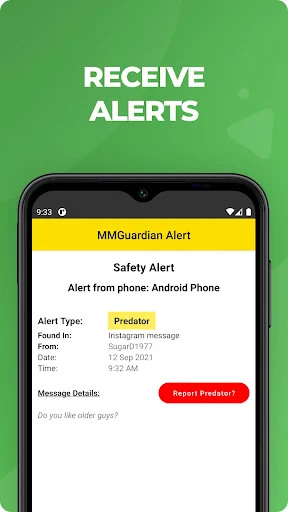
  • Real-time alerts and notifications.
  • Supports multiple devices.
  • Strong web filtering capabilities.
Cons
  • Limited free version features.
  • Occasional app crashes.
  • Complex setup for non-tech users.
  • Premium version is pricey.
  • Battery consumption is high.

Ratings

4.2

Similar Apps

Baby Name Together

Baby Name Together

4.3
Get
BabySleep: Whitenoise lullaby

BabySleep: Whitenoise lullaby

4.5
Get
Pregnancy App & Baby Tracker

Pregnancy App & Baby Tracker

4.9
Get
Smart Sleep Coach by Pampers™

Smart Sleep Coach by Pampers™

3.6
Get
Kids360: Parental Control App

Kids360: Parental Control App

4.5
Get
Good Inside: Parenting

Good Inside: Parenting

4.9
Get
HiMommy: Ovulation & Pregnancy

HiMommy: Ovulation & Pregnancy

4.6
Get
Pregnancy Tracker: amma

Pregnancy Tracker: amma

4.6
Get
گهواره تربیت کودک و بارداری

گهواره تربیت کودک و بارداری

4.3
Get
Pregnancy Tracker App | Glow

Pregnancy Tracker App | Glow

4.4
Get
Canopy - Parental Control App

Canopy - Parental Control App

3.7
Get
GPS Location Tracker Phone App

GPS Location Tracker Phone App

4.4
Get

Frequently Asked Questions

What is MMGuardian Parental Control and how does it work?

MMGuardian Parental Control is a mobile app designed to help parents monitor and manage their children's smartphone usage. It offers features like app blocking, web filtering, and location tracking. Parents can set up usage limits, view detailed reports, and receive alerts about potentially harmful activities. The app works by installing a monitoring application on the child’s device, which communicates with the parent’s device where controls and settings are managed.

Is MMGuardian Parental Control compatible with both Android and iOS devices?

Yes, MMGuardian Parental Control is compatible with both Android and iOS devices. However, the features available can vary slightly between the two platforms due to different operating system restrictions. For instance, some advanced monitoring features may be more limited on iOS devices compared to Android. It's crucial to check the specific capabilities for your device on the MMGuardian website before downloading.

How secure is the data collected by MMGuardian Parental Control?

MMGuardian places a strong emphasis on data security and privacy. All data collected by the app is encrypted and stored securely. The company follows strict privacy policies and compliance with relevant data protection regulations to ensure that users’ information is protected. Parents can rest assured that their family's data is handled with the utmost care and confidentiality.

Can children uninstall the MMGuardian app without parental consent?

MMGuardian Parental Control is designed to prevent unauthorized uninstallation by children. On Android, the app can be set as a device administrator, which restricts the ability to uninstall it without a parent’s permission. On iOS, while direct uninstallation is more challenging to prevent, parents are notified immediately if the app is removed. It's always recommended to have an open discussion with children about the app's purpose to ensure compliance.

What are the subscription costs associated with MMGuardian Parental Control?

MMGuardian Parental Control offers a range of subscription plans tailored to different needs and budgets. Pricing may vary based on the number of devices you wish to monitor and the plan duration. Typically, there are monthly, yearly, and family plans available. Potential users should check the official MMGuardian website for the most current pricing and plan details to choose the option that best suits their family’s needs.