BabyTime (Tracking & Analysis)
Ever wondered how to keep track of all those tiny details about your baby’s day-to-day activities? Well, I stumbled upon the BabyTime (Tracking & Analysis) app, and let me tell you, it’s like having a personal assistant dedicated to your baby’s schedule. This app is a lifesaver for all the new parents out there!
Getting Started with BabyTime
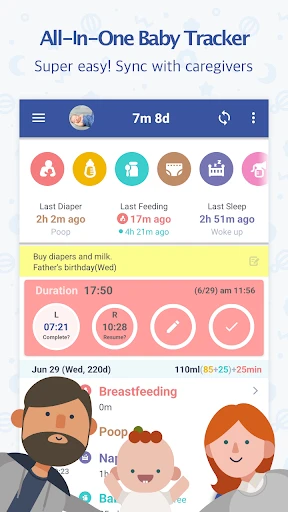
First off, downloading and setting up the BabyTime (Tracking & Analysis) app is a breeze. It’s available on both Android and iOS, which is fantastic because you can sync it across different devices. Once you’ve got it installed, the app greets you with a clean and intuitive interface. You won’t find yourself lost in a maze of options, which is a win in my book!
Tracking Made Simple
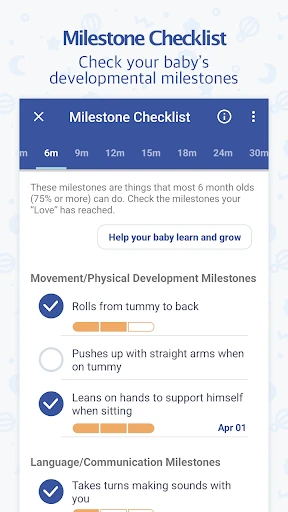
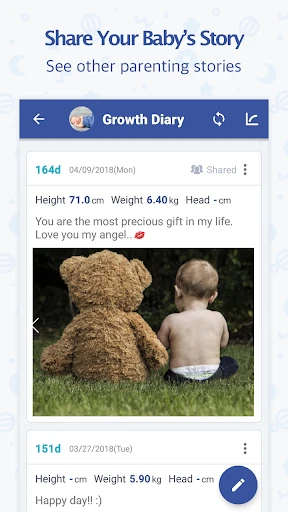
The main charm of BabyTime lies in its ability to track an array of activities, from feeding and diaper changes to sleep patterns and growth milestones. Just imagine, you can log every feeding session and even jot down notes if you’re trying out a new formula or introducing solid foods. It’s like having a digital diary that helps you remember everything.
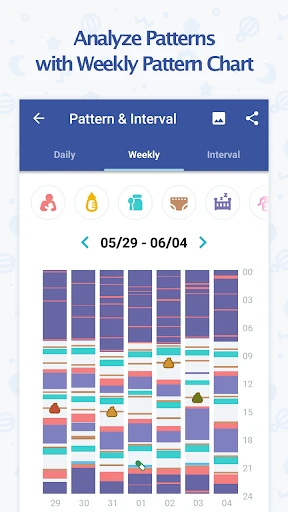
One of the coolest features is the sleep tracker. You can monitor how long your baby sleeps, and the app will give you insights into their sleep patterns over time. This is super helpful if you’re trying to establish a bedtime routine or if you’re just curious about whether your baby is getting enough rest.
Analyzing the Data
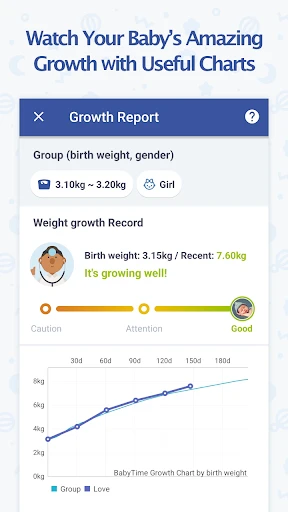
What sets BabyTime apart is its analysis capabilities. It doesn’t just collect data; it helps you make sense of it. The app provides detailed graphs and statistics that you can share with your pediatrician. This is a huge plus because sometimes, doctors need more than just a verbal report, and BabyTime delivers that extra layer of detail.
I also love how you can set reminders for medication or even for the next vaccination schedule. It’s a small feature, but it gives peace of mind, knowing you won’t miss any important dates.
Personal Reflection
Using BabyTime has genuinely made my life easier. It’s a relief to have all these details at my fingertips, especially during those late-night feedings when my brain feels like mush. The app is user-friendly, and its design is quite pleasing, which is always a bonus.
If you’re a parent looking for a way to keep track of your baby’s activities, I’d highly recommend giving BabyTime a try. It’s comprehensive without being overwhelming, and it’s one of those apps that once you start using, you’ll wonder how you ever managed without it.
In conclusion, BabyTime is not just an app; it’s a handy tool that supports you through the beautiful chaos of parenting. So, go ahead and check it out – your future self will thank you!
- Developer
- Simfler
- Version
- Varies With Device
- Installs
- 1,000,000+
- Android Version
- Varies With Device
- Content Rating
- Everyone
- Price
- Free
- User-friendly interface for easy navigation.
- Tracks multiple aspects of baby care.
- Secure data backup for peace of mind.
- Customizable notifications for reminders.
- Detailed growth analytics available.
- Requires regular manual data entry.
- Limited free features; premium needed.
- Occasional sync issues reported.
- Interface lacks visual appeal.
- Requires internet for full functionality.