Dual Camera Sides
Hey there, photography enthusiasts! If you're anything like me, you're always on the lookout for the next cool app to take your photography game to the next level. I recently stumbled upon an app called Dual Camera Sides, and I have to say, it’s quite the nifty tool for anyone who loves capturing moments from all angles. Let me take you through my experience with this app.
What is Dual Camera Sides All About?
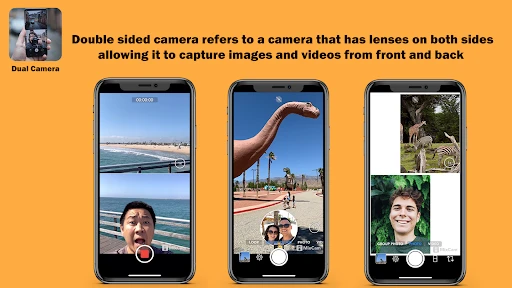
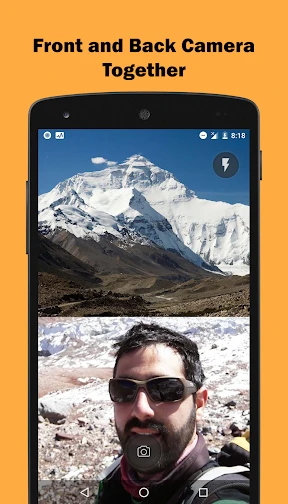
So, picture this: you've got a stunning view in front of you and an equally memorable scene behind you. Now, with Dual Camera Sides, you don't have to choose between them. This app allows you to use both the front and back cameras simultaneously! It’s like having your cake and eating it too. Whether you're vlogging, documenting a trip, or just capturing a day out with friends, this app gives a new perspective to your photography.
Getting Started
First things first, getting started with Dual Camera Sides is a breeze. The user interface is clean and intuitive. Even if you're not a tech wizard, you'll find it super easy to navigate. After downloading the app, you just need to grant some basic permissions, and you're good to go. The main screen displays both camera views, and you can easily swap between different layouts to suit your style.
Features That Stand Out
One of the standout features of Dual Camera Sides is its versatility. You can choose from various split-screen modes, allowing you to adjust how much of each camera's view you want to capture. Whether you prefer a 50/50 split or want to emphasize one view over the other, the choice is yours.
Moreover, the app offers some basic editing tools. It’s not Photoshop, but you can apply filters, adjust brightness, and tweak contrast right within the app. This means you can polish your photos before sharing them on social media. Oh, and did I mention the app supports video too? Yup, you can record videos with both cameras simultaneously – perfect for vloggers and content creators!
Performance and Usability
In terms of performance, I found Dual Camera Sides to be pretty smooth. There's minimal lag when switching between camera modes, and the app doesn’t drain your battery like some other camera apps out there. It's optimized to run efficiently, which is always a plus in my book. I tested it on both Android and iOS devices, and it performed admirably on both platforms.
However, a small caveat: the app's performance might vary slightly depending on your device's hardware capabilities. If you're using an older phone, you might experience a bit of lag, especially with video recording. But for most modern devices, it should run like a charm.
Final Thoughts
So, is Dual Camera Sides worth the download? Absolutely, especially if you're someone who loves capturing the full story. It's a fun, creative tool that opens up new possibilities for photography and videography. Plus, it's free to download, so why not give it a try?
In a world where social media is all about sharing experiences, Dual Camera Sides offers a fresh way to do just that. So go ahead, download it, and start capturing those dual-perspective moments. Trust me, once you try it, you’ll wonder how you ever lived without it!

- Developer
- kahlochSto
- Version
- 7.0
- Installs
- 100,000+
- Android Version
- 7.0
- Content Rating
- Everyone
- Price
- Free
- Simultaneous front and back camera use
- Easy-to-navigate interface
- High-quality video output
- Real-time video switching
- Compatible with most smartphones
- Consumes a lot of battery power
- Limited editing features
- May lag on older devices
- Requires good lighting conditions
- Large file sizes