Allstate Mobile
Getting to Know Allstate Mobile
Let me tell you about this nifty little app called Allstate Mobile. I’ve been playing around with it for a while, and boy, does it pack a punch for anyone juggling insurance and roadside assistance on the go. If you’re someone like me who dreads the thought of dealing with insurance paperwork, this app might just be your new best friend. It’s available for both Android and iOS, so no worries about compatibility!
First Impressions
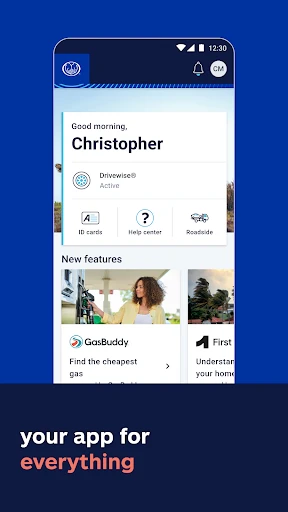
Okay, so first things first, downloading and setting up the Allstate Mobile app is a breeze. Seriously, just a few taps and you’re in. The interface is clean, intuitive, and doesn’t overwhelm you with too much information at once. I appreciate that because, let’s be honest, nobody wants to feel like they need a tech degree just to navigate an app, right?
Features That Stand Out
One of the coolest features is the Digital Locker. It’s like having a virtual safe box where you can store all your insurance documents. You can even add photos of your valuables, making it super easy to keep track of everything. And for someone like me who’s always misplacing things, this is a total lifesaver.
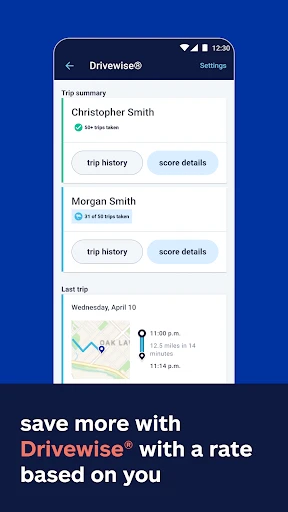
Another highlight is the Drivewise feature. This nifty tool tracks your driving habits and rewards you for safe driving. Who doesn’t love getting rewarded just for being a cautious driver? Plus, it gives you real-time feedback, which is pretty neat if you ask me.
Helping You on the Road
Ever been stuck on the side of the road with no idea what to do? Yup, been there. Well, with Allstate Mobile, the Roadside Assistance is just a tap away. Whether you’ve got a flat tire or need a jump-start, help is literally at your fingertips. I actually had a chance to use this feature recently, and the service was prompt and efficient. It’s reassuring to know that help is never far away.
Payment Made Easy
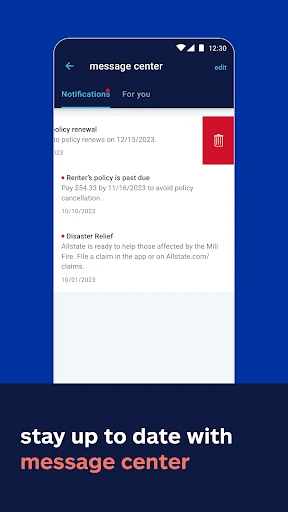
Nobody likes dealing with bills, but Allstate Mobile makes it a tad more bearable. You can manage your policy, pay bills, and even file claims directly through the app. The payment process is seamless, and I love that it sends you reminders so you don’t miss a due date. It’s like having a personal assistant making sure you’re always on top of things.
Wrapping It Up
So, is the Allstate Mobile app worth a download? In my opinion, absolutely! It’s packed with features that make managing your insurance a whole lot simpler and less stressful. Plus, with the added perks like Drivewise and Roadside Assistance, it truly stands out in a sea of other insurance apps. If you’re looking for convenience and efficiency wrapped up in one neat little package, give Allstate Mobile a try. You might just find it makes your life a whole lot easier, just like it did for me!


- Developer
- The Allstate Corporation
- Version
- 19.8.1
- Installs
- 5,000,000+
- Android Version
- 10
- Content Rating
- Everyone
- Price
- Free
- User-friendly interface for easy navigation.
- Real-time claim tracking available.
- Integration with Allstate Drivewise.
- Quick access to digital insurance ID cards.
- Customizable notifications for policy updates.
- Occasional app crashes reported.
- Limited features for non-Allstate users.
- Some functions require strong internet.
- Login issues reported by users.
- Limited payment options within app.