John GBC
Step into Nostalgia with John GBC
Hey there, fellow retro gaming enthusiast! If you’ve ever felt a pang of nostalgia for those classic Game Boy Color games, I’ve got just the app for you. Let me introduce you to John GBC, a fantastic emulator that lets you dive back into your favorite childhood games right on your Android device. I’ve been playing around with it, and I’m here to spill the beans on why this app might just be your new best friend.
Getting Started: Simple Yet Effective
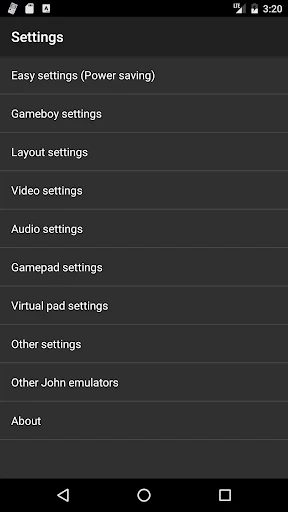
First things first, setting up John GBC is as easy as pie. After downloading the app from the Play Store, the installation process is straightforward. The interface is clean and user-friendly, which is a huge plus for those of us who aren’t exactly tech-savvy. You just load your ROMs, and voila! You’re ready to play. The app supports a wide range of Game Boy Color games, so chances are, your favorites are covered.
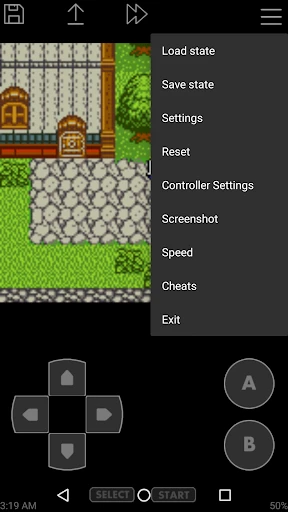
One thing I really appreciate is the simplicity of the controls. They’re customizable, meaning you can adjust them to suit your gaming style. And let’s be honest, there’s nothing more annoying than fiddling with awkward controls when you’re trying to relive epic battles in Pokémon or navigate through the tricky levels of Super Mario.
Performance: Smooth as Butter
Now, let’s talk about performance. John GBC runs incredibly smoothly, with no noticeable lags or glitches. The graphics remain true to the original Game Boy Color quality, which is exactly what I was hoping for. It’s like having a mini time machine in your pocket, taking you back to those lazy afternoons spent gaming.
Moreover, the sound quality is spot on. There’s nothing like hearing that familiar chime when you start up a game, am I right? John GBC replicates the original sound effects perfectly, enhancing the overall gaming experience. Plus, the app includes features like save states and cheats, which can be a lifesaver if you’re stuck on a particularly tough level.
Why It Stands Out
So, what makes John GBC stand out in a sea of emulators? For one, its reliability. I’ve tried a couple of other emulators before, and let me tell you, nothing grinds my gears more than constant crashes and bugs. With John GBC, I’ve had none of those issues. It’s stable, consistent, and gets the job done without any fuss.
Another standout feature is its compatibility with external controllers. If you’re like me and prefer using a physical controller over touchscreen buttons, you’ll love this feature. It adds a whole new level of comfort and control, making your gaming sessions even more enjoyable.
The Final Verdict
All in all, if you’re looking to relive the glory days of Game Boy Color gaming, John GBC is the way to go. It’s reliable, easy to use, and provides an authentic gaming experience. Whether you’re a seasoned gamer or just looking to revisit some childhood memories, this app is sure to hit the spot.
So, grab your favorite ROMs, fire up John GBC, and let the nostalgia trip begin. Trust me, you won’t regret it!


- Developer
- John emulators
- Version
- v4.11
- Installs
- 100,000+
- Android Version
- 6.0
- Content Rating
- Everyone
- Price
- $2.99
- Supports cheat codes for enhanced gameplay.
- Smooth performance with minimal lag.
- Customizable controls for user preference.
- Supports external controllers and keyboards.
- Saves and loads game states efficiently.
- Ads can be intrusive during gameplay.
- Limited game library compared to other emulators.
- Occasional crashes on older devices.
- Some games experience audio glitches.
- Initial setup can be confusing for new users.