
Timestamp Camera
Timestamp Camera is an intriguing app designed to make your photos and videos more organized and meaningful by adding date and time information directly onto them. It’s quite the tool, especially if you’re someone who loves documenting every moment with precision. Let’s dive into what this app has to offer and whether it’s worth giving a shot.
Features That Stand Out
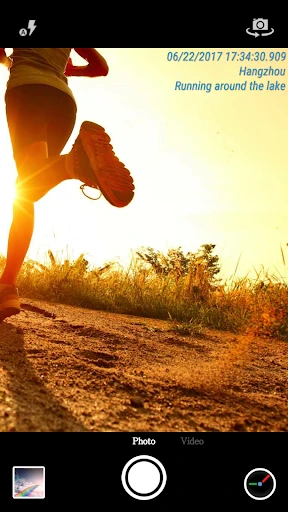
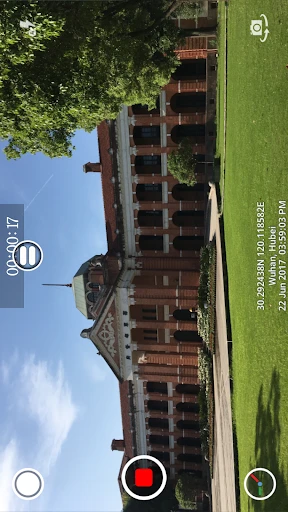
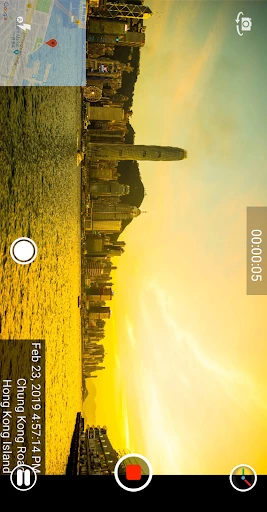
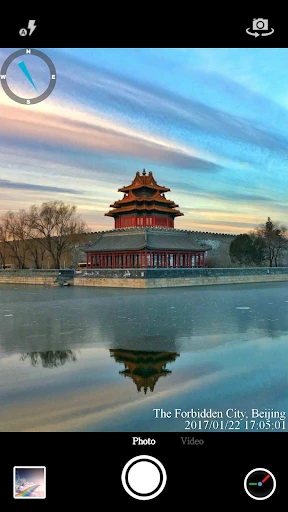
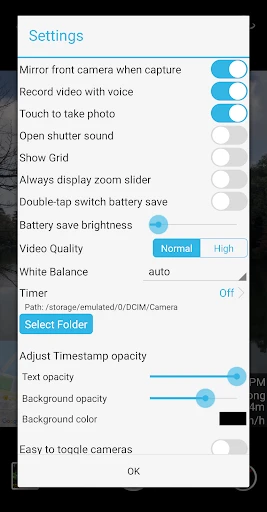
One of the first things you'll notice about Timestamp Camera is its straightforward interface. The app is designed to be user-friendly, making it easy for anyone to pick up and start using immediately. You can customize the timestamp format to include just the date, just the time, or both, which is handy depending on what you’re using it for. Plus, it supports over 20 timestamp formats, so you’ve got plenty of options to choose from!
Another cool feature is its real-time timestamp function. As you’re taking a photo or recording a video, the app automatically applies the timestamp. This is perfect for those spontaneous moments when you want to capture the exact time something happens.
Customization Galore
What really sets Timestamp Camera apart is its level of customization. You can adjust the position, font, color, and size of the timestamp so it doesn’t interfere with your photo or video’s aesthetic. Sometimes, apps can be pretty rigid in this area, but not this one. It’s like having your cake and eating it too!
Moreover, if you’re into live streaming, you’ll be thrilled to know that the app supports live timestamping as well. It’s compatible with social media platforms such as Facebook and Instagram, which means you can broadcast with the timestamp for all your followers to see. Pretty neat, right?
Performance in the Real World
Using Timestamp Camera is a breeze, even for tech novices. The app runs smoothly with minimal lag, which is crucial when you’re capturing important moments. I found that the timestamps were accurate and didn’t affect the quality of the photos or videos, which can be a concern with some similar apps out there.
A potential downside, however, could be the ads. While they’re not overwhelming, they do pop up occasionally, which might be a bit distracting. But hey, it’s a free app, so it’s something I’m willing to overlook.
Final Thoughts
If you’re someone who loves keeping track of when and where your photos and videos were taken, Timestamp Camera is definitely worth a download. Its customizable features and real-time timestamping make it a standout choice. Just remember to be patient with the ads, or consider the paid version to remove them altogether.
Overall, Timestamp Camera does what it promises and does it well. It’s a nifty little tool that adds a bit of flair and precision to your media collection. So go ahead, give it a try and see how it can add a new dimension to your photographic adventures!
- Developer
- Bian Di
- Version
- Varies With Device
- Installs
- 50,000,000+
- Android Version
- Varies With Device
- Content Rating
- Everyone
- Price
- Free
- High accuracy in timestamping
- Easy-to-use interface
- Supports multiple formats
- Customizable date & time formats
- Works offline smoothly
- Limited editing features
- Watermark on free version
- Ads in free version
- No cloud backup
- Battery consumption is high