

The Roku App (Official)
If you’re like me and love to binge-watch your favorite shows without any interruptions, then The Roku App (Official) might just be your new best friend. This handy app is essentially a universal remote for your Roku device, but it’s packed with so many more features that make streaming a breeze. Let’s dive into what makes this app a must-have for any Roku user.
Getting Started with The Roku App
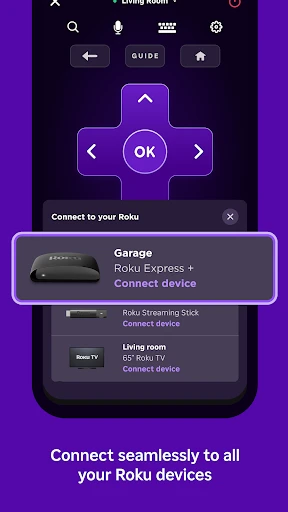
First things first, setting up The Roku App is a walk in the park. You’ll need to download it from either the App Store or Google Play, depending on your device. Once installed, the app seamlessly connects to your Roku device as long as you are on the same Wi-Fi network. No more fussing with lost remotes or dead batteries; your phone is now your gateway to endless entertainment.
Features That Stand Out
One of the standout features of The Roku App is the ability to use voice commands. Whether you want to search for a specific movie, launch a channel, or even pause your show, simply speaking into your phone’s microphone makes it happen. It’s like having your very own personal assistant at your beck and call.
Another cool feature is the private listening mode. Ever wanted to watch a late-night movie without disturbing your partner or roommate? Just plug in your headphones, and voila, the sound is streamed directly to your ears. This feature alone is worth downloading the app for, in my opinion.
Seamless Navigation and Control
The app’s interface is incredibly user-friendly. You can swipe, tap, and scroll through channels and shows with ease. It’s intuitive and mirrors the physical remote’s functions, ensuring there’s no learning curve involved. You also have the added bonus of a keyboard feature, making it a breeze to type in search queries or login credentials.
Additional Perks
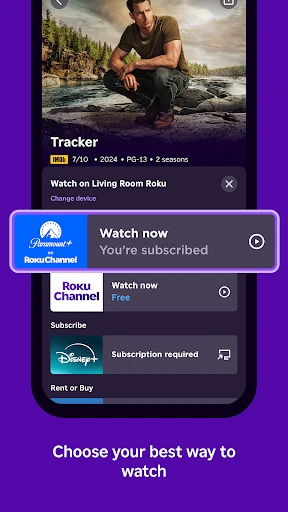
Aside from the basic remote functions, The Roku App allows you to stream content from your smartphone directly to your TV. This means your personal videos, photos, and even music playlists can be enjoyed on a bigger screen. Plus, with the app’s ability to add and remove channels from your Roku device, you have complete control over what you watch.
Not to mention, the app’s “What’s On” feature is a lifesaver when you’re unsure of what to watch. It offers a curated list of trending and recommended shows and movies, making decision time a bit less daunting.
Wrapping It Up
In conclusion, The Roku App (Official) is more than just a substitute for your remote. It’s a comprehensive tool that enhances your streaming experience with its array of features like voice search, private listening, and content casting. Whether you’re a tech-savvy individual or someone who just wants an easy way to manage their viewing options, this app is a solid choice. So go ahead, give it a try, and transform the way you enjoy your Roku device.



- Developer
- Roku, Inc. & its affiliates
- Version
- 12.5.2.5558560
- Installs
- 50,000,000+
- Android Version
- 8.0
- Content Rating
- Teen
- Price
- Free
- Seamless integration with Roku devices.
- User-friendly interface for easy navigation.
- Supports voice commands for quick searches.
- Allows private listening via headphones.
- Free to download and use without ads.
- Limited functionality without Roku device.
- Occasional connectivity issues reported.
- No offline viewing option available.
- Requires stable internet for optimal use.
- In-app purchases for premium features.


