Publix
Alright folks, gather around because today I'm diving into the Publix app, which is basically a digital extension of your neighborhood grocery store. If you're like me, you appreciate anything that can save you time and make life a bit easier, especially when it comes to shopping for groceries. So, let's see if this app can actually deliver on those promises or if it's just another icon taking up space on your device.
Getting Started with Publix
First things first, downloading and setting up the Publix app is a breeze. It's available for both Android and iOS, so no one's left out of the loop. Once you've got it installed, the registration process is pretty straightforward. You'll need to create an account, which involves the usual email and password setup. Nothing too complicated here.
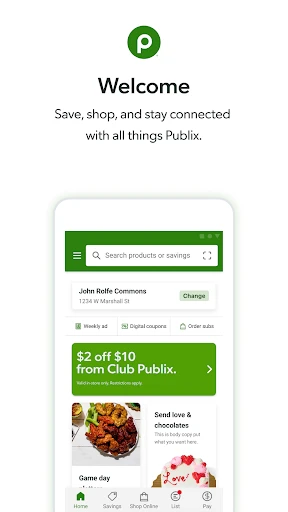
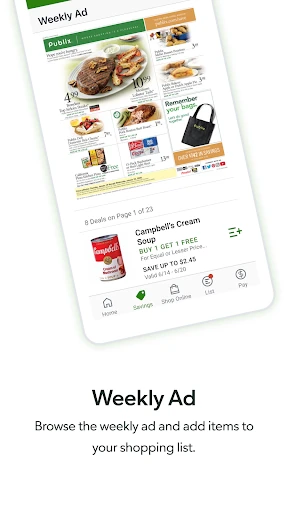
Once you're in, the app greets you with a clean and user-friendly interface. I have to say, it's pretty well-organized. The main screen gives you access to weekly ads, digital coupons, and your shopping list all in one place. It's like having your own personal grocery shopping assistant right at your fingertips.
Features That Stand Out
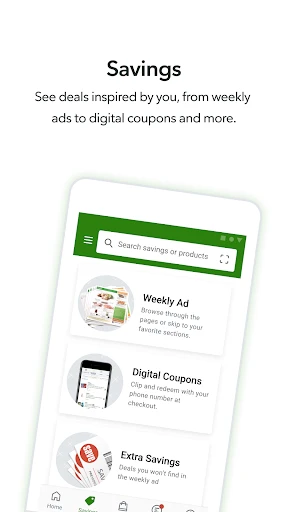
One of the standout features of the Publix app is its digital coupon system. I mean, who doesn't love a good deal, right? Instead of clipping coupons from the Sunday newspaper, you can browse and clip digital coupons right from the app. It's convenient, and you can save quite a bit if you keep an eye on the deals.
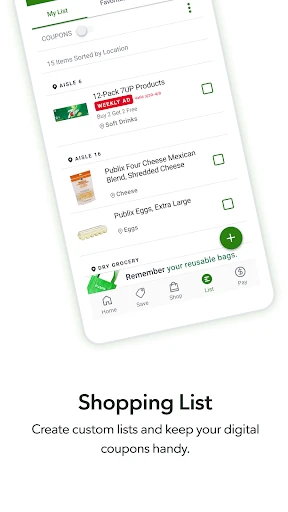
Another feature worth mentioning is the ability to create shopping lists. You can either manually add items or use the barcode scanner to quickly add products to your list. Plus, the app organizes your list according to the layout of your local Publix store, which is super handy when you’re doing your shopping run.
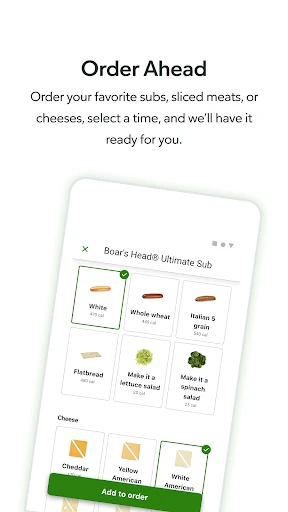
Oh, and did I mention the order-ahead option? If you're in a rush, you can order deli items in advance and simply swing by to pick them up. It’s a real time-saver, especially if you're grabbing lunch on the go.
Performance and Usability
In terms of performance, the Publix app runs smoothly for the most part. I didn’t experience any crashes or major glitches, which is always a plus in my book. However, I did notice that the app can occasionally lag when loading certain features, but it's nothing too bothersome.
As for usability, the app is pretty intuitive. Whether you're tech-savvy or not, you should have no trouble navigating through the various features. The icons and menus are clearly labeled, making it easy to find what you need without any hassle.
Final Thoughts: Is the Publix App Worth It?
So, after spending some time with the Publix app, I have to say I’m impressed. It's not just a glorified shopping list; it actually enhances the shopping experience with its useful features. The digital coupons alone are worth having the app, and the convenience of the order-ahead option is a huge bonus.
If you're a regular Publix shopper, this app is definitely worth checking out. It saves you time, helps you stay organized, and might even save you a few bucks along the way. So go ahead, give it a try, and make your grocery shopping a little less of a chore.
- Developer
- Publix Super Markets Inc.
- Version
- 4.72.0
- Installs
- 5,000,000+
- Android Version
- 7.0
- Content Rating
- Everyone
- Price
- Free
- User-friendly interface
- Wide range of products
- Easy online ordering
- Fast delivery options
- Loyalty rewards program
- Limited international shipping
- Occasional app crashes
- Some items out of stock
- No dark mode
- Limited payment options