SharkClean
First Impressions of SharkClean
Alright folks, let’s dive deep into the world of home cleaning with the SharkClean app. If you’re anything like me, the idea of a robot vacuum doing all the heavy lifting while I kick back with a cup of coffee is pure bliss! SharkClean is designed to be the companion app for your Shark robot vacuum, and let me tell you, it’s packed with some pretty neat features that make managing your cleaning schedule a breeze.
Setting Up: Easy Peasy
First things first, setting up the SharkClean app was a walk in the park. Available for both Android and iOS, the app is super user-friendly. After downloading, it took me just a few minutes to pair my robot vacuum with the app. The interface is intuitive, and the app guides you through each step of the process, so even if you’re not tech-savvy, you won’t feel lost.
Features That Stand Out
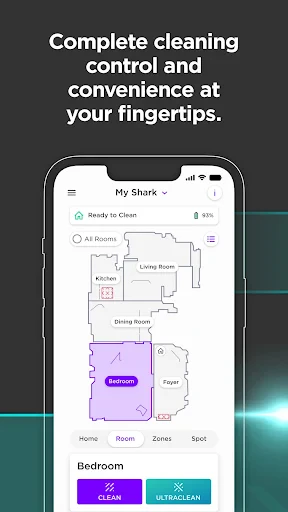
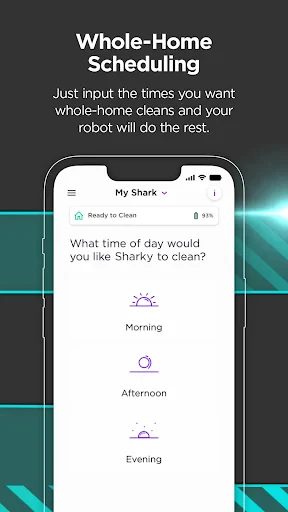
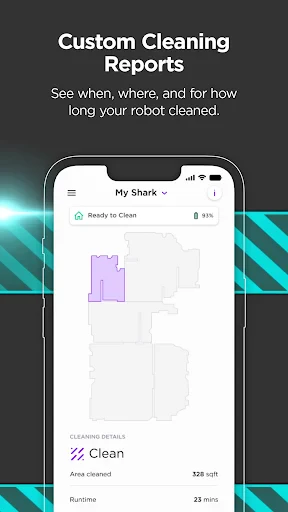
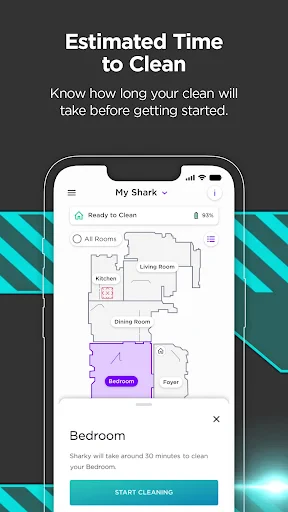
Once your vacuum is synced, the app opens up a world of possibilities. You can schedule cleanings, which is perfect for those of us who want to come home to a freshly cleaned space without lifting a finger. I personally love the map feature—it’s seriously cool! The app lets you see where your little cleaning buddy has been and what areas might need a second pass. This real-time map is not just a gimmick; it’s practical and ensures no dust bunny is left behind.
Another highlight is the ability to set no-go zones. If there are areas in your house that you’d rather keep off-limits, you can easily mark these zones in the app. It’s like having a virtual fence for your vacuum! Plus, the notifications keep you updated on the cleaning progress, battery level, and if there’s any maintenance needed. It’s like having a personal assistant for your robot vacuum.
Performance in Real Life
Now, let’s talk about how the SharkClean app performs in day-to-day life. I’ve been using it for a couple of weeks now, and honestly, it’s become an integral part of my cleaning routine. The convenience of managing everything from my phone is unmatched. Whether I’m at work or lounging on the couch, I can easily start, stop, or schedule a cleaning session.
The app itself is quite stable. I haven’t experienced any crashes, and the updates seem to bring useful enhancements rather than pesky bugs. The developers seem to be on top of their game, ensuring the app runs smoothly alongside the vacuum hardware.
Final Thoughts
To wrap it up, the SharkClean app is a fantastic addition to any household that uses a Shark robot vacuum. It’s user-friendly, packed with useful features, and frankly, it makes managing your home’s cleanliness almost effortless. Whether you’re a busy professional or someone who just hates vacuuming (like me), this app will make your life so much easier.
So, if you’re ready to elevate your home cleaning game, give SharkClean a whirl. Trust me, once you’ve tried it, you’ll wonder how you ever lived without it!

- Developer
- SharkNinja
- Version
- 5.5.3
- Installs
- 1,000,000+
- Android Version
- 8.0
- Content Rating
- Everyone
- Price
- Free
- Intuitive user interface for easy navigation.
- Features smart mapping and room selection.
- Voice control compatible with Alexa and Google.
- Schedule cleaning sessions at your convenience.
- Strong suction power for deep cleaning.
- Battery life could be improved for larger areas.
- Occasional connectivity issues with Wi-Fi.
- High noise level during operation.
- Limited support for multi-floor mapping.
- Pricey compared to similar models.