

BIGVU Teleprompter & Captions
Buckle up, folks, because today I'm diving into the world of BIGVU Teleprompter & Captions! If you've ever dreamt of becoming a pro at creating seamless video presentations, this app might just be your new best friend. So, let's see what this app has to offer and whether it deserves a spot on your phone.
Getting Started with BIGVU
First things first, let's talk about the setup. Downloading BIGVU Teleprompter & Captions is a breeze, available on both Android and iOS platforms. Once you've got it on your device, the user-friendly interface greets you with open arms. No need for a manual here, everything is pretty intuitive. You've got your scripts, teleprompter, and editing tools all laid out neatly, making it super easy to navigate.
Teleprompter: Your On-Screen Script Buddy
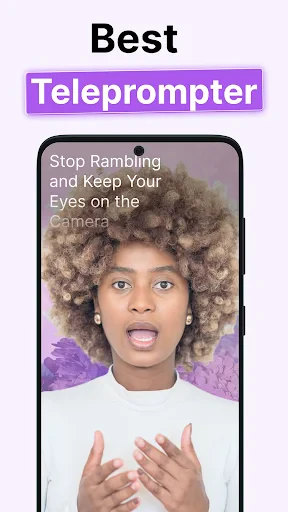
Now, the teleprompter feature is where the magic happens. Imagine having your script rolling on your screen while you record your video – it's like having a personal assistant feeding you lines. You can adjust the speed, font size, and even the position of the text on your screen. This means you can keep your eyes on the camera and maintain a natural flow, which is just what you need for professional-looking content.
Spice Up Your Videos with Captions
Moving on to captions, because let's be honest, who doesn't love a good caption? Adding captions to your videos not only makes them more accessible but also keeps your audience engaged. With BIGVU, you can automatically generate captions and tweak them to perfection. The accuracy is pretty impressive, and the editing tools are straightforward, allowing you to polish your captions with ease.
Editing Made Simple
Let's talk editing. We all know that editing can be a daunting task, but BIGVU simplifies it. Trim your clips, add music, and even include your logo to personalize your videos. The app offers a range of themes and styles to choose from, so you can give your content that extra flair. It's like having a mini editing studio right in your pocket.
Sharing Your Masterpiece
Once your video is polished to perfection, it's time to share it with the world. The app lets you export your videos in various formats and resolutions, ready to be shared on your favorite platforms. Whether it's for social media, a presentation, or your YouTube channel, BIGVU has got you covered.
In conclusion, BIGVU Teleprompter & Captions is a gem for anyone looking to create professional-looking videos without breaking a sweat. It's user-friendly, packed with features, and perfect for both beginners and seasoned content creators. So, if you're ready to up your video game, give BIGVU a shot. You might just be surprised at how much easier and fun video creation can be!


- Developer
- BIGVU AI Eye Contact & Video Subtitles
- Version
- 2.56.2
- Installs
- 5,000,000+
- Android Version
- 8.0
- Content Rating
- Everyone
- Price
- Free
- Easy script import from cloud services.
- Intuitive teleprompter interface.
- High-quality video outputs.
- Supports various video formats.
- Real-time captioning feature.
- Limited free version features.
- Occasional sync issues with cloud.
- Requires stable internet connection.
- No offline editing capability.
- Some features locked behind paywall.


