
Pydroid 3 - IDE for Python 3 icon

Pydroid 3 - IDE for Python 3

Education

Related searches

Ah, Python! The go-to language for many of us when it comes to coding. And if you're like me, always on the lookout for the best tools to code on-the-go, then you might have stumbled upon Pydroid 3. Let me tell you, this app is a game-changer for Python enthusiasts who want to carry their coding environment in their pocket.

Getting Started with Pydroid 3

The first thing I noticed about Pydroid 3 is how easy it is to set up. Once you download the app from the store, you’re pretty much ready to start your Python journey right away. It’s designed to work seamlessly on Android devices, and boy, does it deliver! The interface is clean and intuitive, making it easy even for beginners to navigate.

Features That Stand Out

One of the features that I absolutely love is the offline Python 3 interpreter. Yes, you heard that right! You don’t need an internet connection to run your scripts, which is perfect for those moments when you’re commuting or just away from Wi-Fi. Furthermore, it supports a wide range of libraries out-of-the-box, including NumPy, SciPy, and Matplotlib, which are essential for data science projects.

Another aspect worth mentioning is the ease of installing additional libraries. The app comes with a built-in pip package manager, allowing you to install any additional packages you might need. It’s almost like having a mini-computer in your hand!

Perfect for Students and Professionals

Whether you’re a student learning Python or a professional developer, Pydroid 3 caters to all. For students, the app offers a great way to practice coding without needing a laptop. Plus, the interactive console is a fantastic feature for testing snippets of code on the fly. For professionals, it’s a handy tool to test and prototype ideas quickly. And let’s not forget the educational mode, which makes it easier to learn with additional tips and suggestions.

I also appreciate the syntax highlighting and code prediction features, which make coding much more efficient. It even supports code folding, which is a blessing when working on larger scripts. It’s these little things that add up to create a smooth coding experience.

Limitations and Final Thoughts

Now, while Pydroid 3 is a powerhouse, it’s not without its limitations. Being a mobile app, it’s naturally not as powerful as a full-fledged PC IDE. Some of the more heavy-duty tasks might be a bit sluggish. However, for most day-to-day coding tasks, it gets the job done quite effectively.

In conclusion, if you’re looking for a reliable and portable Python IDE, Pydroid 3 is definitely worth checking out. Its convenience and feature-rich environment make it a must-have for any Python programmer. So, go ahead, give it a try, and take your Python coding to the next level!
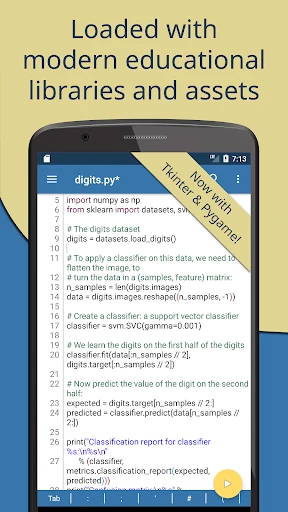
Pydroid 3 - IDE for Python 3 screenshot Pydroid 3 - IDE for Python 3 screenshot Pydroid 3 - IDE for Python 3 screenshot Pydroid 3 - IDE for Python 3 screenshot Pydroid 3 - IDE for Python 3 screenshot
Pydroid 3 - IDE for Python 3 icon
Pydroid 3 - IDE for Python 3
Developer
Lider Soft KZ
Version
Varies With Device
Installs
10,000,000+
Android Version
Varies With Device
Content Rating
Everyone
Price
Free
Pros
  • Intuitive user interface for beginners.
  • Supports various Python libraries.
  • Runs Python 3 scripts smoothly.
  • Offline Python compiler capability.
  • Integrated terminal for real-time coding.
Cons
  • Limited features in free version.
  • Occasional lagging on older devices.
  • Ads can be intrusive at times.
  • Might require additional setup for libraries.
  • No support for Python 2.

Ratings

4.4

Similar Apps

Learn Ethical Hacking: HackerX

Learn Ethical Hacking: HackerX

4.7
Get
Smart Noter - AI Note Taker

Smart Noter - AI Note Taker

4.1
Get
PROmote - Army Study Guide

PROmote - Army Study Guide

4.3
Get
AI Tutor - Math Homework Help

AI Tutor - Math Homework Help

3.9
Get
Writing Wizard - Learn Letters

Writing Wizard - Learn Letters

4
Get
Blinkist: Book Summaries Daily

Blinkist: Book Summaries Daily

4.6
Get
Pydroid 3 - IDE for Python 3

Pydroid 3 - IDE for Python 3

4.4
Get
Night Sky Guide - Planetarium

Night Sky Guide - Planetarium

4.4
Get
SkyView® Explore the Universe

SkyView® Explore the Universe

4.5
Get
AnkiDroid Flashcards

AnkiDroid Flashcards

4.8
Get
Brilliant: Learn by doing

Brilliant: Learn by doing

4.5
Get
Grammar Check by AI Writing

Grammar Check by AI Writing

4.5
Get

Frequently Asked Questions

What is Pydroid 3 and what can it be used for?

Pydroid 3 is a powerful integrated development environment (IDE) specifically designed for running Python 3 on Android devices. It allows users to write, compile, and execute Python scripts directly on their smartphones or tablets. Ideal for both beginners learning Python and experienced developers who want to code on the go, Pydroid 3 supports various Python libraries and frameworks, making it a versatile tool for educational purposes or quick prototyping.

Is Pydroid 3 suitable for beginners learning Python?

Yes, Pydroid 3 is an excellent choice for beginners who are learning Python. The app provides a user-friendly interface with features like syntax highlighting, code prediction, and an offline Python 3 interpreter, which help make the learning process smoother. Additionally, it includes educational examples and tutorials, which are particularly useful for those new to programming. Beginners can easily experiment with Python scripts and see immediate results, enhancing their learning experience.

Does Pydroid 3 support external Python libraries and packages?

Absolutely, Pydroid 3 supports a wide range of external Python libraries and packages. Users can install additional libraries using PIP (Python Package Index), which is integrated into the app. This capability allows developers to work on more complex projects involving libraries like NumPy, Pandas, Matplotlib, and many others. This feature significantly enhances the app's utility, making it suitable for various Python development activities, from simple scripts to data analysis and machine learning tasks.

Can Pydroid 3 be used offline?

Yes, Pydroid 3 can be used offline, which is one of its key advantages. It includes a built-in Python 3 interpreter, allowing users to write and execute Python code without needing an internet connection. This makes it particularly useful for users who want to practice coding during commutes or in areas with limited connectivity. However, downloading new libraries or packages requires an internet connection, so users should plan accordingly if they need additional resources.

What are the system requirements for installing Pydroid 3?

To install Pydroid 3, your Android device should be running at least Android 4.4 or higher. The app is optimized for both smartphones and tablets, but performance may vary based on the device's specifications. It is recommended to have a device with at least 2GB of RAM for smooth operation, especially when working with large libraries or complex projects. Ensuring your device meets these requirements will provide a better experience when using the app.