
PrinterShare Mobile Print
Let’s dive into the world of PrinterShare Mobile Print, an app that promises to revolutionize your printing experience via your mobile device. Imagine being anywhere in the world and needing to print an important document. With PrinterShare Mobile Print, this scenario is no longer a nightmare.
Seamless Printing Experience
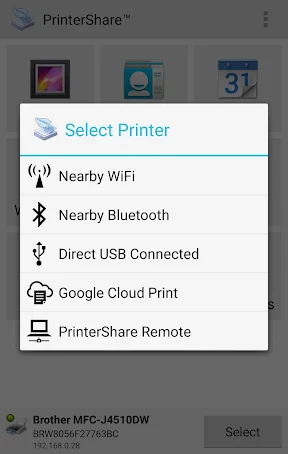
The first thing that strikes you about this app is its seamless integration with various printer models. Whether you’re using a Wi-Fi, Bluetooth, or even a USB connection, this app has got you covered. I tried printing a variety of documents, from PDFs to photos, and it handled everything with ease. The app supports a plethora of printer brands, which is a huge plus for those of us who might have different printers at home and work.
User-Friendly Interface
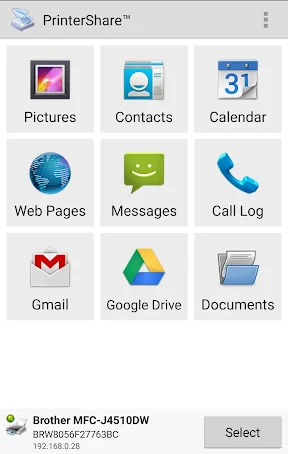
One of the standout features of the app is its user-friendly interface. Navigating through the app is a breeze, even for those who aren’t particularly tech-savvy. The developers have clearly prioritized the user experience, and it shows. From selecting the document to tweaking the print settings, everything is intuitive.
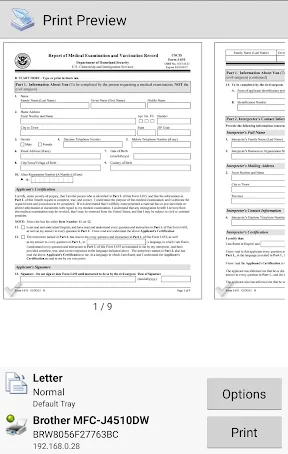
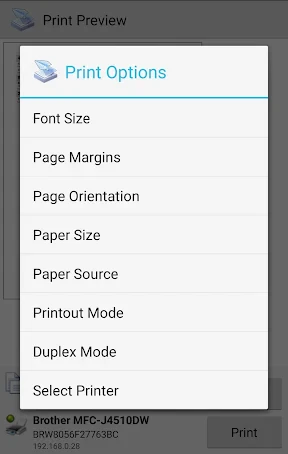
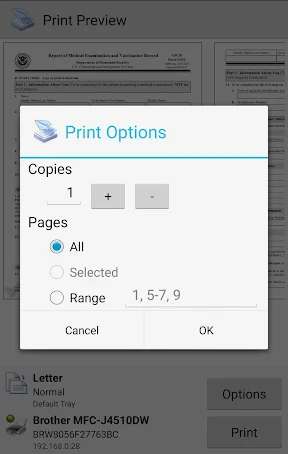
Moreover, the app offers a preview option, which, let me tell you, has saved me from embarrassing misprints on more than one occasion. You can easily adjust the print quality, paper size, and orientation before hitting that print button, ensuring everything comes out just as you want it.
Flexibility at Its Best
This app is all about flexibility, offering printing options from your phone’s gallery, email, cloud storage services like Google Drive and Dropbox, and even web pages. Having all these options at your fingertips is incredibly convenient, especially when you’re on the go. I found myself printing directly from my email and Google Drive more times than I can count, and it worked flawlessly every time.
Also, let’s not forget the app’s capability to print directly from social media platforms. So, those cherished Instagram moments or Facebook memories are just a click away from being in your hands physically.
Final Thoughts
In conclusion, PrinterShare Mobile Print is a must-have for anyone who finds themselves needing to print documents frequently. Its ease of use, versatility, and reliability make it stand out in the crowded app market. Whether you’re a student, a professional, or just someone who loves having hard copies of everything, this app is worth checking out. It not only simplifies the printing process but also ensures that you’re always ready to print, no matter where you are.
So, if you’re tired of the old ways of printing and want something that adapts to your modern lifestyle, give this app a try. You won’t be disappointed!
- Developer
- Mobile Dynamix
- Version
- 12.15.01
- Installs
- 10,000,000+
- Android Version
- 5.0
- Content Rating
- Everyone
- Price
- Free
- Supports a wide range of printers
- Cloud printing from Google Drive
- Dropbox
- Prints emails
- contacts
- Limited free version features
- Occasional connectivity issues
- Requires app purchase for full features
- No support for certain printer models
- May consume a lot of data when printing