PENUP – Drawing-sharing SNS icon

PENUP – Drawing-sharing SNS

Art & Design

Related searches

Have you ever wanted to unleash your inner artist but felt a bit intimidated by the complex tools of professional drawing apps? Well, let me introduce you to PENUP, a delightful drawing-sharing social network that makes art creation as easy as pie. This app, available on both Android and iOS, is designed for artists of all skill levels to not only create but also connect and share their masterpieces with a vibrant community.

Exploring the World of PENUP

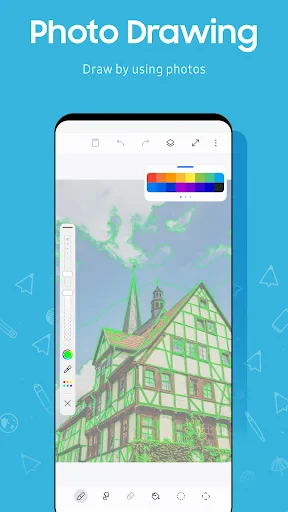
Once you dive into PENUP, the first thing you'll notice is its user-friendly interface. The app is designed to be intuitive, making it easy for anyone to start sketching right away. Whether you're waiting for your coffee or just lounging at home, this app provides a seamless experience to create art anytime, anywhere. The tools are straightforward, providing a variety of brushes, colors, and effects that can transform a simple doodle into a work of art.

Creating and Sharing Art

What makes PENUP stand out is its social networking aspect. You can easily share your creations with an enthusiastic community, gather feedback, and even get inspired by others. The app encourages interaction, allowing users to follow other artists, comment on their work, and participate in exciting challenges. This community feature is a great way to keep your creative juices flowing and to stay motivated.

Challenges and Inspiration

If you're ever in a creative slump, the app's challenge section is there to save the day. These challenges are regularly updated and provide themes that push you to think outside the box. It's an excellent way to test your skills and get inspired by how others interpret the same theme. Plus, seeing your work among other creative pieces is incredibly fulfilling.

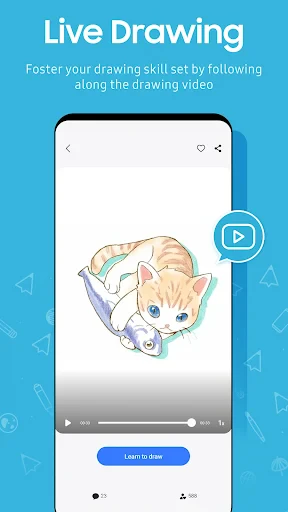
Another feature worth mentioning is the tutorials section. For those looking to improve their skills or learn new techniques, the tutorials offer step-by-step guidance on various art styles and methods. It's like having a personal art teacher right at your fingertips!

Final Thoughts

In a nutshell, PENUP is not just an app; it's a thriving community for artists. It’s perfect for those who want to explore their artistic side without the pressure of professional-grade tools. The app’s simplicity, combined with its robust community features, makes it a must-try for anyone interested in art. So, why not give it a whirl and see where your imagination takes you?

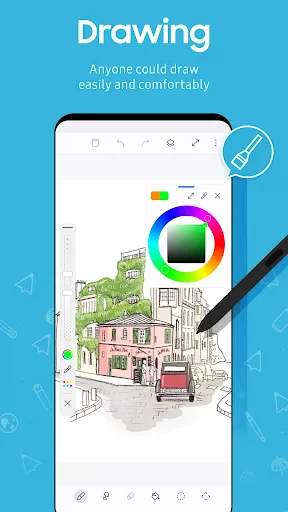
PENUP – Drawing-sharing SNS screenshot PENUP – Drawing-sharing SNS screenshot PENUP – Drawing-sharing SNS screenshot PENUP – Drawing-sharing SNS screenshot PENUP – Drawing-sharing SNS screenshot
PENUP – Drawing-sharing SNS icon
PENUP – Drawing-sharing SNS
Developer
Samsung Electronics Co., Ltd.
Version
Varies With Device
Installs
100,000,000+
Android Version
Varies With Device
Content Rating
Teen
Price
Free
Pros
  • User-friendly interface for beginners
  • Wide variety of drawing tools available
  • Large community for sharing art
  • Regular contests and challenges
  • Free to use with optional in-app purchases
Cons
  • Requires stable internet for sharing
  • Limited offline functionality
  • Advertisements can be intrusive
  • Some features behind paywall
  • Community moderation could improve

Ratings

4.6

Similar Apps

Learn to Draw Anime by Steps

Learn to Draw Anime by Steps

4.2
Get
Photoleap: AI Photo Generator

Photoleap: AI Photo Generator

4
Get
Mark - AI Logo Generator

Mark - AI Logo Generator

4
Get
AR Tracer: Trace Drawing

AR Tracer: Trace Drawing

3.9
Get
Easy Pose - 3D pose making app

Easy Pose - 3D pose making app

3.6
Get
Mens Hairstyles And Haircuts

Mens Hairstyles And Haircuts

3.3
Get
AI Drawing : Trace & Sketch

AI Drawing : Trace & Sketch

3.5
Get
Logo Maker : Logo Creator

Logo Maker : Logo Creator

4.1
Get
Hicut:Face Swap AI Video App

Hicut:Face Swap AI Video App

3.2
Get
starryai - AI Art Generator

starryai - AI Art Generator

4.2
Get
Hexa AI: Logo & Design Creator

Hexa AI: Logo & Design Creator

4.5
Get
Spellai - AI Art Maker

Spellai - AI Art Maker

4.3
Get

Frequently Asked Questions

What is PENUP and how does it work?

PENUP is a social networking service designed for artists and drawing enthusiasts. It allows users to create and share digital artwork using a variety of drawing tools. The app provides a platform for users to showcase their art, gain inspiration from others, and participate in drawing challenges. You can interact with other artists through likes, comments, and by following their work. It’s an engaging way to grow as an artist and connect with a creative community.

Is PENUP free to use, or are there any in-app purchases?

PENUP is free to download and use. It offers a wide range of drawing tools and features without any cost. However, like many apps, it may offer optional in-app purchases that provide additional content or features, such as special brushes or advanced editing tools. These purchases are entirely optional and not necessary to enjoy the basic functionalities of the app.

Can I use PENUP offline, or do I need an internet connection?

While you can use PENUP to create and edit artwork offline, an internet connection is necessary to upload your creations, interact with the community, and participate in challenges. Offline mode is useful for drafting and creating art, but to fully engage with the app’s social features, an internet connection is required.

What devices are compatible with PENUP?

PENUP is available for both Android and iOS devices. It is optimized for use on smartphones and tablets, providing a seamless experience across different screen sizes. Make sure your device is running on a compatible operating system version, usually Android 6.0 or later, and iOS 11.0 or later, to ensure the best performance and access to all features.

How can I participate in drawing challenges on PENUP?

To participate in drawing challenges on PENUP, navigate to the 'Challenges' section within the app. Here, you will find a variety of themed challenges that you can join. Simply create your artwork based on the challenge theme and submit it directly through the app. Participating in challenges is a great way to test your skills, gain exposure, and connect with other artists in the community.