iSyncr: iTunes to Android icon

iSyncr: iTunes to Android

Music & Audio

Related searches

Have you ever found yourself in the frustrating situation where you've got this awesome music collection on iTunes, but your device of choice is an Android? Yeah, been there. Well, enter iSyncr, the bridge to your musical happiness. This nifty app is your go-to for syncing your iTunes library to your Android device without any of those complicated workarounds. Let's dive into what makes this app a lifesaver for music lovers.

Syncing Made Simple

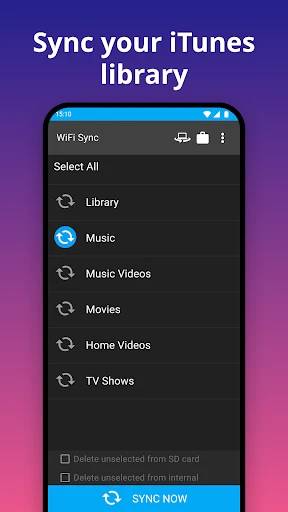
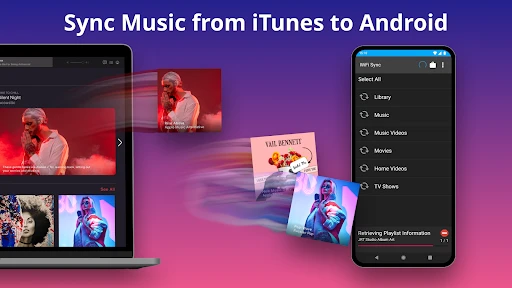
First things first, iSyncr is all about making your life easier. Once you have it installed, syncing your iTunes library is a breeze. You can sync over WiFi or USB, giving you that flexible option based on your preference or situation. The interface is pretty straightforward too, so no need to worry about getting lost in a sea of options.

Features That Hit The Right Note

One of the coolest things about this app is its attention to detail. It doesn't just sync your music; it also brings over your playlists, album art, ratings, and even play counts. If you're like me and have meticulously organized playlists, this feature is a godsend. Plus, it supports smart playlists, so those dynamic playlists you love on iTunes? They're coming along for the ride!

Another sweet feature is the ability to sync podcasts and videos, which means your entertainment options are not limited to music. It's like having your own little portable iTunes library right on your Android.

Performance and Usability

In terms of performance, iSyncr is pretty solid. The syncing process is quick and efficient, and I didn't notice any significant lag or issues during my time using it. It's also worth noting that the app is regularly updated, which is always a good sign that the developers are committed to keeping it running smoothly.

Using the app is a straightforward affair. The controls are intuitive, and you don't need to be a tech wizard to get things up and running. Whether you're syncing via WiFi or USB, the process is seamless, and you can easily manage your sync settings to suit your needs.

Final Thoughts

All in all, iSyncr is a must-have for any Android user who doesn't want to give up their beloved iTunes library. It's user-friendly, efficient, and packed with features that make syncing a breeze. If you're tired of leaving your iTunes collection behind, this app is definitely worth checking out. So go ahead, give it a shot, and let the music play on!

iSyncr: iTunes to Android screenshot iSyncr: iTunes to Android screenshot iSyncr: iTunes to Android screenshot iSyncr: iTunes to Android screenshot iSyncr: iTunes to Android screenshot
Developer
JRT Studio Music Players
Version
7.0.5
Installs
5,000,000+
Android Version
5.0
Content Rating
Everyone
Price
Free
Pros
  • Seamlessly syncs iTunes library to Android.
  • Supports playlists
  • ratings
  • and play counts.
  • Automatic wireless syncing via Wi-Fi.
Cons
  • Requires iTunes installed on a computer.
  • Limited features in free version.
  • Syncing large libraries can be slow.
  • Occasional connection issues reported.
  • No support for Apple Music tracks.

Ratings

4.3

Similar Apps

Bose QC Earbuds

Bose QC Earbuds

4.7
Get
stats.fm for Spotify

stats.fm for Spotify

4.2
Get
Volume Booster - Equalizer

Volume Booster - Equalizer

4.8
Get
Mini Piano Lite

Mini Piano Lite

4.6
Get
Offline Podcast App: Player FM

Offline Podcast App: Player FM

4.2
Get
Music Echo-Offline Music

Music Echo-Offline Music

3.6
Get
Offline Music Player

Offline Music Player

4.5
Get
Beat Tune - Offline Music

Beat Tune - Offline Music

3.1
Get
TuneIn Radio: Music & Sports

TuneIn Radio: Music & Sports

4.7
Get
Android Ringtones 2024

Android Ringtones 2024

4.7
Get
Video Voice Changer + Effects

Video Voice Changer + Effects

4.4
Get
Phone Ringtones

Phone Ringtones

4.5
Get

Frequently Asked Questions

What is iSyncr and how does it work?

iSyncr is an app designed to facilitate the synchronization of iTunes music libraries with Android devices. By installing the iSyncr app on your Android device and its companion desktop client on your computer, you can seamlessly transfer playlists, music tracks, and other content from iTunes directly to your Android phone or tablet, maintaining all metadata like play counts and ratings.

Is iSyncr compatible with all Android devices?

iSyncr is compatible with most Android devices that run Android 5.0 (Lollipop) and above. However, users should ensure that their device supports USB Mass Storage or MTP (Media Transfer Protocol) for a smooth syncing process. It's advisable to check device-specific compatibility details on the app's official website or in the app store before downloading.

Does iSyncr support wireless syncing?

Yes, iSyncr offers both USB and Wi-Fi syncing options. With Wi-Fi syncing, users can transfer their iTunes library to their Android device without the need for cables, provided both the computer and Android device are connected to the same Wi-Fi network. This feature offers convenience and flexibility, especially for those who prefer cable-free solutions.

Are there any limitations to using iSyncr?

While iSyncr is a powerful tool for syncing iTunes with Android, there are some limitations to be aware of. For instance, DRM-protected tracks from iTunes cannot be synced. Additionally, users might experience limitations in terms of syncing very large libraries, depending on the storage capacity of their Android device. It's important to manage expectations based on these constraints.

How secure is the data when using iSyncr?

iSyncr prioritizes user data security by ensuring that all data transfer processes are conducted locally, either via USB or over a secure Wi-Fi connection. The app does not transmit your data to external servers, which minimizes the risk of unauthorized access. However, users should still ensure their own networks are secure to further protect their data.