
Inky - Run Inkscape on Android
As an avid graphic designer who’s always on the move, I was thrilled to learn about Inky - Run Inkscape on Android. If you're like me, you know how crucial it is to have access to your favorite design tools no matter where you are. Inky promises to bring the power of Inkscape, a beloved vector graphics editor, right to your Android device. Sounds exciting, doesn’t it? Let’s dive in and see if it really lives up to the hype.
Getting Started with Inky
First things first, downloading and installing Inky is a breeze. Just head over to the Google Play Store, and within a few taps, you’re ready to go. The app itself is lightweight, so it doesn't hog your device’s resources, which is a huge plus for those of us with slightly older phones.
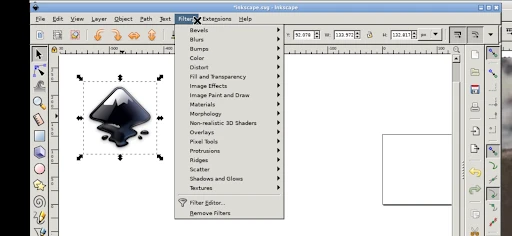
Once you open the app, you're greeted with a familiar interface if you’ve used Inkscape before. The developers have done a commendable job of retaining the essence of the desktop version, which is a relief for seasoned users. For newbies, though, there’s a bit of a learning curve, but hey, that’s part of the fun, right?
Features That Stand Out
Inky is packed with features that make it a powerful tool for creating vector graphics on-the-go. One feature that I personally love is the node editing. It’s incredibly intuitive and allows for precise adjustments, which is key when you're trying to get those lines and curves just right.
The app also supports layers, making it easy to organize your projects and experiment with different design elements without messing up your main work. Trust me, having layers at your fingertips on a mobile device feels like a game-changer.
And let’s not forget about the extensive range of file formats you can export your work in. Whether you’re sending a quick draft to a client or prepping a final piece for print, Inky has got you covered.
Designing on the Go
One of the greatest advantages of using Inky is the freedom it gives you to design anytime, anywhere. Whether you’re waiting for a friend at a cafe or traveling on a train, you’ve got a mini design studio right in your pocket. I’ve found myself sketching out ideas during my morning commute, which has been a fantastic use of what would otherwise be idle time.
However, designing on a smaller screen can be a bit challenging, especially if you’re used to a large monitor. But with a bit of practice, you’ll find that you can adapt quite easily. Plus, Inky supports a stylus, which can make all the difference in precision and control.
Final Thoughts
Inky - Run Inkscape on Android is a solid app that bridges the gap between desktop and mobile graphic design. It’s not without its quirks, but the convenience it offers is undeniable. Whether you’re a professional designer or just someone who enjoys dabbling in graphics, Inky is definitely worth checking out.
So, next time you find yourself inspired and on-the-go, why not whip out your phone and give Inky a try? Who knows, it might just become your new favorite design tool.
- Developer
- UserLAnd Technologies
- Version
- 24.11.27
- Installs
- 10,000+
- Android Version
- 5.0
- Content Rating
- Everyone
- Price
- $1.99
- Seamlessly runs Inkscape on Android.
- Supports SVG and various file formats.
- Offers touchscreen-friendly interface.
- Regular updates with new features.
- Compatible with stylus for precision.
- May lag on older devices.
- Limited advanced features for pros.
- Occasional crashes during heavy tasks.
- Requires substantial storage space.
- Interface can be overwhelming for newbies.