Handy Art Reference Tool
Discovering the Handy Art Reference Tool: A Digital Artist’s Best Friend
Hey there, fellow art enthusiasts! If you’re like me and spend countless hours sketching, painting, or just dabbling in creative endeavors, you know how crucial a good reference can be. Enter the Handy Art Reference Tool, an app that promises to be your guiding light in the world of digital art. I’ve spent some quality time with this app, and I’m here to spill the beans on what it’s all about.
What’s the Buzz All About?
First things first, the Handy Art Reference Tool is exactly what its name suggests. It’s like having a pocket-sized library of references right on your smartphone. Whether you’re looking for anatomy references, pose ideas, or even lighting setups, this app’s got your back. As someone who’s constantly on the lookout for fresh inspiration, this tool quickly became my go-to.
The app is available for both Android and iOS, so no matter what device you’re using, you’re in luck! Setting it up is as easy as pie, and within minutes, you’re diving deep into a pool of artistic resources. The user interface? Smooth as butter. Even if you’re not the most tech-savvy person, you’ll find your way around in no time.
Features that Make it Stand Out
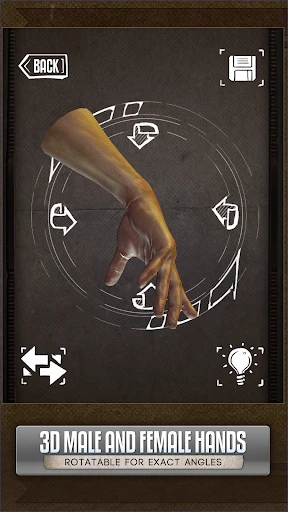
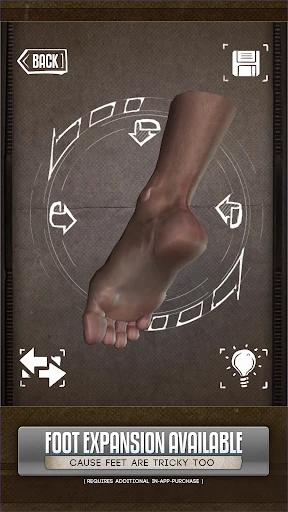
Anatomy References: One of the standout features is the detailed anatomy references. It’s like having a digital anatomy book at your fingertips. Whether you’re trying to perfect the human hand or understand muscle groups, this app has detailed 3D models that you can rotate and study from different angles.
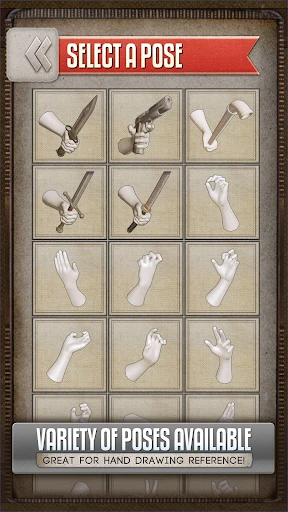
Poseable Models: Remember those wooden mannequins we used in art class? Well, this is the digital version, but way cooler. You can virtually manipulate the poseable models to capture just the right stance or expression for your artwork.
Lighting Options: Lighting can make or break your piece. Thankfully, this tool offers various lighting options to help you understand how light interacts with different forms. It’s like having your own mini studio setup.
Why I’m Hooked
Now, let me tell you why I’m quite smitten with this app. As an artist, the struggle to find reliable and varied references is real. With Handy Art Reference Tool, it’s like opening a treasure chest every time you launch the app. The ability to customize and manipulate models is a game-changer, especially when you’re trying to capture dynamic poses or complex lighting scenarios.
The app doesn’t just stop at human references. You’ll find animals, hands, skulls, and even heads. The diversity is impressive, and it’s clear that the developers have put a lot of thought into what artists really need. Plus, the regular updates mean that there’s always something new to explore.
Final Thoughts
If you’re serious about improving your art or just want a handy tool (pun totally intended) to assist you in your creative journey, the Handy Art Reference Tool is worth checking out. It’s user-friendly, packed with features, and genuinely makes the process of creating art more enjoyable and efficient. So, whether you’re a seasoned pro or just starting out, give it a whirl. You might find it becomes as indispensable to your toolkit as your favorite sketchbook.
So, what are you waiting for? Dive into the world of endless references and let your creativity flow!


- Developer
- Belief Engine
- Version
- 5.0.5
- Installs
- 50,000+
- Android Version
- 5.0
- Content Rating
- Teen
- Price
- $2.99
- Comprehensive anatomy models.
- User-friendly interface.
- High-quality 3D visuals.
- Customizable lighting.
- Regular updates.
- Requires internet connection.
- Limited free features.
- Occasional app crashes.
- Large file size.
- Steep learning curve.