DuckDuckGo Browser, Search, AI
When it comes to browsing the vast expanses of the internet, privacy is often a major concern for many of us. If you've been on the hunt for a browser that doesn't just promise privacy but actually delivers it, then let me introduce you to the DuckDuckGo Private Browser. This little gem is all about keeping your online activities under wraps, and I've taken it for a spin to give you the lowdown.
First Impressions
Right off the bat, DuckDuckGo’s interface is clean and straightforward. It’s not cluttered with unnecessary elements, which is a relief for anyone who's tired of browsers that try to do too much. The minimalist design makes it easy to navigate, even if you’re not a tech whiz. When you open the app, you're greeted with the familiar DuckDuckGo search bar, which, if you didn’t know, doesn’t track your searches or store your personal information. Pretty cool, right?
Features That Stand Out
Now, let's talk about what makes this browser really shine. One feature that caught my attention is the Fire Button. With a single tap, you can burn all your open tabs and browsing data, giving you a fresh start whenever you need it. It’s a fantastic feature if you’re browsing on a shared device or just want to ensure no lingering data is hanging around.
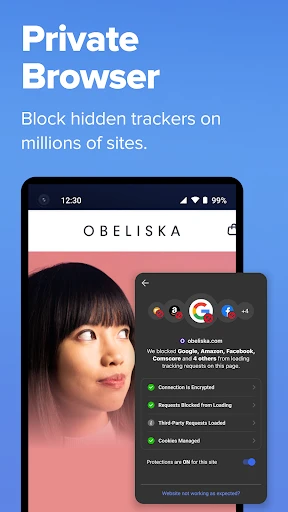
Another standout is the built-in tracker blocker. DuckDuckGo Private Browser automatically blocks hidden third-party trackers, preventing companies from tracking your online activities. This means faster load times and a smoother browsing experience, which is something we all appreciate.
Seamless Integration with DuckDuckGo Search
Of course, it wouldn't be the DuckDuckGo Private Browser without seamless integration with the DuckDuckGo search engine. As expected, searches are private and ad-free, allowing you to explore the web without the fear of being profiled by advertisers. Plus, it offers unbiased search results, so you get the information you need without any hidden agendas.
Performance and Usability
In terms of performance, DuckDuckGo holds its own against some of the bigger names out there. Pages load quickly, and I didn't encounter any hiccups or crashes during my time using it. It’s also worth mentioning that the app is available on both Android and iOS, offering a consistent experience across devices.
Usability is another area where this browser excels. Whether you’re a privacy enthusiast or just someone who wants a straightforward browsing tool, DuckDuckGo Private Browser fits the bill. It doesn’t overwhelm you with options or settings, yet it packs enough punch to keep your data safe.
Final Thoughts
So, should you make the switch to DuckDuckGo Private Browser? If privacy is a priority for you, then absolutely. It’s a no-nonsense browser that respects your data and gives you control over your online footprint. While it might not have all the bells and whistles of some other browsers, it does what it promises—keeps your browsing private and secure.
In a world where data is currency, having a tool like DuckDuckGo Private Browser in your arsenal is invaluable. Give it a try, and you might just find it becomes your go-to browser for all things private. Happy browsing!



- Developer
- DuckDuckGo
- Version
- 5.233.0
- Installs
- 50,000,000+
- Android Version
- 8.0
- Content Rating
- Everyone
- Price
- Free
- Enhanced privacy protection by default
- Integrated ad and tracker blocking
- Simple and intuitive user interface
- Fast browsing speed without tracking
- No sign-up required for use
- Limited customization options
- Occasional site compatibility issues
- Lacks advanced browsing features
- No built-in VPN service
- Search engine results not as robust as competitors