clickworker
Ever thought of turning your downtime into productive hours? Meet Clickworker, the app that lets you do just that! Imagine sipping coffee at your favorite café while earning a few bucks. Sounds cool, right? Well, let me walk you through this app that has made microjobs a thing.
What is Clickworker?
In a nutshell, Clickworker is a platform that connects businesses with freelancers for various small tasks, commonly referred to as microjobs. From data categorization to surveys and writing, there's a wide array of tasks you can choose from. The app is available on both Android and iOS, making it accessible to anyone with a smartphone.
Getting Started
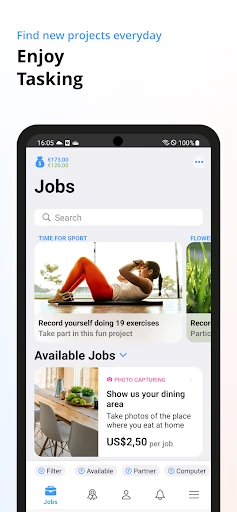
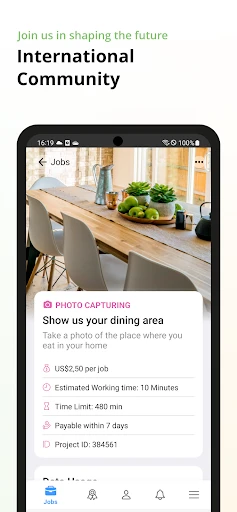
Starting with Clickworker is a breeze. You download the app, sign up, and complete your profile. The app then offers you a list of available tasks based on your skills and location. I found the interface to be quite intuitive, ensuring even the least tech-savvy among us can navigate it with ease.
Variety of Tasks
One of the things I love about Clickworker is the diversity in tasks. Whether you enjoy writing, data entry, or prefer more hands-on jobs like mystery shopping, there’s something for everyone. I particularly enjoyed trying out different types of tasks, which kept the experience fresh and engaging.
Earning Potential
Now, let’s talk about the money. Don’t expect to make a fortune, but it’s a great way to earn some extra cash. Payment is task-based, and while some gigs pay better than others, it all adds up. I found it to be a perfect side hustle that doesn’t interfere with my regular job. Plus, payments are processed via PayPal, which is a massive plus for convenience.
User Experience
The overall user experience is quite satisfying. The app runs smoothly, and I didn’t encounter any glitches. It’s refreshing to use an app that does what it promises without unnecessary frills. The support system is also commendable. If you hit a snag, the help desk is just a click away, ready to assist.
In conclusion, if you're looking for a flexible way to make some extra cash during your free time, Clickworker is worth checking out. With its wide range of tasks and user-friendly interface, it caters to a broad audience. So next time you find yourself with some free time, why not turn it into an opportunity to earn? Give Clickworker a try and see how it fits into your lifestyle. Happy clicking!



- Developer
- clickworker GmbH
- Version
- 1.22.1
- Installs
- 1,000,000+
- Android Version
- 5.0
- Content Rating
- Everyone
- Price
- Free
- Flexible work hours.
- Diverse tasks available.
- Easy-to-use platform.
- No special skills required.
- Global accessibility.
- Low pay for tasks.
- Payment delays.
- Limited task availability.
- No employment benefits.
- Inconsistent task quality.