Bose
When it comes to premium audio experiences, Bose has been a household name for decades. Their reputation for delivering top-notch sound quality is well-deserved, and the Bose app aims to enhance this experience even further. As someone who's always on the lookout for that perfect audio app to complement my listening habits, I decided to give the Bose app a whirl. Here’s my take on it.
First Impressions: Sleek and User-Friendly
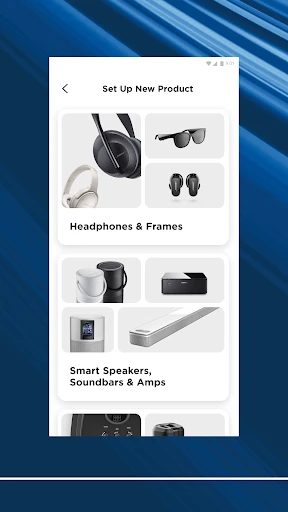
The moment I launched the Bose app, I was greeted with a sleek interface that screams modernity. The design is intuitive, making it easy for anyone to navigate, whether you’re tech-savvy or not. The initial setup was a breeze, with the app guiding me through connecting my Bose devices smoothly. I particularly appreciated the straightforwardness—no complicated jargon or unnecessary steps, just a simple connection process.
Feature-Packed for Audio Enthusiasts
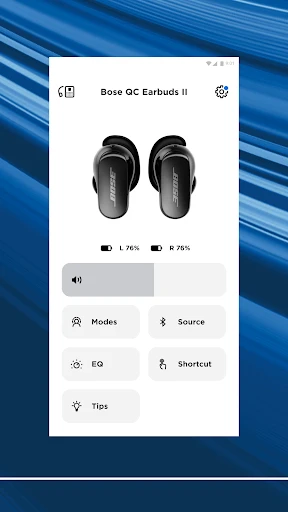
One of the standout features of the Bose app is its robust customization options. I’m a bit of an audiophile, so having the ability to tweak my sound settings to my exact liking was a huge win. The app offers a variety of presets, but if those don’t suit your taste, you can dive into the equalizer and adjust the sound profile manually. This level of control is something I didn’t know I needed until I had it.
Another impressive feature is the noise-cancellation settings. If you own a pair of Bose headphones, you know that their noise-cancelling capabilities are second to none. With the app, you can adjust the level of noise cancellation based on your environment. It’s like having a personal sound engineer right in your pocket!
Seamless Integration and Connectivity
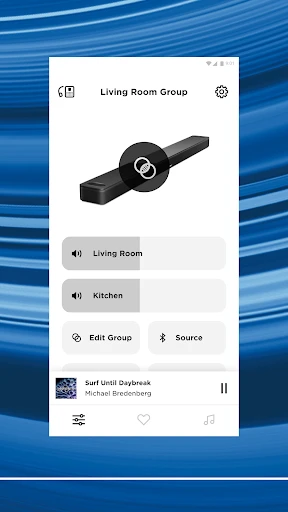
Connectivity is often a pain point with many audio apps, but the Bose app handles it like a champ. Whether I was switching between my phone and tablet or moving from one room to another, the app maintained a stable connection with my devices. This seamless integration extends to other smart home devices, allowing me to control everything from the app itself. It’s like having a central hub for all my audio needs.
Room for Improvement
No app is without its flaws, and the Bose app is no exception. While the functionality is top-notch, I did notice that the app occasionally lagged when switching between different sections. It wasn’t a deal-breaker, but it did disrupt the otherwise smooth experience. Additionally, while the app is feature-rich, new users might feel a bit overwhelmed with all the options available. A more guided tutorial section could really enhance the onboarding process.
Lastly, while the app is great for Bose device owners, it doesn’t offer much for those who might use other brands. It’s very much an app that’s designed to work best with its own ecosystem, which makes sense but could be a limitation for some.
Final Thoughts: A Must-Have for Bose Users
In conclusion, the Bose app is a fantastic companion for anyone who owns Bose audio equipment. Its user-friendly interface, extensive customization options, and seamless connectivity make it a standout in the crowded world of audio apps. While there’s room for improvement, especially in terms of performance speed and user guidance, it’s a solid choice for enhancing your audio experience. So, if you’re already a part of the Bose family, downloading this app is a no-brainer. Trust me, your ears will thank you!

- Developer
- Bose Corporation
- Version
- Varies With Device
- Installs
- 10,000,000+
- Android Version
- Varies With Device
- Content Rating
- Everyone
- Price
- Free
- Excellent sound quality for all media types
- Easy-to-use interface for seamless navigation
- Customizable sound settings for tailored experience
- Reliable Bluetooth connectivity and range
- Compact design
- Premium price point may not suit all budgets
- Limited compatibility with non-Bose devices
- Occasional app crashes on older OS versions
- Setup can be complex for some users
- Battery life could be improved in future updates