Adobe Capture: Illustrator,Ps
Ever found yourself in a creative rut, desperately seeking a muse or the right tool to bring your artistic visions to life? Well, let me introduce you to Adobe Capture: Illustrator, Ps, the app that’s transforming the way we interact with design and creativity. This app is like having a mini design studio right in your pocket, and trust me, it’s a game-changer for both amateur and professional creators alike.
Design on the Go
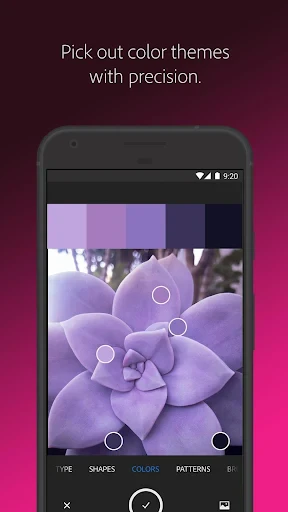
Imagine walking down the street and spotting a color palette on a mural that just speaks to you. With Adobe Capture, you can snap a picture of that mural and instantly extract the colors to use in your next project. The app’s ability to capture and create color themes is just one of its many nifty features. I’ve found myself using it all the time—not just for work—but for personal projects too.
Textures and Patterns Galore
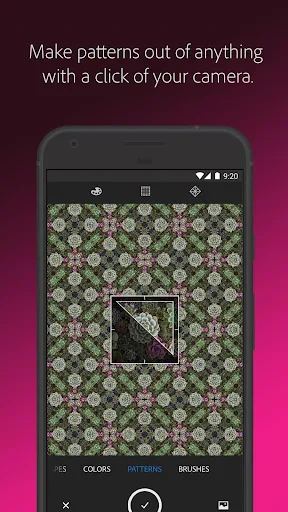
But wait, there’s more! Patterns and textures are another area where this app truly shines. You can turn any image into a seamless pattern or texture. Whether it's the intricate details of a leaf or the rustic charm of a brick wall, Adobe Capture allows you to harness these elements and incorporate them into your digital artwork. It’s like having a magic wand that lets you create complex designs with just a click.
Brushes and Shapes at Your Fingertips
Now, if you’re anything like me, you’ll be blown away by the brush creation feature. Imagine drawing with a brush that you designed yourself! Adobe Capture lets you turn your doodles into custom brushes that you can use in Adobe Photoshop or Illustrator. This feature is particularly awesome for those who want to add a personal touch to their digital art.
The shape creation tool is another fantastic feature. You can convert images into vector shapes that can be used in your projects, giving your designs a professional edge. It’s like having a vector wizard in your toolkit, always ready to assist you in crafting those perfect shapes.
Integration with Adobe Creative Cloud
The seamless integration with Adobe Creative Cloud is another big plus. All your creations are automatically synced, meaning you can start a project on your phone and finish it on your desktop without missing a beat. For someone who’s always on the go, this feature is invaluable. It’s like having your creative workspace with you, wherever you are.
Adobe Capture is not just an app; it’s a gateway to endless creative possibilities. From capturing inspiring elements in your environment to turning them into digital assets, this app does it all. And while it’s packed with features, it’s still incredibly user-friendly. Even if you’re new to design apps, you’ll find it intuitive and easy to navigate.
If you’re looking to elevate your creative projects, Adobe Capture is definitely worth checking out. It’s a must-have for anyone serious about design, offering a treasure trove of tools that will inspire and empower you to push your creative boundaries. So go ahead, give it a whirl, and watch as your ideas come to life in ways you never imagined possible.


- Developer
- Adobe
- Version
- 9.1.1 (3594)
- Installs
- 5,000,000+
- Android Version
- 8.0
- Content Rating
- Everyone
- Price
- Free
- Intuitive interface for easy use.
- Seamlessly integrates with Adobe apps.
- High-quality image capturing.
- Offers diverse creative tools.
- Regular updates enhance features.
- Requires Adobe account to access.
- Premium features need subscription.
- Resource-heavy
- may slow device.
- Limited offline functionality.