YouTube Studio
Unleashing the Power of YouTube Studio: Your Ultimate Content Creation Ally
Hey there, fellow creators! If you're like me, constantly on the hunt for the perfect tool to amp up your YouTube game, then you might want to stick around. Let me introduce you to YouTube Studio, the official app by YouTube that promises to be your trusty sidekick in managing your channel. Whether you’re just starting your journey or already a seasoned content creator, YouTube Studio offers a suite of tools that can help streamline your process and optimize your channel's performance.
First Impressions Matter
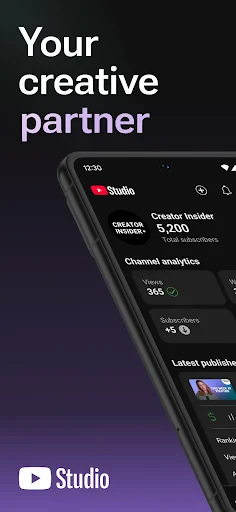
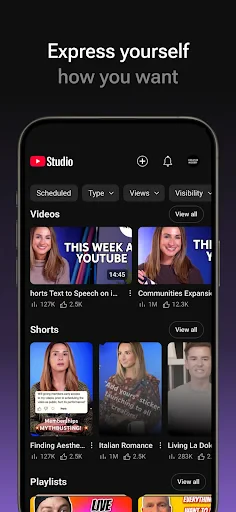
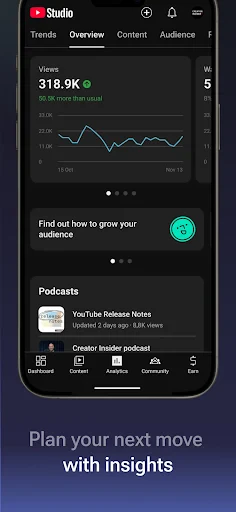
So, jumping straight into it, the first thing you'll notice about YouTube Studio is its sleek and user-friendly interface. It's designed to be intuitive, which means you won’t find yourself lost in a sea of buttons and options. Everything you need is right there, at your fingertips. From managing uploads to diving deep into analytics, the app seems to be built with the user experience in mind. And, let’s be honest, who doesn’t appreciate a good-looking app that’s easy to navigate?
Features That Pack a Punch
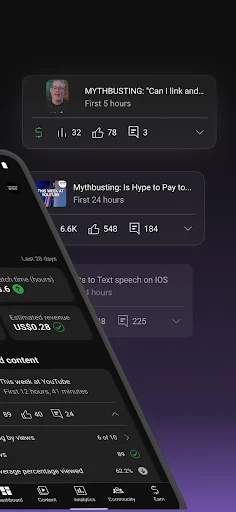
This app isn’t just about aesthetics though. It’s loaded with features that can make a huge difference in how you manage your channel. For starters, the dashboard is a real-time reflection of your channel’s performance. You can see your latest video stats, subscriber count, and essential updates all in one place.
One of my favorite features has to be the analytics section. It’s like having a backstage pass to your own channel. You can track which videos are performing the best, understand your audience demographics, and even get insights into how viewers are discovering your content. It’s data-driven decision-making at its finest, giving you the power to tailor your content strategy for maximum impact.
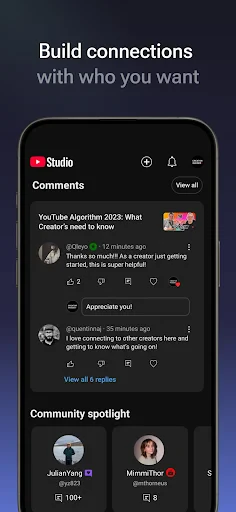
Another noteworthy mention is the comment moderation feature. We all know how the comment section can sometimes get a little... wild. With YouTube Studio, managing this becomes a breeze. You can easily filter comments, respond directly, and even remove or flag inappropriate comments without breaking a sweat.
Editing on the Go
For those moments when you're away from your computer, the app’s video editing capabilities come in handy. While it’s not as comprehensive as the desktop version, it allows for basic edits like trimming and adding end screens or cards. It’s perfect for last-minute tweaks and ensuring your content is polished before hitting that publish button.
Room for Improvement?
No app is perfect, right? While YouTube Studio is a fantastic tool, there are a few areas where it could improve. Some users might find the mobile app a bit limited compared to its desktop counterpart, especially when it comes to in-depth analytics and editing features. However, for an on-the-go solution, it does a pretty stellar job!
Final Thoughts
All in all, YouTube Studio is a must-have for anyone serious about growing their YouTube channel. It combines functionality with ease of use, offering a comprehensive suite of tools that are crucial for any content creator. Whether you’re tracking your channel's growth or engaging with your community, this app covers all bases. So, if you haven’t already, give YouTube Studio a spin. It might just become your new favorite companion in your content creation journey. Happy creating!
- Developer
- Google LLC
- Version
- Varies With Device
- Installs
- 100,000,000+
- Android Version
- Varies With Device
- Content Rating
- Teen
- Price
- Free
- Comprehensive analytics tools available.
- Easy integration with YouTube account.
- Real-time performance metrics.
- Customizable dashboard features.
- Mobile-friendly interface.
- Limited editing features for videos.
- Requires stable internet connection.
- Some features not available on mobile.
- Occasional sync issues.
- Complex for new users.