Timestamp Camera Pro
Ever found yourself at a breathtaking location or event and wished your photos could convey not just the moment but also the exact time and place you captured them? Enter Timestamp Camera Pro, a nifty app that ensures your photos and videos are stamped with precise details. I've been playing around with it, and let me tell you, it’s quite the game-changer for anyone serious about documenting their memories.
What Makes Timestamp Camera Pro Stand Out?
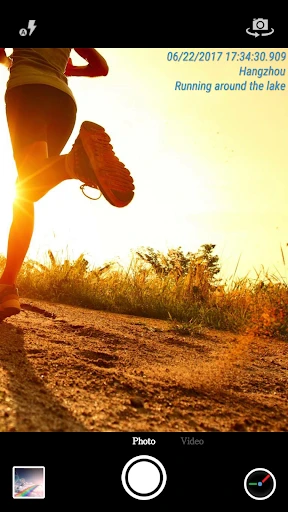
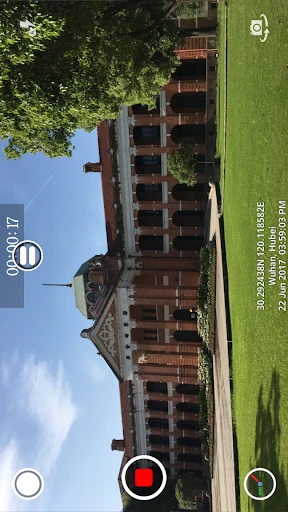
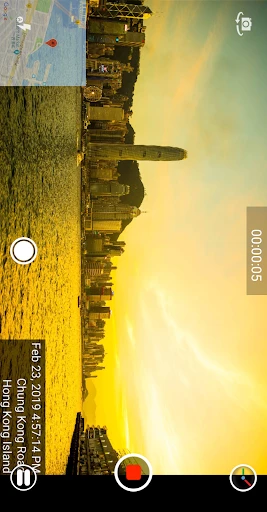
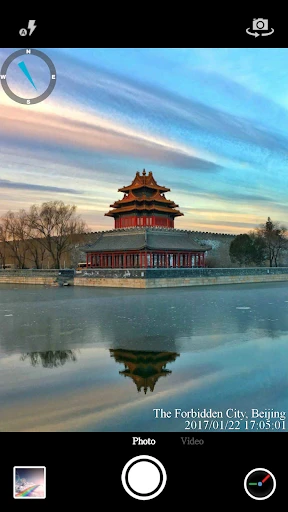
First off, the app is super user-friendly. From the moment you fire it up, you’re greeted with a clean interface that’s straightforward to navigate. The main attraction here is, of course, the ability to add timestamps to your photos and videos. But it doesn’t stop there. You can customize the timestamp format to include date, time, location, and even the weather. Yes, you read that right—weather!
Customization Galore
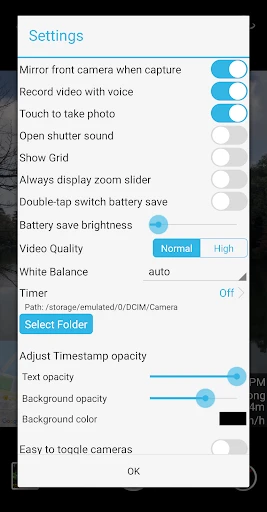
One of my favorite things about Timestamp Camera Pro is the level of customization it offers. You can choose from a plethora of font styles, colors, and sizes to make sure your timestamp matches the vibe of your photo. Want to add some text of your own? No problem! The app lets you do that too, making each capture uniquely yours.
Perfect for Professionals and Enthusiasts Alike
Whether you’re a professional photographer or just someone who loves taking pictures, this app has something for you. For professionals, it’s a great way to keep track of when and where each photo was taken, especially useful for location-based projects. For enthusiasts, it’s just fun to see how your day unfolds through time-stamped images.
Performance and Usability
Now, let’s talk about performance. The app runs smoothly on both Android and iOS devices. I tested it on my slightly outdated phone, and it performed like a champ. No lags, no crashes—everything just worked seamlessly. The battery consumption is also minimal, which is a big plus for those long days of shooting.
Share Your Moments Easily
Sharing your timestamped photos is a breeze. The app integrates well with social media platforms, so you can upload your photos to Instagram or Facebook in just a few taps. Plus, with the ability to save your photos in high resolution, there’s no compromise on quality.
Final Thoughts
In a world where capturing the moment is everything, Timestamp Camera Pro adds that extra layer of authenticity to your photos and videos. It’s not just an app; it’s a tool that transforms everyday moments into cherished memories. Whether you’re at a family gathering, a concert, or traveling the world, this app ensures your memories are preserved with precision.
So, if you’re looking to add a bit more context to your photo gallery, I highly recommend giving Timestamp Camera Pro a try. It’s one of those apps that you didn’t know you needed until you start using it. Trust me, once you do, you’ll wonder how you ever lived without it!
- Developer
- Bian Di
- Version
- Varies With Device
- Installs
- 100,000+
- Android Version
- Varies With Device
- Content Rating
- Everyone
- Price
- $4.99
- High-quality timestamp for photos
- Customizable timestamp formats
- Supports video recording
- Easy to use interface
- Frequent updates
- Limited editing features
- Paid app with no free version
- Consumes significant battery
- Watermark visible on videos
- No cloud backup option