SuperCook - Recipe Generator icon

SuperCook - Recipe Generator

Food & Drink

Related searches

Imagine rummaging through your kitchen, wondering how on earth you’re going to make a meal with what you have on hand. Enter SuperCook - Recipe Generator, a nifty app that takes the guesswork out of meal preparation by suggesting recipes based on the ingredients you already have. It’s like having a personal chef who knows exactly what’s in your pantry and fridge!

Getting Started with SuperCook

So, how does this culinary wizardry work? The app is super user-friendly. Once you’ve downloaded it, you simply input the ingredients you have at your disposal. The more specific you are, the better the suggestions. I had some leftover mushrooms, chicken, and a can of coconut milk, and boy, did SuperCook surprise me with a delicious Thai curry recipe! It made me feel like a gourmet chef in no time.

Features that Stand Out

SuperCook isn’t just about recipes; it’s about making your life easier. One of my favorite features is the shopping list creator. If you’re missing a few ingredients for a recipe you fancy, the app can generate a list for you. It’s like having a little sous-chef in your pocket!

Another cool aspect is the ability to filter recipes by dietary preferences and restrictions. Whether you’re vegan, gluten-free, or on a keto diet, SuperCook has you covered. I tested this by trying out some gluten-free recipes, and the results were deliciously satisfying.

Why You’ll Love It

What I love most about SuperCook is how it makes cooking fun and stress-free. No more agonizing over what to cook or wasting ingredients. It’s a game-changer for anyone looking to reduce food waste and make the most out of what they have.

Plus, the app is constantly updated with new recipes, so there’s always something fresh to try. Whether you’re a novice cook or a seasoned pro, SuperCook offers a treasure trove of culinary adventures.

SuperCook - Recipe Generator is more than just an app; it’s a kitchen companion that inspires creativity and makes cooking accessible to everyone. Next time you’re staring blankly at your pantry, remember, your culinary masterpiece is just a few taps away!

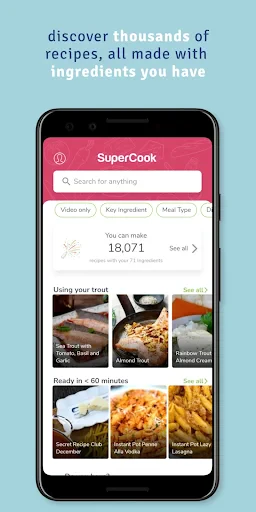
SuperCook - Recipe Generator screenshot SuperCook - Recipe Generator screenshot SuperCook - Recipe Generator screenshot SuperCook - Recipe Generator screenshot SuperCook - Recipe Generator screenshot
SuperCook - Recipe Generator icon
SuperCook - Recipe Generator
Developer
SuperCook
Version
2.0.27
Installs
1,000,000+
Android Version
4.4
Content Rating
Everyone
Price
Free
Pros
  • Intuitive user interface for easy navigation.
  • Wide variety of recipes using common ingredients.
  • Healthy meal suggestions included.
  • Option to save and categorize favorite recipes.
  • Free to use with minimal ads.
Cons
  • Requires internet connection for recipe updates.
  • Limited customization of ingredient preferences.
  • No offline mode available.
  • Some features locked behind a premium subscription.
  • Occasional recipe inaccuracies.

Ratings

4.7

Similar Apps

MEATER® Smart Meat Thermometer

MEATER® Smart Meat Thermometer

4.3
Get
Del Taco - Del Yeah! Rewards

Del Taco - Del Yeah! Rewards

4.8
Get
instashop: Groceries & more

instashop: Groceries & more

4.2
Get
Speedway: Rewards & Shopping

Speedway: Rewards & Shopping

4.5
Get
KFC US - Ordering App

KFC US - Ordering App

3.4
Get
Vivino: Drink the Right Wine

Vivino: Drink the Right Wine

4.7
Get

Frequently Asked Questions

What is SuperCook and how does it work?

SuperCook is a recipe generator app that helps users create meals based on the ingredients they already have at home. By entering the ingredients you have into the app, SuperCook generates a list of recipes that you can make without needing to buy anything extra. This makes it a convenient tool for reducing food waste and planning meals efficiently.

Is SuperCook free to use or are there any in-app purchases?

SuperCook is free to download and use. The app provides its core functionality without any fees, but it may contain ads. There are no mandatory in-app purchases required to access the main features. However, supporting the developers through optional purchases can enhance your experience by removing ads or unlocking additional features.

Can I use SuperCook offline?

SuperCook requires an internet connection to function properly as it needs to access its database of recipes and ingredients. While you can browse some previously accessed recipes offline, the app's main features, such as searching for new recipes and ingredient updates, need an online connection to provide the most relevant results.

How extensive is the recipe database in SuperCook?

SuperCook boasts a vast recipe database sourced from a wide array of culinary websites and user submissions. This extensive variety ensures that users can find recipes from different cuisines, catering to various dietary preferences and restrictions. Whether you're looking for vegan, gluten-free, or low-carb options, SuperCook has something to offer.

Is SuperCook suitable for people with dietary restrictions?

Yes, SuperCook is suitable for users with dietary restrictions. The app allows you to filter recipes based on dietary preferences such as vegetarian, vegan, gluten-free, nut-free, and more. By doing so, it ensures that the recipes suggested align with your dietary needs, making meal planning easier and safer for individuals with specific health considerations.