Related searches

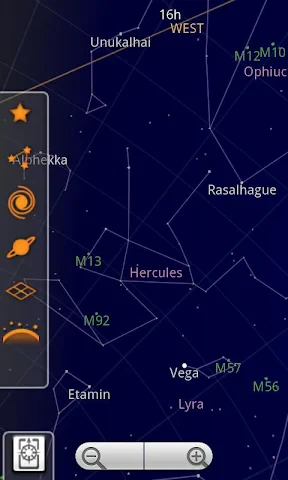
Ever found yourself gazing up at the night sky and wondering about the stars and planets above? Well, Sky Map might just be the app for you! This little gem turns your smartphone into a portable planetarium, allowing you to explore the cosmos with just a few taps.

Getting Started with Sky Map

First things first, let’s talk about getting started with Sky Map. Available for both Android and iOS, the app is super easy to download and install. Once you’ve got it on your device, you’re pretty much ready to become an amateur astronomer. Just make sure your GPS is on and you’re good to go.

Features That Shine

One of the coolest things about Sky Map is its simplicity. The user interface is clean and intuitive, making it easy for anyone to use. Just point your phone towards the sky, and voilà, you have a map of the stars right in your hand!

Sky Map uses your phone’s sensors to detect your location and orientation, providing a real-time view of the sky. It’s like having a personal guide to the universe right in your pocket. You can identify stars, planets, constellations, and even distant galaxies. How cool is that?

Exploring the Night Sky

Whether you’re a seasoned stargazer or just a curious newbie, Sky Map has something to offer. The app has a feature that lets you search for celestial bodies. Just type in the name of a planet or star, and the app will guide you to its location in the sky.

Another nifty feature is time travel. No, not the sci-fi kind, but you can actually see what the sky looked like in the past or what it will look like in the future. This is perfect for planning your stargazing nights or understanding how the night sky changes over time.

Why You’ll Love It

Sky Map is perfect for anyone who’s ever looked up at the night sky and wondered what they were seeing. It’s educational, fun, and it doesn’t require any fancy equipment. Just your smartphone and a sense of wonder.

Plus, it’s a great way to bond with family and friends. Imagine camping under the stars and being able to point out constellations and planets. It’s a conversation starter, for sure!

All in all, Sky Map is a fantastic app for anyone interested in astronomy. It’s user-friendly, packed with features, and best of all, it’s free. So, if you’ve got a smartphone and a curious mind, why not give it a try? You might just find yourself looking up at the stars more often.

Sky Map screenshot Sky Map screenshot Sky Map screenshot Sky Map screenshot Sky Map screenshot
Developer
Sky Map Devs
Version
Varies With Device
Installs
50,000,000+
Android Version
Varies With Device
Content Rating
Everyone
Price
Free
Pros
  • Easy to navigate interface
  • Accurate star and planet identification
  • Works offline
  • Educational tool for astronomy lovers
  • Supports multiple languages
Cons
  • Limited features in free version
  • Occasional bugs in star alignment
  • Heavy battery usage
  • Requires compass calibration
  • Ads in free version

Ratings

4

Similar Apps

Camouflage Doors Mod for MCPE

Camouflage Doors Mod for MCPE

4.6
Get
HerBible--Verses&Prayer

HerBible--Verses&Prayer

4.9
Get
Tarteel ترتيل - Memorize Quran

Tarteel ترتيل - Memorize Quran

4.7
Get
Blessed - Bible verse & Prayer

Blessed - Bible verse & Prayer

4.9
Get
Bible Homescreen - Read Now

Bible Homescreen - Read Now

4.2
Get
Bible: Advent Prayers & Verses

Bible: Advent Prayers & Verses

4.5
Get
Biblia Católica en español

Biblia Católica en español

4.8
Get
Freewave: Romance Audiobooks

Freewave: Romance Audiobooks

4.8
Get
Chirp Audiobooks

Chirp Audiobooks

4.6
Get
Libby, the Library App

Libby, the Library App

4.8
Get
RhymeZone Rhyming Dictionary

RhymeZone Rhyming Dictionary

4.5
Get
NovelBar-Your Reading Haven

NovelBar-Your Reading Haven

3.9
Get

Frequently Asked Questions

What is Sky Map and how do I use it?

Sky Map is an intuitive astronomy app designed to turn your smartphone into a portable planetarium. With the app, you can easily identify stars, planets, and other celestial bodies by simply pointing your device towards the sky. The app uses your phone's sensors and GPS to provide real-time information about the objects you're viewing.

Is Sky Map available for both Android and iOS devices?

Sky Map is primarily available for Android devices. Originally developed by Google, it was later released as open-source software, allowing the community to enhance its features. Unfortunately, there isn’t an official iOS version, but there are many similar alternatives available on the App Store that offer comparable functionality for Apple users.

Does Sky Map require an internet connection to function?

Sky Map does not require an internet connection to identify celestial objects as it utilizes your device's GPS and sensors. However, having an internet connection can enhance the experience by allowing access to additional features, such as downloading sky maps for offline use or receiving updates to improve accuracy and functionality.

Can Sky Map be used during the day or only at night?

Sky Map can be used both during the day and at night. While it's more intuitive to use at night, where stars and planets are visible, the app's augmented reality feature allows you to explore celestial objects even in daylight. You simply need to point your device towards the sky to discover what's above, regardless of the time of day.

Are there any costs associated with using Sky Map?

Sky Map is a free application with no hidden costs or in-app purchases. Since it is open-source, it is maintained by a community of developers who ensure its functionality and updates without charging users. This makes it an excellent choice for anyone interested in astronomy without any financial commitment.