Samsung Food: Meal Planning
Hey there, fellow food enthusiasts! If you're anything like me, juggling meal planning while keeping up with a busy lifestyle can be quite the challenge. Enter Samsung Food, a nifty app that's here to revolutionize the way we approach meal planning and cooking. Having spent some quality time experimenting with it, I'm excited to share my quirky journey and insights with you!
Your Ultimate Kitchen Companion
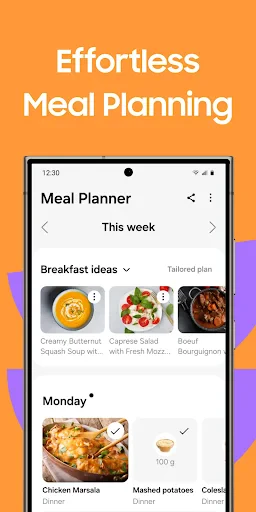
First things first, Samsung Food isn’t just your average meal planning app; it’s like having a personal chef in your pocket. Once you dive into the app, the clean and user-friendly interface warmly greets you, making it super easy to navigate. I must admit, the design is a breath of fresh air, especially when you’re dealing with a plethora of recipes and meal plans.
Recipe Wonderland
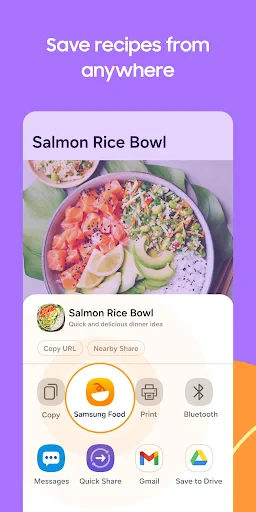
One of the standout features of Samsung Food is its extensive recipe library. Whether you’re in the mood for a quick snack or planning an elaborate dinner, this app has got your back. I was pleasantly surprised to find recipes from various cuisines, catering to diverse dietary preferences. From vegan delights to gluten-free options, there’s something for everyone.
What really caught my attention was the step-by-step cooking instructions. Each recipe is broken down into digestible steps, complete with timers and cooking tips. It’s like having a culinary coach guiding you through every dish! And for those days when I’m feeling a bit adventurous, the app suggests variations and tweaks to spice things up.
Seamless Meal Planning
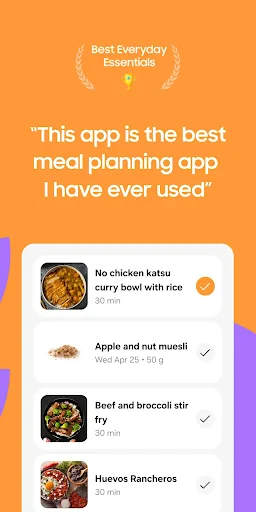
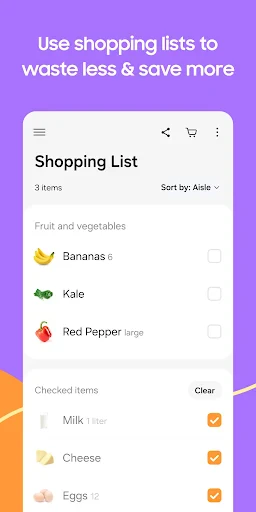
Now, let’s talk about the meal planning feature. Samsung Food simplifies the entire process by allowing you to plan meals for the week ahead—no more last-minute dinner chaos! You can easily add recipes to your meal calendar, and the app even generates a shopping list with all the ingredients you’ll need. It’s been a game-changer for my grocery shopping routine, saving me both time and money.
Another cool aspect is the nutritional breakdown provided for each meal. As someone who’s conscious about healthy eating, I found this feature incredibly helpful. You can track your calorie intake and ensure you’re hitting those nutritional goals without any fuss.
Smart Integration
Samsung Food doesn’t stop at just recipes and meal planning—it seamlessly integrates with Samsung’s ecosystem. If you own Samsung appliances, you can sync the app with your smart fridge or oven for an even more streamlined cooking experience. Imagine your oven preheating itself based on the recipe you choose—futuristic, right?
For those with a passion for sharing, the app also allows you to connect with a community of fellow foodies. You can share your culinary creations, exchange tips, and even discover trending recipes. It’s like having a social network dedicated to food lovers!
In conclusion, Samsung Food is more than just an app; it’s a lifestyle enhancer. Whether you’re a seasoned home cook or a newbie in the kitchen, this app caters to all skill levels and dietary preferences. Its seamless integration, extensive recipe collection, and efficient meal planning features make it a must-have for anyone looking to elevate their cooking game. So why not give it a whirl and let it transform your culinary adventures?

- Developer
- SamsungFood
- Version
- 2.40.1
- Installs
- 1,000,000+
- Android Version
- 7.0
- Content Rating
- Teen
- Price
- Free
- User-friendly interface and easy navigation
- Extensive recipe collection and variety
- Personalized meal plans tailored to diet
- Grocery list export simplifies shopping
- Integration with Samsung Health app
- Limited offline functionality
- Ads may interrupt user experience
- Some features require premium subscription
- Occasional syncing issues reported
- Limited support for non-Samsung devices